Renault Captur
Courtesy light A
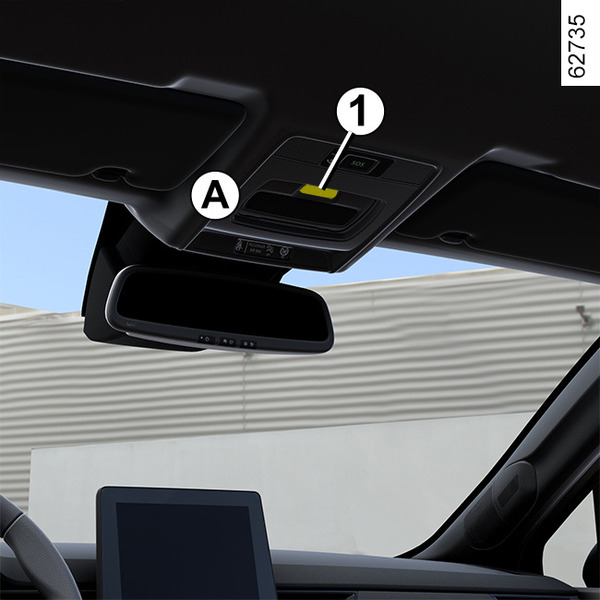
Press the switch 1 to enable:
- permanent lighting;
- lighting controlled by the unlocking of the vehicle or by opening one of the doors. This switches off after a time delay, once the relevant doors have been closed correctly;
- lighting switches off immediately.
Reading lights B or C


To activate permanent lighting, press switch 2 for the driver or switch 3 for the front passenger.
Note: on vehicles fitted with a multimedia screen, you can use the multimedia screen to deactivate/activate the reading lights which switch on when the doors or luggage compartment are opened Vehicle settings personalisation menu.
Courtesy light D

Press switch 4 to enable:
- permanent lighting;
- lighting controlled by the unlocking of the vehicle or by opening one of the doors. This switches off after a time delay, once the relevant doors have been closed correctly;
- lighting switches off immediately.
Reading lights E

Press switch 5, 6 or 7 to activate permanent lighting.
Note: on vehicles fitted with a multimedia screen, you can use the multimedia screen to deactivate/activate the reading lights which switch on when the doors or luggage compartment are opened Vehicle settings personalisation menu.
Glove box light

The light 8 comes on when the cover is opened.
Luggage compartment light

The light 9 comes on when the luggage compartment is opened.
tip
Unlocking and opening the doors or tailgate switches on the timed courtesy lights and lights.