R-Link 2
Screen controls 1


Function | |
1 | Short press: On/Off. Press and hold (around 5 seconds): restart the system. |
2 | Volume up. |
3 | Volume down. |
4 | Access to home pages. |
5 | Access to the settings menu for driving assistance devices. |
6 | Access to the settings menu for the displays. |
7 | Direct access to the Easy park assist function screen (for further information, please refer to the section on «Parking aids»). |
Screen controls 3

Function | |
8 | Access the driving assistance system settings menu or access the user settings. |
9 | Access to home pages. |
10 | Short press: On/Off. Press and hold (around 5 seconds): restart the system. Rotate: adjust the volume of the source currently in use. |
Screen controls 4
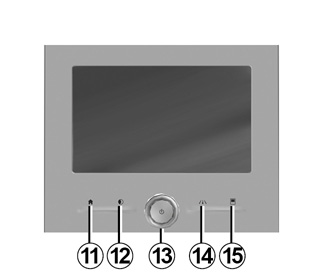
Screen controls 5

Function | |
11 | Access to home pages. |
12 | Displaying a blank screen. |
13 | Short press: On/Off. Press and hold (around 5 seconds): restart the system. Rotate: adjust the volume of the source currently in use. |
14 | Access the driving assistance system settings menu or access the user settings. |
15 | Access to the settings menu for the displays. |
16 | Short press: On/Off. Press and hold (around 5 seconds): restart the system. |
17 | Volume up. |
18 | Volume down. |
Remote control

Function | |
19 | Return to the previous screen. |
20 | Access to home pages. |
21 | Access to the options menu (pop-up menu). |
22 | Switching: - navigation within the selected area; - up/down: move around the various areas of a menu (upper bar, central zone, lower bar); - left/right: move around the various tabs of a menu. Rotate: - move around the various elements of a zone; - move around a list; - change the scale of the navigation map (ZOOM mode). Press: - confirm. |
23 | Access the system menu Multi-Sense or change the previously defined preferred mode. |
Steering wheel control


Function | |
24 | Audio source selection. |
25 | Access to telephone functions. |
26 | Increase the volume of the source currently in use. |
27 | Radio mute on/off. Pause/play an audio track. Interrupt the voice recognition voice synthesizer. |
28 | Decrease the volume of the source currently in use. |
29 | Short press: - Change the radio scrolling mode (preset/list/frequency); - Confirmation. Long press: exit the lists (folders/audio tracks). |
30 | Browse the radio stations or the audio tracks/directories. |
31 | Answer/end a call. |
32 | - Brief press: activate/deactivate multimedia system voice recognition; - Long press: activate/deactivate voice recognition for your phone if it is connected to the multimedia system. |
33 | Depending on the display theme selected from the Multi-Sense menu: - Displays the route in progress and the compass; - Displays the audio source being listened to; - Displays the current fuel consumption, engine power and torque. |