Renault Master 3 phase 1
The display of information shown below DEPENDS ON THE VEHICLE EQUIPMENT AND COUNTRY.
Examples of selections | Interpreting the display selected | |||||
|---|---|---|---|---|---|---|
a) Total mileage and trip mileage recorder | ||||||
37360 KM 7080 KM | ||||||
| ||||||
b) Journey parameters Fuel consumed since the last reset. | ||||||
FUEL USED | ||||||
26.0 L | ||||||
| ||||||
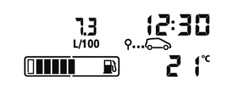
AVERAGE |
| Average fuel consumption since the last reset. This value is displayed after driving 400 metres and takes into account the distance travelled and the fuel used since the last time the reset button was pressed. | ||||
7.3 L/100 | ||||||
| ||||||



Examples of selections | Interpreting the display selected | |||||
|---|---|---|---|---|---|---|
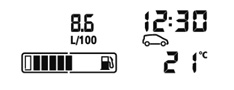
CURRENT |
| Current fuel consumption This value is displayed after a speed of approximately 20 mph (30 km/h) is reached. | ||||
8.6 L/100 | ||||||
RANGE |
| Estimated range with remaining fuel This range takes into account the average fuel consumption since the last time the reset button was pressed. The value is displayed after driving 400 metres. Several minutes after the reserve light has come on (refer to the information on the “Instrument panel”), the estimated range will no longer be displayed. | ||||
------ KM | ||||||
| ||||||
DISTANCE |
| Distance travelled since the last reset. | ||||
0.0 KM | ||||||
| ||||||
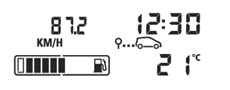
AVERAGE |
| Average speed since the last reset. The value is displayed after driving 400 metres. | ||||
109.2 KM/H | ||||||
| ||||||



Examples of selections | Interpreting the display selected | |||||
c) Mileage before service Distance remaining until the next service (displayed in miles/kilometres), then when the service time nears, several scenarios are possible: - distance/time less than 1,800 miles (3,000 km) or two months: depending on the vehicle, the message “SERVICE IN” is displayed; - distance/time remaining 0 miles or service date reached: depending on the vehicle, the message “SERVICE PROMPTLY” is displayed when the selected display is “mileage before service”, accompanied by the 9 symbol and the © warning light. The vehicle requires a service as soon as possible. | ||||||
SERVICE IN |
| |||||
39624 KM | ||||||
| ||||||
NB: depending on the vehicle, the mileage before service changes according to the driving style (frequent driving at low speed, door-to-door journeys, extensive use at idle speed, towing a trailer etc.). The distance remaining until the next service can therefore decrease more quickly in some cases than the actual distance travelled. The service intervals are independent of the vehicle’s maintenance schedule: please refer to your vehicle’s Maintenance Document. Resetting: to reset the distance before service with the display selecting “service”, press and hold one of the display reset buttons for approximately 10 seconds until the display shows the mileage permanently. | ||||||


Examples of selections | Interpreting the display selected | ||
TYRE PRESSURE ACQUISITION | d) Reset the tyre pressures Please refer to the information on the “Tyre pressure loss warning” in Section 2. | ||
SPEED LIMITER | e) Cruise control/speed limiter programmed speed (depending on vehicle). Refer to the information on the “Cruise control/Speed limiter” in Section 2. | ||
70 KM/H | |||
CRUISE CONTROL | |||
70 KM/H | |||
NO MESSAGE AVAILABLE | f) Trip log Successive display: - of information messages (automatic lighting etc.); - operating fault messages (Check injection system, etc.). | ||