Renault Symbioz
Fuel consumption, and energy consumption on E-Tech Full Hybrid versions, is approved according to a standard and regulatory procedure.
Identical for all manufacturers, this enables vehicles to be compared with one another.
Consumption in real time depends on vehicle usage conditions, the equipment fitted and the user's driving style.
To optimise fuel consumption, please refer to the following advice.
Depending on the vehicle, there may be different functions available to help you reduce your fuel consumption:
- the rev counter;
- the gear change indicator;
- the driving style indicator;
- the journey record and eco-driving advice via the multimedia screen;
- acceleration indicator Eco;
- ECO mode;
- the "free-wheel" function;
- the Stop and Start Stop and Start function function;
- the charge meter on E-Tech Full Hybrid versions.
If fitted on the vehicle, the navigation system provides additional information.
On the instrument panel A or B
Depending on the vehicle, the information display can be organised and customised based on the instrument panel customisation style selected from the multimedia screen.
Gear change indicator 1


Depending on the vehicle, to obtain optimum consumption levels, a warning light on the instrument panel lets you know the best time to move up or down a gear:
 shift up a gear;
 downshift a gear.
If you regularly follow this indicator, you will reduce your vehicle’s fuel consumption.
Driving style indicators 2 or 3
"Eco-monitor 2"


Informs you about the driving style adopted in real time. You will be notified by indicator 2.
The more petals displayed on the indicator 2, the more your driving is flexible and economical.
If you regularly monitor this indicator, you will reduce your vehicle’s fuel consumption.
Please refer to the multimedia instructions for further information.
"Safety monitor 3"

"Safety monitor" allows you to assess your driving behaviour in real time.
It helps you to ensure your safety by providing you with personalised advice and warnings tailored to your driving.
The shield 3 adapts according to your driving behaviour over the previous few seconds:
- the more full it is, the better your management of speed, safe distance, trajectory and alertness;
- the more reduced it is, the more your driving has points to improve in one or more of these areas.
When it becomes orange and reduced, a tip may appear to help you quickly adjust your driving.
Consult the "Safety monitor" to reduce the risk of accidents, identify your areas for improvement and develop a smooth, serene and responsible driving style.
Eco acceleration indicator 4


This informs you in real time whether you are accelerating moderately or strongly.
You will be notified by indicator 4:
- green: acceleration is moderate and correct;
- white: acceleration is too high;
- grey: acceleration is high.
Note: it is not possible to simultaneously display the driving style indicator 2 or 3 and the acceleration indicator Eco 4.
On the multimedia screen
Journey record

Once the engine is switched off, you will see "Journey record" displayed on the multimedia screen 4, enabling you to view information on your last journey.
This indicates:
- general score;
- score evolution;
- distance without fuel consumption.
An overall rating from 0 to 100 is displayed to let you assess your eco driving performance.
The higher the rating, the lower the fuel consumption.
Eco advice is given to help improve your performance.
With your favourite journeys saved, you can compare your performance between trips and the performance of other vehicle users.
Please refer to the multimedia instructions for further information.
ECO mode
ECO mode is a function which optimises fuel consumption.
It affects certain driving operations (acceleration, shifting gears, cruise control, deceleration etc.).
Limiting acceleration enables low fuel consumption in urban and surrounding areas.
Activating the function
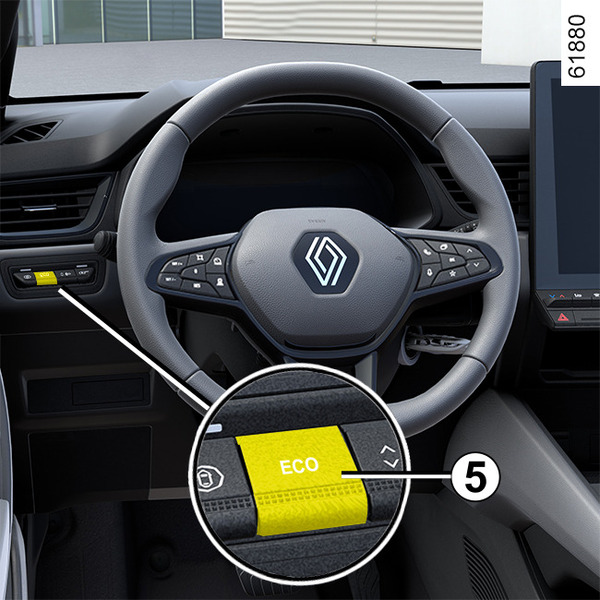

Depending on the vehicle, the function can be activated either:
- by pressing switch 5;
- by pressing the switch 6MULTI-SENSE;
- from the multimedia screen (refer to the multimedia instructions).
The warning light
 comes on on the instrument panel to confirm activation.
While driving, it is possible to leave the ECO mode temporarily in order to improve engine performance.
To do this, press the accelerator pedal firmly and fully.
ECO mode is reactivated when you take pressure off the accelerator pedal.
Deactivating the function
Depending on the vehicle, the function can be deactivated either:
- by pressing switch 5;
- by pressing the switch 6MULTI-SENSE.
The warning light
goes out on the instrument panel to confirm deactivation.
Free-wheel function
Depending on the vehicle, for vehicles fitted with an automatic gearbox, in the deceleration phases (with the foot fully off the accelerator pedal), switching to freewheeling (automatic neutral) decreases engine braking and allows you to farther without accelerating in order to save fuel.
The free-wheel
 warning light is displayed when the "Free-wheel" option is activated (ON) in the user settings Vehicle settings personalisation menu.
This warning light is displayed when the function is activated:
- in grey when the vehicle is not in free-wheel mode;
- in green or white, depending on the vehicle, when the vehicle is in freewheel mode (automatic neutral).
Note: depending on the vehicle, on vehicles equipped with MULTI-SENSEMULTI-SENSE, activation/deactivation is carried out by configuring the various My Sense modes or ECO mode.
Charge meter

(on the instrument panel)
The charge meter gives the driver a real-time view of the vehicle's energy consumption.
Blue "Energy recovery" C usage zone
During driving, if you lift your foot off the accelerator pedal or press the brake pedal, the electric motor generates electrical current during deceleration and this energy is used to slow down the vehicle and recharge the traction battery.
"Energy consumption" D usage area
The colour of the charge meter varies:
- in green: all-electric mode, the traction battery provides the energy required for the electric motor to power movement of the vehicle;
- in white: hybrid traction mode, the traction battery and/or the combustion engine provide the energy required to power movement of the vehicle.
tip
The presence and display of this information depends on the type of ambient setting selected.
Driving advice, Eco-driving

Heating levels
It is normal to notice an increase in the vehicle's fuel consumption when using the heating (particularly when the outside temperature drops below zero) or air conditioning.
Behaviour
- Drive carefully until the engine reaches its normal operating temperature, rather than let it warm up while the vehicle is stationary.
- Driving at high speed has a strong impact on the vehicle's fuel consumption or, in the case of E-Tech Full Hybrid vehicles, reduces the vehicle's range.
"Sporty" driving reduces the range of an E-Tech Full Hybrid vehicle: opt for a "smoother" driving style.
Examples (at a steady speed):
- reducing the speed from approximately 80 mph (130 km/h) to 68 mph (110 km/h) saves up to around 20% of fuel;
- reducing the speed from approximately 56 mph (90 km/h) to 50 mph (80 km/h) saves up to around 10% of fuel.
- Dynamic driving involving heavy and frequent acceleration and braking is expensive on fuel in comparison to the time saved.
- Do not over rev the engine in the intermediate gears. You should always use the highest gear possible.
- Avoid sudden acceleration.
- Brake as little as possible. If you anticipate an obstacle or bend in advance, you may then simply release the accelerator pedal.
- Do not try to maintain the same speed up a hill, accelerate no more than you would on level ground. Keep your foot in the same position on the accelerator pedal.
- Double declutching and accelerating before switching off the engine are unnecessary in modern vehicles.
- Bad weather, flooded roads:
| Do not drive through water if it is higher than the lower edge of the wheel rim. |

warning
Driver obstruction
On the driver's side, only use mats suitable for the vehicle, attached with the pre-fitted components, and check the fitting regularly. Do not lay one mat on top of another.
There is a risk of wedging the pedals.
Tyres

- An underinflated tyre increases fuel consumption.
- To optimise fuel consumption, set the highest speed tyre pressure or the recommended pressure indicated on the edge of the driver's door Tyre pressure.
- The use of non-recommended tyres can increase fuel consumption.
Advice on use

- Favour ECO Mode.
- Electricity is fuel – switch off all the electrical components when they are not genuinely needed. However (safety first), keep your lights on when the visibility is bad ("see and be seen").
- Use the air vents. Driving with the windows open at 62 mph (100 km/h) will increase fuel consumption by 4%.
- Never fill the fuel tank right to the brim to avoid overflow.
- On vehicles equipped with non-automatic air conditioning, switch off the air conditioning when it is not required.
Advice for reducing consumption and helping to preserve the environment:
If the vehicle has been parked in the sun, open the doors for a few moments to let the hot air escape before starting the engine.
- Do not leave an empty roof rack fitted to the vehicle.
- It is better to fit a trailer for bulky objects.
- When towing a caravan, fit a wind deflector and adjust it carefully.
- Avoid using the vehicle for "door-to-door" calls (short journeys with long waits in between) because in such conditions the engine never reaches its optimal operating temperature.