easy link
" Driving Eco " menu
From the main menu, press "Car info", then "Driving Eco" to access the following information:
- « General » ;
- « Details » ;
- « Advice ».
« General »
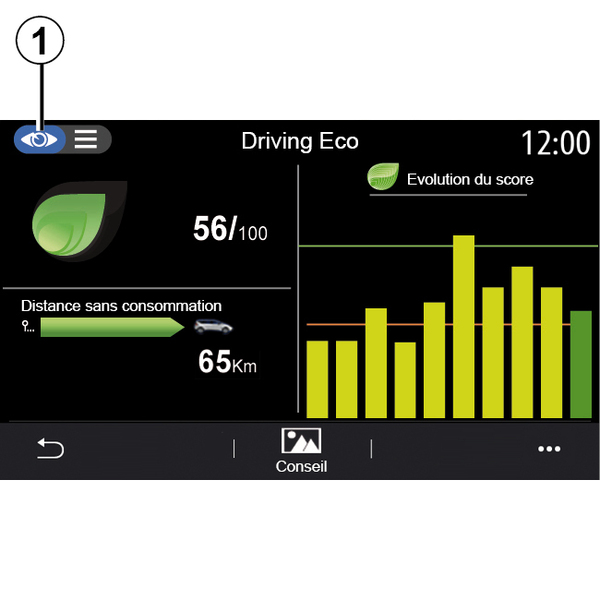
From the "General" view mode 1, you can view your current journey information:
- "General score";
- "Score evolution";
- "Distance without fuel consumption"/"Distance w/o acceleration" (depending on configuration).
"General score"
This data allows you to find your overall score.
The sheet is updated based on your score, from 0 to 100.
"Score evolution"
This bar diagram shows the progress of your score.
- score above the green line (75%): Eco driving;
- score below the orange line (45%): dynamic driving.
"Distance without fuel consumption"/"Distance w/o acceleration"
This data allows you to find out the distance travelled without fuel consumption during your journey.
"Details"

From the "Details" view mode 2, you can view your current journey information:
- "General score";
- "Breakdown of scores";
- "Distance without fuel consumption"/"Distance w/o acceleration" (depending on configuration);
- "Eco Trip data Eco Trip ».
Journey data
The information displayed is calculated based on the last journey reset:
- mileage;
- average speed;
- average fuel consumption.
Calculation of scores 3
The number of stars (10 levels) is given in real-time according to scores based on:
- acceleration;
- gear changing;
- anticipation.
Score trend 4
The arrows are positioned according to the data in real time as follows:
- if the new score is higher than the previously stored journey score: the arrow points upwards;
- if the new score is lower than the previously stored journey score: the arrow points downwards;
- if the new score is the same as the previously stored journey score: the arrow points horizontally.
« Advice »
This menu monitors your driving style and gives general advice on Eco-Driving to optimise your fuel or electricity consumption (energy efficient and consuming actions, how to charge the vehicle, tyre pressures, how to plan the trip, etc).
To access this menu, press "Advice" 6 and read the instructions carefully.
Scroll through the pages by pressing "General", "Acceleration", "Change gear" and "Anticipation".
Note: "Advice" is deactivated if the vehicle speed exceeds the "Advice" threshold.
The default "Advice" threshold value is approximately 7 mph (12 km/h).
The "Advice" content is restricted if the distance driven since the last reset is insufficient.
Pop-up menu
From the pop-up menu 5 you can access the following settings:
- "New journey Eco";
- « Show saved data » ;
- "Clear history";
- "Report after trip"/"Hide journey record".
Start a new journey
To reset your journeys, press "New journey Eco". A message will ask you to confirm the data reset. Press "Yes" to confirm or "No" to cancel.
Note: the on-board computer trip data is reset at the same time.

My favourite journeys
To view the stored journeys, press "Show saved data".
From the pop-up menu 7 you can "Save" or "Delete" your journeys Eco.
The different journey types are classified in the following categories:
- « Home-Work » ;
- « Journey » ;
- « Personal ».
Clear score evolution
To reset your score progress, press 7 then "Delete history". A confirmation message is displayed on the screen. Press "Yes" to delete the history or press "No" to cancel.
Record after journey
To display the end of journey record, press "Report after trip". The hide the end of journey record, press "Hide journey record".

Consumption evolution
Depending on your vehicle, information provided by the "Driving Eco" menu may vary:
- on a combustion engine vehicle, the multimedia system informs you of your fuel consumption 9;
- on an electric vehicle, the multimedia system informs you of your energy consumption 10;

- 9.
-on a hybrid vehicle, the multimedia system displays your average fuel consumption (dark colour) separately from your energy consumption (light colour) 10.