easy link
" Programming " menu
From the "Settings" menu, then the "Vehicle" tab, the "Programming" menu can be accessed to configure the vehicle charging programmes using the "Charge" tab 6, to programme comfort temperatures using the "Comfort" tab 5 and to view all of your settings using the "Calendar" tab 4.
Zones A, B or C display the dates, times and programmes that are set.
Note: charging will start if the engine is shut down, the vehicle is connected to a power supply and access is authorised.
Charging programming

"Immediate charging" 1
Once your vehicle is connected to a power source, charging starts.
Zone A informs you that the "Immediate charging" function is activated.
Immediate charging starts as soon as the scheduled time for deferred charging is reached.

« Delayed charge » 2
Even though your vehicle is connected to a power source, you can programme the start time for charging.
Press "Modify" 7 to open the settings to set the start time for charging.
Set the start time for charging then press "Close" to confirm.
Zone B shows the programmed charging start time.

« Program » 3
You can save several programmed charging times per week.
The programmed times are displayed in zone C.
Press "Modify" 8 to open the programming configuration settings.

Select the programming time 9 that you wish to modify in order to access the settings.
Set the charging start 11 and end 12 times as well as the days 13 to which these times will apply, then press "Close" 14.
To confirm, press the return button 10 after ensuring that the desired program is set to "ON".
To deactivate a program, press "OFF".

Note:
- if the start and end times are identical, the charging period is 24 hours;
- you cannot confirm a charging programme if you do not select a day of the week.
warning
For safety reasons, carry out these operations when the vehicle is stationary.
Comfort programme

From the "Comfort" tab 5, you can activate/deactivate the "Comfort program" or set the comfort temperature and time.
The programmed times are displayed in zone D.
Nota: the minimum time period between each programme is two hours.
Press "Modify" 16 to access the comfort settings.

You can save several "Comfort programs".
From this menu, you can set the temperature 17 (depending on the equipment) and activate/deactivate the stored "Comfort programs" by pressing the button 18.
Select the programming time 19 that you wish to modify in order to access the settings.
Note: the selected temperature is displayed on the menu 15.
Calendar

From the "Calendar" tab 4, you can see an overview of all the activated charging and comfort programmes.
If Immediate charging is activated, the symbol will be filled with the charging colour.
If deferred charging is activated, the charging progress colour is displayed once the charging start time is reached.
Press a day on the calendar to view your settings.

" Energy info " menu
From "Car info" menu, then the "Vehicle" tab, access the "Energy info" menu to view the vehicle's energy consumption.
Note: the information may vary according to the vehicle's engine (electric or hybrid).

"Histogram"
From the "Histo" tab 23, you can view your vehicle's energy consumption over the last fifteen minutes of driving in the form of a graph:
- the periods of energy consumption;
- the periods of energy recovery to recharge the traction battery.
Note: depending on the multimedia screen, additional information is shown below the graph.

Press the graph to view your energy consumption information.
From the pop-up menu 20, you can access the multimedia system user manual.

« List »
From the "List" tab 22, the multimedia system displays the various values concerning consumption on your journeys since the last reset:
- « Distance travelled in electric mode » ;
- « Average speed » ;
- « Average electric consumption » ;
- "Total consumption" (of fuel and/or electricity);
- total consumption for air conditioning;
- total energy recovered;
- ...
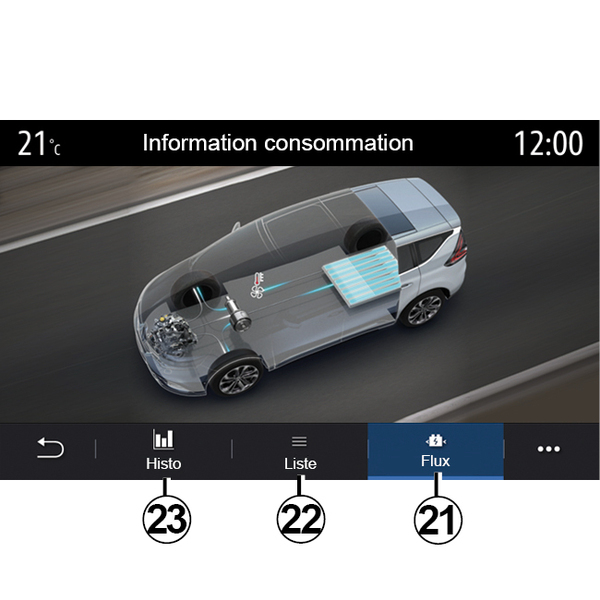
« Flow »
From the "Flow" tab 21, you the multimedia system can display a diagram of the vehicle and indicate the periods when the vehicle consumes or recovers energy in order to recharge the traction battery.