Renault Scenic 4
There are two ways to unlock/lock the vehicle:
- the “hands-free” card in “hands-free” mode;
- the “hands-free” card in remote control mode.
Do not store the “hands-free” card anywhere it may come into contact with other electronic equipment (computer, phone, etc.) as this could hinder its operation.
Driver’s responsibility
Never leave an animal, child or adult who is not self-sufficient alone in your vehicle, even for a short time.
They may pose a risk to themselves or to others by starting the engine, activating equipment such as the electric windows or locking the doors, for example.
Also, in hot and/or sunny weather, please remember that the temperature inside the passenger compartment increases very quickly.
RISK OF DEATH OR SERIOUS INJURY.

Using the card in “hands-free” mode
In “hands-free” mode, it is possible to lock/unlock the vehicle without using any of the “hands-free” card buttons, as long as the card is within the access zone 1.
Note: “hands-free” access can be deactivated from the multimedia screen (please see the equipment instructions).
Never leave your vehicle with the card inside.
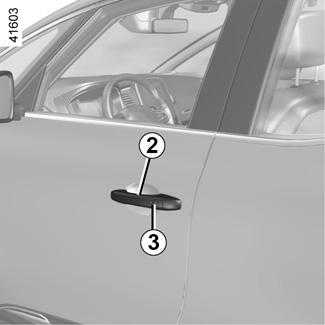

“Hands-free” unlocking
With the “hands-free” card in zone 1, position your hand behind a handle 2: the vehicle will unlock.
Unlocking is indicated by one flash of the hazard warning lights and the indicator lights.
Press the button 4 once to unlock the entire vehicle and slightly open the luggage compartment.
The “hands-free” system may experience temporary difficulties if one of the sensors built into the inside of the door handle is obscured (by dirt, mud, snow, gritting salt etc.).
Clean the sensors. If there is still a problem, contact an approved dealer.
Remote “Hands-free” locking
With the “hands-free” card on you and the doors and luggage compartment closed, move away from the vehicle: it will lock automatically as soon as you leave the access zone.
Note: the distance at which the vehicle locks depends on the surroundings.
To indicate that the vehicle has been locked, the hazard warning lights and indicator lights flash once and then light up for approximately four seconds, and a beep sounds in confirmation.
“Hands-free” locking using the sensor 3
(depending on the vehicle)
If you wish to lock your vehicle while the card is within range, make sure that the doors and boot are closed and place your finger over the sensor 3 on the driver’s door handle. The vehicle will lock.
Note: a “hands-free” card must be within the vehicle's access zone 1 in order to be able to use the sensor for locking.
Special features of the locking system
Having locked the vehicle by pressing the sensor 3, there is a delay of approximately three seconds before it can be unlocked again. During these three seconds, the door handles can be tried to make sure that the vehicle is locked properly.

Particular features of the locking system (continued)
If a door is open or not properly closed:
- when locking using the sensor 3, the vehicle will lock/unlock in quick succession, but the hazard warning lights and the side indicator lights will not flash;
- the vehicle will not lock as you move away.
If the “hands-free” card has been within the detection area for more than approximately 15 minutes, remote locking is disabled.

The vehicle cannot be locked if the card is within the zone 5.
If the vehicle is unlocked by pressing the button on the “hands-free” card, but an opening element is not then opened, this indicates that remote “hands-free” locking is disabled.
Using the card as a remote control
Unlocking using the “hands-free” card
Press button 6.
Unlocking is indicated by one flash of the hazard warning lights and the indi- cator lights.
Locking using the “hands-free” card
With the doors and boot closed, press button 7: the vehicle locks.
The indicator lights and hazard warning lights flash twice to indicate that the doors have locked.
Note: The maximum distance at which the vehicle locks depends on the surroundings.
Special features
If an opening element (a door or the luggage compartment) is open or not properly closed, the vehicle cannot be locked. The vehicle will lock/unlock in quick succession, but the hazard warning lights and the side indicator lights will not flash.
The card buttons are deactivated when the engine is running.

If, while the engine is running, a door is opened and closed, and the card is no longer in the zone 5, the message “Keycard Not Detected” indicates that the card is not inside the vehicle. This will, for example, prevent you from driving away after dropping off a passenger who has kept the card on them.
The warning disappears when the card is detected again.

Locking/unlocking only the boot
Press the button 8 to lock/unlock the boot only.
Driver’s responsibility when parking or stopping the vehicle
Never leave an animal, child or adult who is not self-sufficient alone in your vehicle, even for a short time.
They may pose a risk to themselves or to others by starting the engine, activating equipment such as the electric windows or locking the doors, for example.
Also, in hot and/or sunny weather, please remember that the temperature inside the passenger compartment increases very quickly.
RISK OF DEATH OR SERIOUS INJURY.