Renault Scenic 4
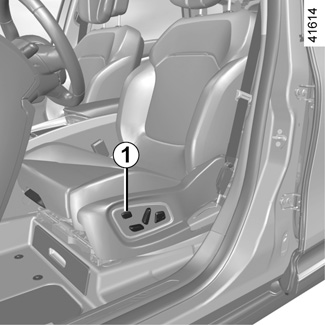
Using the multifunction screen, depending on the vehicle you can access a number of seat functions.
On equipped vehicles, the switch 1 permits direct access to the “Seats” menu on the multifunction screen.
Please refer to the multimedia equipment instructions for further information.

Massage
You can activate the driver and front passenger seat massage function.
Using the multifunction screen, select menu “Vehicle”, “Seats” then “Massage”.
Browse menu “Driver” or “Passenger” to:
- select the type of massage (Tonic, Relaxing or Lumbar);
- adjust the intensity (+ or -);
- adjust the speed (+ or -);
- reset the selected settings. Press 2 then “Reset”;
- activate/deactivate the massage seat (ON or OFF).
Note:
- the duration of the massage is approximately ten minutes. Then the function is disabled automatically (back in OFF position);
- the mode that you select in the “Multi-Sense” menu may affect the massage configuration (please refer to the information on “Multi-Sense” in Section 3);
- with the engine switched off, the massage function will run just once.

Settings
Using the multifunction screen, select menu “Vehicle”, “Seats” then “Settings”.
You can activate or deactivate the following elements:
- easy driver access;
- easy passenger access;
- Courtesy for passenger;
- visual feedback of current movement.
Easy driver and passenger access
Press “ON” or “OFF” to activate or deactivate this function.
When this function is activated, the seat moves backwards automatically as the driver or passenger leaves the vehicle.
The passenger seat returns to its original position when the door is closed.
The driver’s seat returns to its original position when you press the start button with the door closed.

Courtesy for passenger
Press “ON” or “OFF” to activate or deactivate this function.
When this function is activated, the driver can adjust the passenger seat using switches 3, 4 and 5.
Position
It is possible to store the driving position of the driver seat.
The driving position includes all the electric settings for the seat base and seatback.
The driving position can be stored and recalled by pressing the buttons:
- RENAULT hands-free card detected;
- when the driver’s door is opened.

Storing your driving position
- Adjust the driver seat using switches 3, 4 and 5 (refer to previous page);
- from the multifunction screen, select menu “Vehicle”, “Seats”, “Settings” then “Position” and select “Save”.
The position of the driver is then stored.

Recalling the driving position
With the vehicle at a standstill, using the multifunction screen, select menu “Vehicle”, “Seats”, “Settings” then “Position”, select “Recall” and confirm.
Note: recall of the saved driving position is interrupted if one of the seat adjustment buttons is pressed during recall.
When driving, it is not possible to recall a driving position.
For safety reasons, carry out any adjustments when the vehicle is stationary.