Renault Scenic 4

Instrument panel
lights up when the driver’s door is opened. In some cases, the appearance of a warning light is accompanied by a message.
You can customise your instrument panel with the content and colours of your choice.
For vehicles fitted with a navigation system, refer to the handbook for the equipment.
For vehicles not fitted with a navigation system, refer to the information on “Vehicle settings customisation menu” in Section 1.
Engine oil level low warning
When the engine is started, the instrument panel display alerts you when the minimum oil level is reached. Refer to the information on the “Engine oil level” in Section 4.
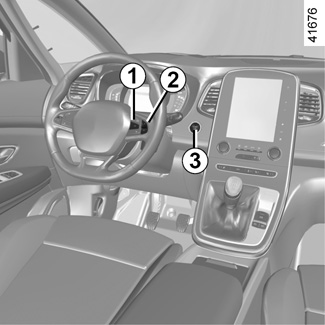
The first time the warning appears, it can be cleared by pressing switch 1 “OK”. Subsequent warnings will disappear automatically after around 30 seconds.
Instrument panel in miles
(option to switch to km/h)
Vehicles not fitted with a navigation system
- With the ignition off, press the OK button 1 and the engine start/stop button 3;
- using control 2, select “Settings”, “Instrument panel”, then the unit;
- Press the OK button 1 to confirm.
To return to the previous mode, repeat the same operation.
Vehicles fitted with a navigation system
From the multimedia touch screen, select “System”, “User Profile” and “UNIT”.
Note: In both cases, once the battery is switched off, the on-board computer automatically returns to the original unit of measurement.
Trip computer and warning system
Refer to the information on the “Trip computer and warning system” in Section 1.
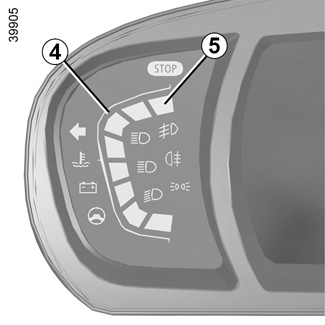
Coolant temperature indicator 4
In normal use, the indicator 4 should be before the red zone 5. Under “intensive” operating conditions, the needle may approach this zone. This is not serious unless the warning light ® comes on accompanied by a message on the instrument panel and a beep.

Rev counter 6
(graduations x 1000)
Speedometer 7
This is displayed differently according to how the instrument panel is customised.
Overspeed buzzer
Depending on the vehicle and country, a buzzer sounds for approximately 10 seconds every 40 seconds, as long as the vehicle is travelling in excess of 72 mph (120 km/h).
Driving style indicator 8
Please refer to the information on “ECO-driving” in Section 2.

Fuel gauge 9
If the level is at the minimum, warning light M integrated in the indicator comes on orange, accompanied by a beep. Fill up as soon as possible.

Head-up display 10
The display details driving and navigation information from the instrument panel and the multimedia screen.
If fitted to the vehicle, this comes on when the engine is started and is retracted when the engine is switched off.
You can adjust certain settings from the multimedia screen: with the engine running, access the menu “System”, “Display”, then “Head-up display”.
Adjusting the display information height
Depending on your driving position, you can raise or lower the information on the display.
Adjusting the display brightness
You can adjust the brightness (day or night mode).
- Automatically: the brightness will vary depending on the outdoor light.
- manually: the brightness automatically switches with the activation/deactivation of the lights.
In both cases, the day mode varies based on the outdoor brightness.
Do not manually force the opening/closure of the head-up display.
For safety reasons, carry out any adjustments when the vehicle is stationary.
Good information visibility can be affected by:
- the seat position;
- the presence of an object placed on the opened display;
- the polarisation of some spectacle lenses;
- extreme weather conditions (rain, snow, very strong sunlight, etc.).
In the event of contradictory information between the instrument panel and the head-up display/multimedia screen, please refer to the information displayed on the instrument panel.
Operating faults
In the event of a malfunction (the display fails to open when the engine is started, or the display retracts, with the engine running, following an object impacting the display):
- stop and restart the engine;
or
- from the multimedia screen, change the display opening settings.
If there is still a problem, contact an authorised dealer.
With the display opened or closed, no object should be placed on it or in its housing.
Do not use solvents, detergents or an abrasive cloth to clean the display.
Only use a microfibre wipe.