easy link
Home screens

- A.
Exterior temperature.
- B.
Time.
- C.
Selected user profile. To configure the user profile Settings.
- D.
Page indicator: quickly swipe the content area to change page.
- E.
Access to main menu.
- F.
Home page/Accessing functions.
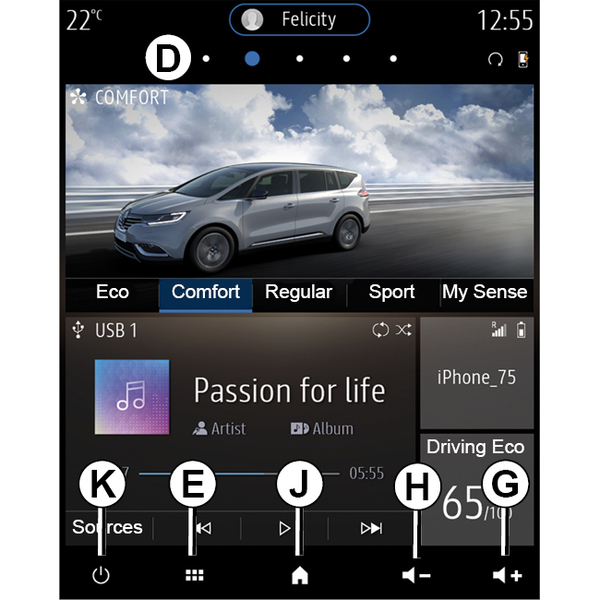
- G.
Increase the volume of the source currently in use.
- H.
Decrease the volume of the source currently in use.
- J.
Access the first page of the home page.
- K.
Accessing the functions:
- Press and hold: restart the system;
- Press briefly: radio/music OFF, minimum display, put on standby.
Note: you can change the home page configuration Add, manage widgets.
tip
For more information, open the user manual from the pop-up menu.
Menu screen
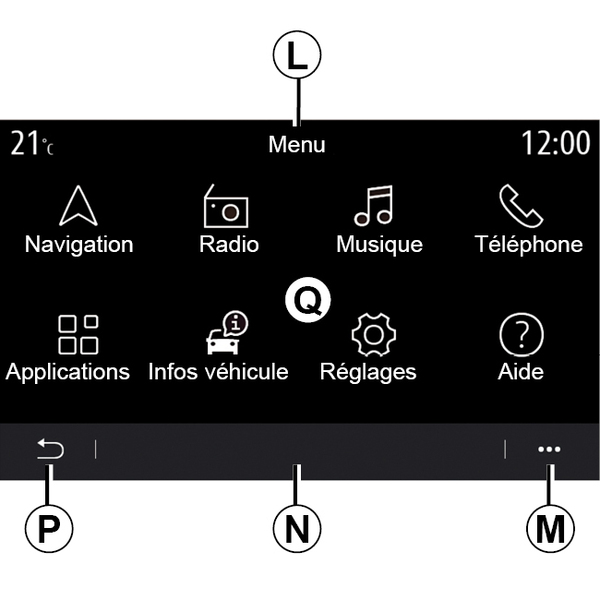
- L.
Depending on the menu, this area displays the shortcuts to the functions in progress.
- M.
Pop-up menu.
- N.
Depending on the menu, this area displays from two to five buttons.
- P.
Back to previous page.
- Q.
Main menu.
Note: depending on the equipment level, only available functions that can be selected appear on the home screen.

tip
For more information, open the user manual from the pop-up menu.