Trip computer and warning system: information messages These can help in the vehicle starting phase, or give information about a selection or a driving status.Examples of information messages are given in the following pages. Chapter
On-board computer: trip settings The display of information shown below DEPENDS ON THE VEHICLE EQUIPMENT AND COUNTRY. Chapter
Trip computer: general information On-board computer 1 Depending on the vehicle, this includes the following functions: Chapter
Warning lights The display of information shown below DEPENDS ON THE VEHICLE EQUIPMENT AND COUNTRY. Chapter
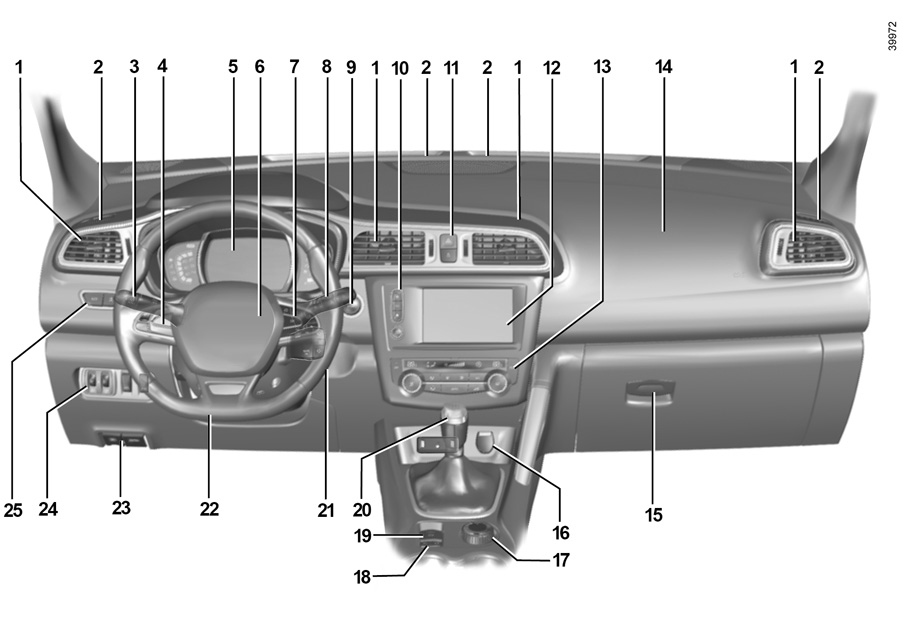
Driving position: right-hand drive The equipment fitted, described below, DEPENDS ON THE VERSION AND COUNTRY. 1 Air vent. Chapter
Driving position: left-hand drive The equipment fitted, described below, DEPENDS ON THE VERSION AND COUNTRY. 1 Air vent. Chapter
Child seats: attachment using the isofix system The table below summarises the information already shown in the diagram on the following pages, to ensure the applicable regulations are respected. Chapter
Child seats: attachment by seat belt ³ Check the status of the airbag before fitting a child seat or allowing a passenger to use the seat. Chapter