Multimedia equipment

<?xml version="1.0" standalone="yes"?>

Multimedia systems A, B or radio C

13016_BJAPH2_013_1_image.jpeg

The location and operation of equipment may vary according to the vehicle.

1.

Multimedia screen.

Chapter

Air conditioning: information and advice on use

<?xml version="1.0" standalone="yes"?>

Advice on use

In some situations (air conditioning off, air recirculation activated, ventilation speed at zero or low etc.), you may notice that condensation starts to form on the windows and windscreen.

If there is condensation, use the "Clear View" function to remove it, then use the air conditioning in automatic mode to stop it forming again.

Chapter

Automatic climate control

<?xml version="1.0" standalone="yes"?>

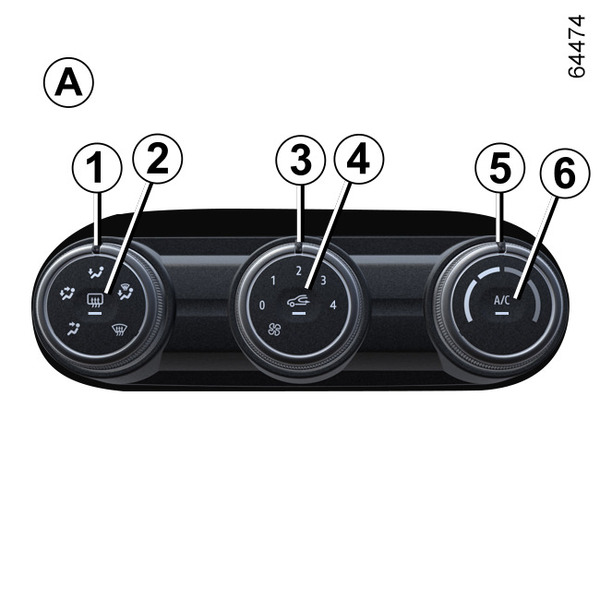
The controls

13002_BJAPH2_009_1_image.jpeg

(depending on the vehicle)

1.

Adjusting the ventilation fan speed.

2.

"Clear View" function.

Chapter

Air vents: air outlets

<?xml version="1.0" standalone="yes"?>

Air outlets

13001_BJAPH2_012_1_image.jpeg

1.

Left-hand air vents

2.

Left-hand side window demisting vent

Chapter

MULTI-SENSE

<?xml version="1.0" standalone="yes"?>

Introduction

The "MULTI-SENSE" system enables a choice between three driving modes that can be used to control driving, ambient lighting, comfort and engine sound (depending on the vehicle):

Chapter

Emergency call

<?xml version="1.0" standalone="yes"?>

If the vehicle is equipped, the emergency call function can be used to call the emergency services (without charge) automatically or manually in the event of an accident or illness, reducing the time it takes for the emergency services to arrive.

Note: the emergency call function is operational:

Chapter