Steering

<?xml version="1.0" standalone="yes"?>

Adjusting the steering wheel height and depth

11042_HJBPH2_001_1_image.jpeg

Lower the lever 1 and set the steering wheel to the required position.

Then, raise the lever fully, beyond the point of resistance to lock the steering wheel.

Chapter

Warning lights

<?xml version="1.0" standalone="yes"?>

The presence and operation of the warning lights VARY ACCORDING TO THE EQUIPMENT AND COUNTRY.

warning

If no lights or sounds are apparent, this indicates a fault in the instrument panel. This indicates that it is essential to stop immediately (as soon as traffic conditions allow). Ensure that the vehicle is correctly immobilised and contact an approved Dealer.

Chapter

Clock and outdoor temperature

<?xml version="1.0" standalone="yes"?>

From the multimedia screen

12012_HJBPH2_002_1_image.jpeg

The time and outdoor temperature are displayed on the multimedia screen 1.

Refer to the multimedia instructions.

Chapter

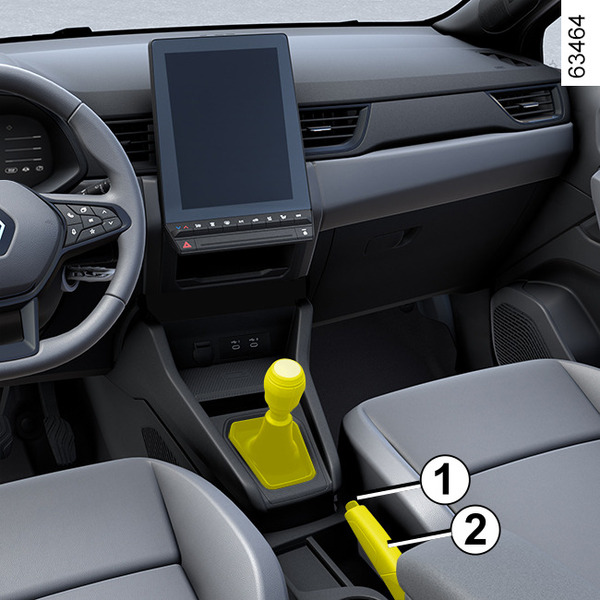
Handbrake

<?xml version="1.0" standalone="yes"?>

To release

Pull the lever 2 upwards slightly, press the button 1 and lower the lever to the floor.

Chapter

"Autohold" function

<?xml version="1.0" standalone="yes"?>

Vehicle stopped (e.g. at a red light, an intersection, a traffic jam, etc.), the function ensures braking force even when the driver releases the brake pedal.

The braking force is released as soon as the driver accelerates sufficiently with a gear engaged.

Chapter

Vehicle settings personalisation menu

<?xml version="1.0" standalone="yes"?>

Depending on the vehicle equipment, this function allows you to activate/deactivate and adjust some of the vehicle's functions.

From the multimedia screen 1

12012_HJBPH2_002_1_image.jpeg

Chapter

Displays and indicators

<?xml version="1.0" standalone="yes"?>

Instrument panel A

11001_HJBPH2_003_1_image.jpeg

It lights up when the ignition is switched on. In some cases, the appearance of a warning light is accompanied by a message.

Chapter

Warning messages

<?xml version="1.0" standalone="yes"?>

These appear with the 1_ALL_040_1_pictogramme.png warning light and require you to stop immediately, for your own safety, as soon as traffic conditions allow. Stop your engine and do not restart it. Call an approved Dealer.

Chapter

Electronic parking brake

<?xml version="1.0" standalone="yes"?>

Assisted operation

Applying the electronic parking brake

12034_HJBPH2_002_1_image.jpeg

With the vehicle stationary, the electronic parking brake can be used to immobilise the vehicle:

Chapter

Operating fault messages

<?xml version="1.0" standalone="yes"?>

These appear with the 1_ALL_036_1_pictogramme.png warning light to inform you that you should drive very carefully to an approved dealer as soon as possible. If you fail to follow this recommendation, you risk damaging your vehicle.

Chapter