Radio Connect R & GO 3
"Audio world"

To access the "Audio world" from the "R&Go" home screen, press the "Audio" button.
This world can be used to manage the audio source (radio/media) being listened to and to change the audio source.
Note: to use all of the Streaming Audio/Media playback functions in the "Audio world", you must connect your Bluetooth® phone to the audio system.
Note: while a multimedia file is being played, the "R&Go" app does not control external apps.
« Sources »
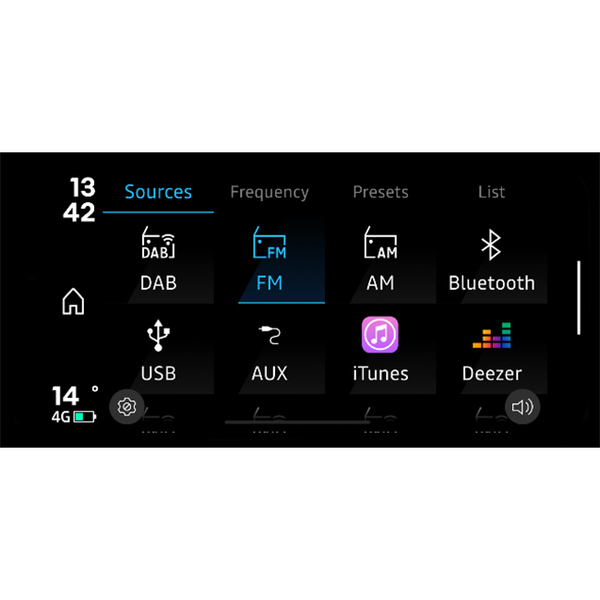
To access the multimedia file source selection menu, press button 36 "Sources". You can use this menu to select the source among those available:
- The various radio bands: "DAB", "FM" or "AM" (depending on availability);
- The various media audio sources : Bluetooth®, USB (depending on availability);
- The audio apps (music, podcast, web radio) installed on your smartphone (availability depends on the country);
- The music apps that are compatible and present on your smartphone.
« Audio : Radio »
You can use the "R&Go" app to listen to radio stations and to:
- select a station using one of three search modes ("Presets" (Favourites), "List" or "Frequency");
- search for a station using the integrated intelligent keypad;
- view text information from certain "FM", "DR" or "AM" radio stations while listening;
update the list of radio stations.
For more information, see Listen to the radio.
" Audio: USB, Bluetooth® Audio streaming, External applications "

You can use the "R&Go" app to listen to a audio source from your vehicle (USB, Jack) or your smartphone (Bluetooth® audio streaming, smartphone audio application).
The content may vary according to your phone, vehicle and country.
The "R&Go" offers the following functions:
- 18.
see the multimedia file currently playing;
- 19.
play/pause;
- 20.
scroll bar, remaining time for the multimedia file currently playing;
- 21.
access to the settings;
- 22.
next/previous file.
Note: content may vary according to the source selected.
"Audio settings"

From the "R&Go" settings menu, which can be accessed by pressing button 25, you can access the audio settings function.
This menu enables you to adjust the following settings:
- "Balance/Fader";
- « Bass/Treble » ;
- "Bluetooth®" volume;
- « AUX In » ;
- « TA » ;
- "DR alerts".
warning
For safety reasons, carry out any adjustments while the vehicle is stationary.