Renault Scenic
Gear control, electronic lever
Electronic selector lever 1

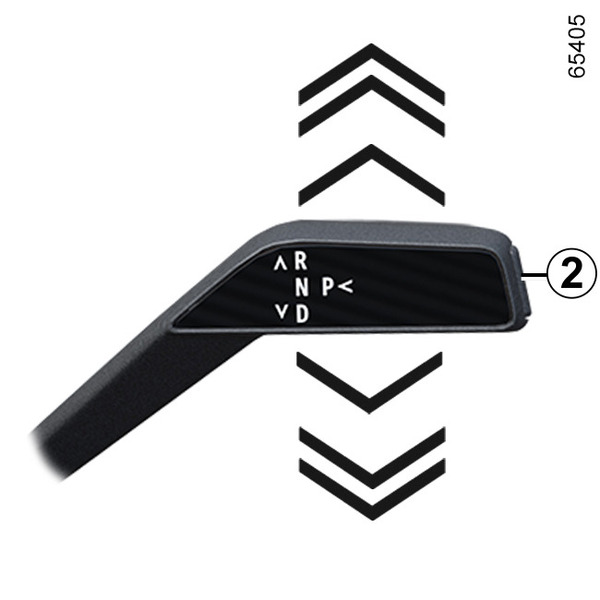

R: reverse gear;
N: neutral;
D: forward gear;
B: forward gear with increased regenerative braking (depending on the vehicle);
P: park, button 2.
The gear engaged is displayed on the instrument panel as a reminder.
One-touch selector
Move the selector lever 1 one or two notches forwards or backwards to engage the desired position (R, N, D or, depending on the vehicle, B) then release the lever and it will return to its stable position.
The position engaged is displayed on the instrument panel.
If certain conditions prevent shifting from one position to another, the current position flashes on the instrument panel.
To engage P position

With the vehicle stationary and the engine running or ignition on, press button 2 to engage P position.
warning
Check that the P warning light on the instrument panel is activated before leaving the vehicle.
Risk of loss of immobilisation of the vehicle
To disengage P position
With the vehicle stationary and the engine on, press the brake pedal and move the selector lever 1 upwards or downwards according to the position desired.
If the brake pedal is not fully pressed, the "Press brake pedal" message and
 warning light are displayed on the instrument panel.
To engage the neutral position ( N )
With the vehicle stationary and the engine running, to engage the N position, it is necessary to press the brake pedal before moving the selector lever 1 one notch upwards or downwards.
To engage the forward gear ( D position)
With the vehicle stationary, the engine running and your foot on the brake pedal, move the selector lever 1 two notches downwards to engage D position.
Note: with D, R or B position engaged (depending on the vehicle), if the vehicle is stationary it will move forward as soon as you release the brake pedal (without pressing on the accelerator pedal).
If one of the conditions is not met, the current position flashes for around five seconds and the "Press brake pedal" message is displayed on the instrument panel for approximately five seconds.
In most traffic conditions, you will not have to touch the gear lever.
Note: with the engine running and the vehicle travelling at between 0 and 5 mph (0 and 8 km/h), in N or R position, you will have to press the brake pedal in order to engage D position.
Driving in mode B
(depending on the vehicle)
This mode allows driving with a more dynamic regenerative mode. By releasing the accelerator, the vehicle uses regenerative braking to slow down the vehicle. Thus the motor generates higher electrical current which allows the traction battery to be recharged.
Note: with D, R or B position engaged (depending on the vehicle), if the vehicle is stationary it will move forward as soon as you release the brake pedal (without pressing on the accelerator pedal).
In B mode, the regenerative braking performance will be reduced if the battery is cold or fully charged.
Move from D position to B or B to D
(depending on the vehicle)
To switch from one position to the other, tilt the lever to one notch or two notches backwards.
The selected gear lever position is displayed on the instrument panel.
To engage the reverse gear ( R position)
With the vehicle stationary and the engine running, move the selector lever 1 two notches upwards to engage R position.
Note: with D, R or B position engaged (depending on the vehicle), if the vehicle is stationary it will move forward as soon as you release the brake pedal (without pressing on the accelerator pedal).
If the brake pedal is not pressed, a beep will sound, the display of the current position flashes for approximately five seconds in the grid shown on the instrument panel and the "Press brake pedal" message is displayed for approximately five seconds.
Note: with the engine running and the vehicle moving at between 0 and 5 mph (0 and 8 km/h), in N, D or B position (depending on the vehicle), it is necessary to press the brake pedal to engage R position.
Parking the vehicle
P position is engaged automatically and, if fitted, the electronic parking brake is applied when:
- the engine is stopped;
- the driver's seatbelt is unfastened and the vehicle is stopped;
and
- the driver's door is opened and the vehicle is stopped.
P is displayed on the instrument panel.
tip
P position must only be engaged when the vehicle is completely stopped.
As P position is automatically engaged when the engine is stopped, it is sometimes necessary to set the vehicle to N position in some situations, for example in a car wash:
- with the engine on, press the P button, move the selector lever 1 one notch upwards or downwards to shift to N position, then stop the engine;
- with the engine off and the ignition on, move the selector lever 1 one notch upwards or downwards then switch off the ignition.
The next time the engine is restarted, P position is engaged automatically according to the cases described earlier.
warning
For safety reasons, do not switch off the ignition before the vehicle has come to a complete standstill.
Operating faults
In the event of an engine fault or an electrical fault (battery fault, etc.), make sure that the vehicle is properly immobilised.
If the "Auto gearbox P failure" message appears on the instrument panel, it may not be possible to apply the parking brake. Be sure to secure the vehicle with the electronic parking brake and consult an approved dealer.
warning
An impact to the underside of the vehicle while manoeuvring (e.g. striking a post, raised kerb or other street furniture) may result in damage to the vehicle (e.g. deformation of an axle).
To avoid any risk of accident, have your vehicle checked by an approved dealer.