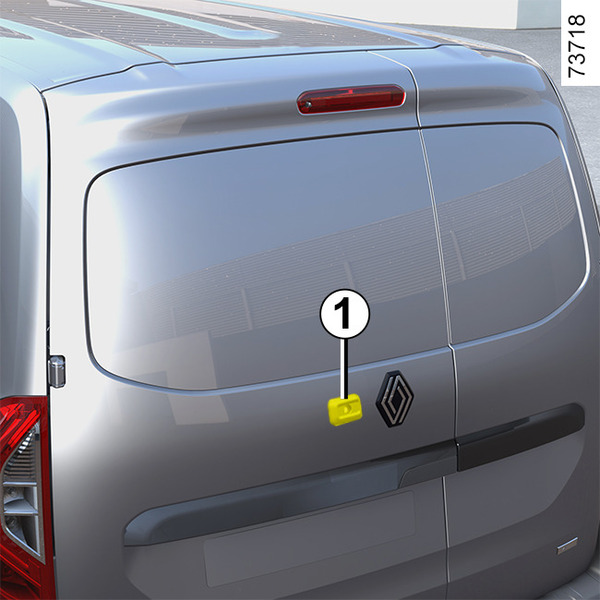
Camera rear view

<?xml version="1.0" standalone="yes"?>

Depending on the vehicle, the rear view may be shown by the camera 1.

Direct rear view by mirror remains available at all times.

The camera 1 is installed on the left-hand rear hinged door.

Chapter

Rear view mirrors

<?xml version="1.0" standalone="yes"?>

Door mirrors

10002_XFKEV_045_1_image.jpeg

Adjustment

Select the door mirror using switch 2, then use button 1 to adjust it to the desired position.

Heated rear view mirrors

Chapter

Steering

<?xml version="1.0" standalone="yes"?>

Adjusting the steering wheel height and depth

Lower the lever 1 and set the steering wheel to the required position.

Then, raise the lever fully, beyond the point of resistance, to lock the steering wheel.

Chapter

Warning lights

<?xml version="1.0" standalone="yes"?>

The presence and operation of the warning lights VARY ACCORDING TO THE EQUIPMENT AND COUNTRY.

warning

If no lights or sounds are apparent, this indicates a fault in the instrument panel. This indicates that it is essential to stop immediately (as soon as traffic conditions allow). Ensure that the vehicle is correctly immobilised and contact an approved Dealer.

Chapter

Clock and exterior temperature

<?xml version="1.0" standalone="yes"?>

Vehicles fitted with a multimedia screen.

The time and exterior temperature are displayed on the multimedia screen 1.

See the multimedia instructions.

Chapter

Vehicle settings customisation menu

<?xml version="1.0" standalone="yes"?>

Depending on the vehicle equipment, this function allows you to activate/deactivate and adjust some vehicle functions.

Vehicles fitted with a multimedia screen 1

Accessing the settings menu

Chapter

Displays and indicators

<?xml version="1.0" standalone="yes"?>

Engine oil level low warning

When the engine is started, the instrument panel display alerts you when the minimum oil level is reachedEngine oil.

Chapter