Facial recognition

<?xml version="1.0" standalone="yes"?>

Operation

After saving your profile from the multimedia system 1, you can recall the driver's user settings (driving position etc.) using facial recognition when entering the vehicle.

Chapter

Luggage compartment

<?xml version="1.0" standalone="yes"?>

To open

11022_HJBPH2_006_1_image.jpeg

Press button 1 to open the luggage compartment door by a few centimetres.

Lift the luggage compartment lid.

Chapter

Automatic locking when driving

<?xml version="1.0" standalone="yes"?>

Operating principle

After the vehicle is started, the system automatically locks the doors when you reach approximately 6 mph (10 km/h).

The door can be unlocked:

Chapter

Opening and closing the doors

<?xml version="1.0" standalone="yes"?>

Opening from the outside

Front doors

11022_HJBPH2_002_1_image.jpeg

With the doors unlocked or the card on you, hold the handle 1 and pull it towards you.

Chapter

Digital key

<?xml version="1.0" standalone="yes"?>

General information

Depending on the country and subscription, you can install a digital key for your vehicle on your smartphone.

The digital key contains the rights required to lock/unlock and start your vehicle using a smartphone.

Thus, your smartphone replaces your card.

The installation, administration and transmission of the digital keys are carried out using the manufacturer's app.

Chapter

Key, remote control

<?xml version="1.0" standalone="yes"?>

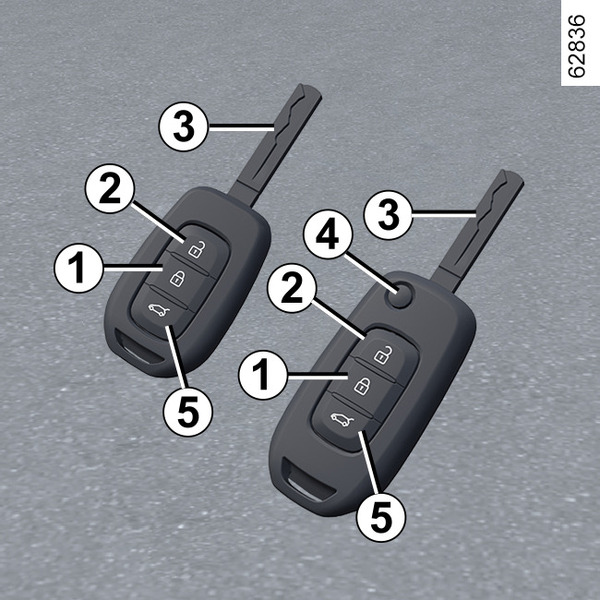
General information

11007_HJBPH2_001_1_image.jpeg

1.

Locks all the opening elements.

2.

Unlocking the doors and luggage compartment.

Chapter

Card

<?xml version="1.0" standalone="yes"?>

General information

11005_DHN_001_1_image.jpeg

1.

Unlocking the doors and luggage compartment.

2.

Locks all the opening elements.

Chapter