Technical Information for the emergency services

<?xml version="1.0" standalone="yes"?>

The QR Code on the label A allows emergency workers to use a tablet or smartphone to immediately access technical information that is useful for working on the vehicle in the event of an accident.

Chapter

Operating faults

<?xml version="1.0" standalone="yes"?>

The following advice will enable you to carry out quick, temporary repairs.

Chapter

Installation and use of accessories

<?xml version="1.0" standalone="yes"?>

Warning

warning

Electrical and electronic accessories

Before installing this type of accessory (particularly for transmitters/receivers: frequency bandwidth, power level, position of the aerial, etc.), make sure it is compatible with your vehicle. Contact an approved dealer.

Chapter

Fitting a radio

<?xml version="1.0" standalone="yes"?>

If your vehicle is not fitted with an audio system, one can be fitted and locations have been provided for:

  • the radio 1;
  • front speakers 2 (depending on the vehicle).

To install any equipment, please consult an approved dealer.

Chapter

Fuses

<?xml version="1.0" standalone="yes"?>

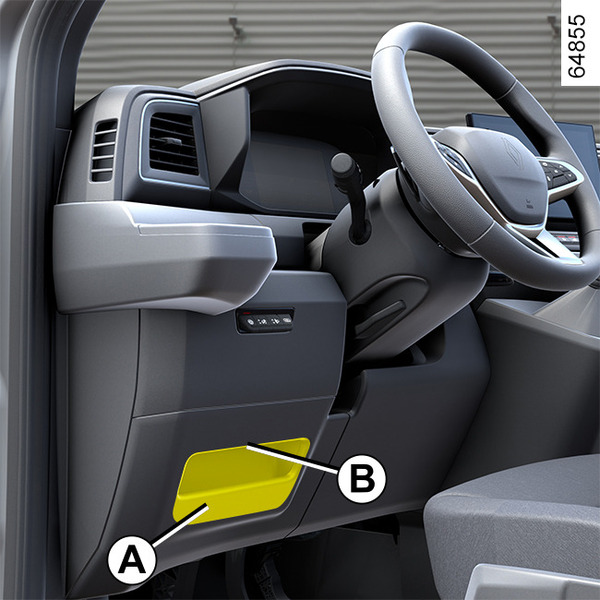
Fuse box

If any electrical component does not work, check the condition of the fuses.

Unclip the flap A using the groove B.

To identify the fuses, refer to the fuse allocation label located on the back of flap A.

Chapter

Wiper blades: replacement

<?xml version="1.0" standalone="yes"?>

Replacing windscreen wiper blades 2

Access

To access the wiper blades, stand on the foot panel 1.

Note: the foot panel may be slippery.

Chapter

Interior lighting: changing bulbs

<?xml version="1.0" standalone="yes"?>

Halogen bulb courtesy light 1

Unclip the diffuser 1 from the ceiling using a flat-blade screwdriver or similar tool.

Pull the bulb to remove it from its housing.

Chapter