easy link
" MULTI-SENSE " menu
From the main menu, press "Settings" then the "Vehicle" tab to access "MULTI-SENSE". This menu lets you customise the behaviour of some on-board systems.
Selecting mode
Available modes may vary according to the vehicle and equipment level. From the "MULTI-SENSE" menu, select the mode 1 desired:
- « My Sense » ;
- « Sport » ;
- « Comfort » ;
- « Race » ;
- « Save » ;
- « Eco » ;
- ...
Note: the last mode is not memorised when restarting the vehicle. By default, the vehicle restarts in " My Sense ». To find out more about each of these modes, please see your vehicle user manual.

Mode configuration
Press "Mode configuration" 3 to customise the various settings of the following on-board systems:
- « Steering » ;
- « 4Control » ;
- « Damping » ;
- « Climate » ;
- "Display";
- « Engine sound design » ;
- « Ambient lighting » ;
- ...
Note:
- some "MULTI-SENSE" configuration menus are restricted according to the category and equipment level of your vehicle. These menus remain visible on the multimedia screen but are unavailable;
- you can also access the various modes by pressing your vehicle's "MULTI-SENSE" control repeatedly. Please refer to the vehicle user manual for further information.
Pop-up menu
From the pop-up menu 2, you can reset the default values for the current mode.
warning
For safety reasons, carry out these operations when the vehicle is stationary.
" MULTI-SENSE " screen

Depending on the multimedia screen, the various "MULTI-SENSE" mode configurations may be displayed on only one tab (screen A), or on several tabs, "Driving" 6 and "Ambiance" 13 (screen B).
Note: the availability of settings may vary according to your vehicle model and equipment level.
Driving settings

From the "Driving" tab 6, you can configure the following equipment:
- « Damping » 4 ;
- « 4Control » 5 ;
- « Coasting » 7 ;
- « Steering » 8 ;
- « Engine » 9 ;
- "Electronic stability program";
- « » ;
- ...
Note: the availability of settings may vary according to your vehicle model and equipment level.
Ambient settings

From the "Ambiance" tab 13 you can configure the following equipment:
- « Ambient lighting » 10 ;
- « Engine sound design » 11 ;
- « Climate » 12 ;
- « Massage » 14 ;
- « Instrument panel » 15 ;
- ...
Note: the availability of settings may vary according to your vehicle model and equipment level.
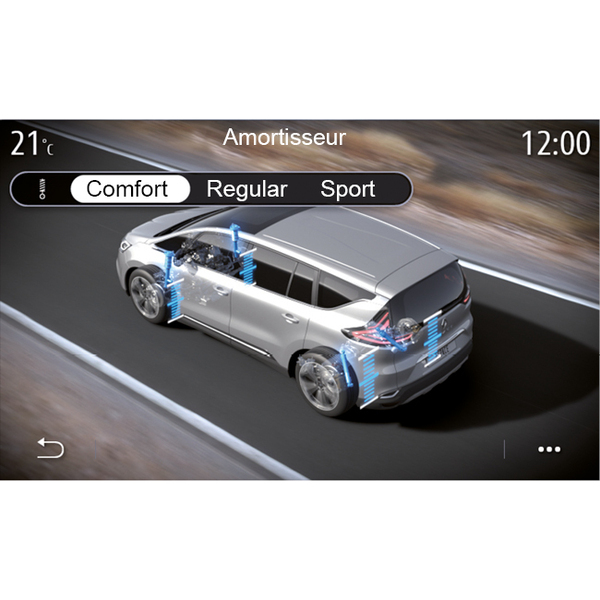
« Damping » 4
This menu offers several suspension modes:
- « Comfort » ;
- « Regular » ;
- « Sport ».
Depending on the mode selected, the travel and rigidity of your shock absorbers is adjusted to provide optimal balance between a comfortable and sporty driving experience.

« 4Control » 5
This menu offers several electronic stability modes:
- « Comfort » ;
- « Regular » ;
- « Sport ».
Depending on the mode selected, the angle of the rear wheels is adjusted in relation to the front wheels in order to provide optimal balance between a comfortable and sporty driving experience.
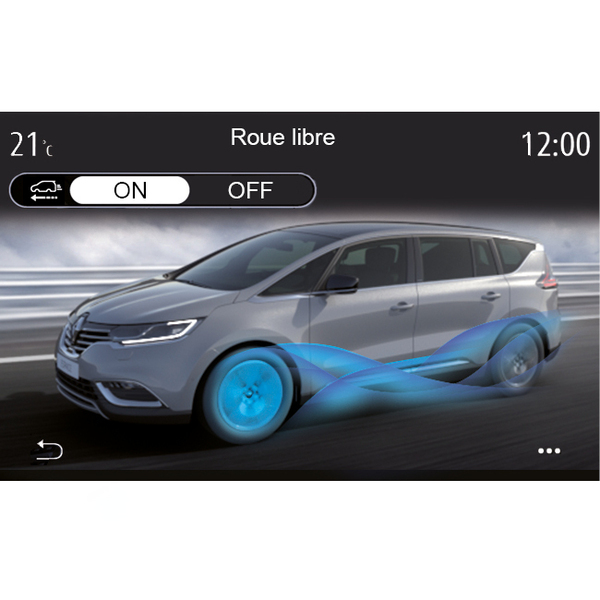
« Coasting » 7
This menu offers "Coasting" mode.
When driving, if engine power is not needed, it switches to Free-wheel mode to optimise fuel efficiency and your Driving Eco performances.
Note:
- when "Coasting" mode is activated, the driving aids remain activated;
- setting only available on vehicles fitted with an automatic gearbox.

« Steering » 8
This menu offers several steering response modes:
- « Comfort » ;
- « Regular » ;
- « Sport ».
Depending on the mode selected, the steering sensitivity can be adjusted to become heavier or more reactive in order to provide optimal balance between a smooth and accurate steering experience.

"Electronic stability program"
This menu offers several electronic stability modes:
- « Normal » ;
- « Sport ».
Depending on the mode selected, the system compares the direction selected by the driver and the actual direction of the vehicle, then corrects this as necessary by applying the brakes selectively and/or acting on the engine power.

« Ambient lighting » 10
Use this menu to set the ambient lighting. For more information, refer to the "Ambient lighting" section in your vehicle user manual.

« Engine sound design » 11
This menu offers several engine sound effects for the passenger compartment:
- « Comfort » ;
- « Sport » ;
- « Regular ».
You can select two sound levels: "Low" or "High". To deactivate the sound effect, set the sound volume to "OFF" mode.

« Climate » 12
This menu offers several air conditioning operating modes:
- « Eco » ;
- « Regular ».
Depending on the mode selected, you will be offered the optimal balance between temperature comfort and fuel economy.
For more information on adjusting the air conditioning, depending on the equipment level, please see the section on "Air conditioning" in your vehicle user manual.

« Massage » 14
Use this menu to enable the multimedia system pre-defined massage cycle on the driver's seat and passenger seat.
For more information on the massage programmes, refer to the "Seats" section in your vehicle user manual.

« Instrument panel style » 15
Use this menu to select one of several display styles.
Depending on the style selected, certain information is displayed such as:
- the current audio source;
- the compass;
- the engine power and torque;
- the current fuel consumption;
- Route direction.
Sports vehicle

On the MULTI-SENSE menu, sports vehicles have a "Race" mode option which offers further settings to give the vehicle an even sportier behaviour.
Note: the last mode is not memorised when restarting the vehicle. By default, the vehicle restarts in " Regular ». To find out more about each of these modes, please see your vehicle user manual.
"Regular" mode
" Regular " mode offers a compromise between dynamism and comfort for daily use.
"MySense" mode
" MySense " is 100% customisable for the driving experience. It enables you to manage the various settings related to the atmosphere, engine, etc.
warning
For safety reasons, carry out these operations when the vehicle is stationary.
" Race " mode
"Race" mode enables a real racing experience, designed in particular for using the vehicle on a race track.
Gear-change times are reduced, acceleration and steering are more responsive, the exhaust sound accentuates the vehicle's sportiness.
"Race" mode disables the ESC (electronic stability program) by default, as well as some driving aids such as:
- active emergency braking;
- speed limiter;
- lane keeping assistance;
- adaptive cruise control;
- ...
Mode configuration
Press "Edit current mode" 16 to customise the various parameters of the following on-board systems:
- « 4Control » ;
- « Electronic stability control » ;
- « Cluster » ;
- « Climate » ;
- « Exhaust sound » ;
- "Engine sound";
- « Throttle pedal » ;
- ...
Note:
- settings may vary according to the equipment level and vehicle model;
- some "MULTI-SENSE" configuration menus are restricted according to the category and equipment level of your vehicle. These menus remain visible on the multimedia screen but are unavailable.
Pop-up menu
From the pop-up menu 17, you can reset the default values for the current mode.
warning
For safety reasons, carry out these operations when the vehicle is stationary.
« 4Control »
This menu offers several operating modes:
- « Regular » ;
- « Sport » ;
- « Race ».
Depending on the mode selected, the angle of the rear wheels varies in relation to the angle of the front wheels in order to offer you the optimum compromise between accessibility and performance and the steering becomes lighter, heavier or more responsive to offer you the optimum compromise between softness and precision.
« Throttle pedal »
This menu offers several accelerator pedal progressiveness modes:
- « Save » ;
- « Regular » ;
- « Sport » ;
- « Race ».
Depending on the mode selected, the sensitivity of the accelerator pedals changes.
"Electronic stability program"
This menu offers several electronic stability modes:
- « Regular » ;
- « Sport » ;
- « OFF ».
In "Sport" mode, the system runs with last minute corrections to allow sportier driving by controlling the braking of certain wheels and/or the engine power. In "OFF" mode, the "Electronic stability program" is disabled.
« Engine »
This menu offers several engine response modes:
- « Save » ;
- « Regular » ;
- « Sport » ;
- « Race ».
Depending on the mode selected, the power and engine torque become more noticeable and responsive.
« Exhaust sound »
(depending on equipment)
This menu offers several exhaust sound effects:
- « Regular » ;
- « Sport » ;
- « Race ».
Depending on the country, the exhaust sound may be subject to local regulations. For further information, please contact an approved dealer.
"Engine sound"
This menu offers several engine sound effects for the passenger compartment:
- « Regular » ;
- « Sport » ;
- « Race ».
You can select two sound levels: "Low" or "High". To deactivate the sound effect, set the sound volume to "OFF" mode.
Hybrid and Electric Vehicles

On hybrid and electric vehicles, from the "MULTI-SENSE" menu you can access the Pure », « My Sense " (only for hybrid vehicles) and "Sport" modes which allow you to configure the equipment.
Note: the availability of settings may vary according to your vehicle model and equipment level.
"Pure" mode
" Pure " mode provides all-electric driving. This mode uses only the electric motor to propel the vehicle. When the traction battery is flat, the vehicle automatically switches to " My Sense " mode and the combustion engine starts. The maximum speed in " Pure " mode is approximately 78 mph (125 km/h).
You can directly access " Pure " mode using the EV switch on your vehicle.
"My Sense" mode
" My Sense mode is the hybrid driving mode. Depending on the driving and battery level, this mode uses either all-electric, or a combination of the two energies, with priority given to the traction battery.
Depending on the vehicle, the IC engine may also start up in order to maintain the battery charge level.
warning
For safety reasons, carry out these operations when the vehicle is stationary.
" Sport " mode
"Sport" authorised increased engine responsiveness. Depending on the driving, electric and IC traction work together to get the best performance. Pedal responsiveness is increased and the steering is firmer.
Maintaining the traction battery charge level: "E-save"
There are two ways to access this function using your multimedia screen:
- activation/deactivation from the "Vehicle settings" menu;
- positionable widget on the home page.
This mode enables you to maintain a sufficient charge level in the traction battery in anticipation of a mountain road or a long motorway slope.
Note: some functions are disabled to optimise the performance of the electric motor.