Radio Connect R & GO 3
Display
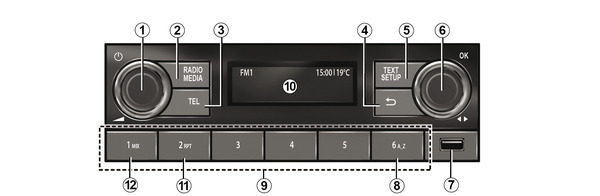
Steering column controls

Steering wheel control

Introduction to the controls
AUDIO/MEDIA function | TELEPHONE function | ||
|---|---|---|---|
1 |
|
| |
2 |
|
| |
3 |
|
| |
4 |
|
| |
5 |
|
|
|
6 |
+
| Panel control knob:
| Panel control knob:
|


AUDIO/MEDIA function | TELEPHONE function | ||
|---|---|---|---|
7 |
| USB socket for an MP3 player or auxiliary audio sources. | To access telephone content without a Bluetooth® connection (depending on the telephone). |
8 |
| Search by letter in the music lists/search by letter in the contacts list. | |
9 |
| ||
10 | Car radio operation control display screen. | ||
11 |
| RPT: repeat playback of the audio playlist. | |
12 |
| MIX: shuffle playback of the audio playlist. | |
13 and 14 |
| Scroll through to select an audio source FM→ DR→ AM→ USB→ BT Audio. | |
15 |
| Steering column control knob: Rotate:
| Steering column control knob: Rotate: scroll through suggested actions (end call, put call on hold, switch to hands-free mode, display digital keypad). |


AUDIO/MEDIA function | TELEPHONE function | ||
|---|---|---|---|
16 and 17 |
| Progressively adjust the volume of the audio source currently playing. | |
16 + 17 |
+
|
| |
18 |
| With the audio medias in USB/Bluetooth :
|
|
19 |
| Incoming call:
Call in progress/outgoing:
| |
20 |
|
| |


General description
Introduction
The audio system includes the following functions:
- FM and AM radio;
- terrestrial digital radio DR;
- management of auxiliary audio sourcesUSB;
- Bluetooth® hands-free phone system.
Radio function
The radio can be used to listen to radio stations on the following bands: FM (frequency modulation) and AM (amplitude modulation).
The DR system (digital terrestrial radio in DAB format, DAB+, T-DMB) improves sound reproduction and enables you to access the "Radio-text" stored radio text information by scrolling the text to display:
- news updates;
- sports news;
- ...
warning
Your hands-free telephone system is only intended to facilitate communication by reducing the risk factors, but does not remove them completely. Always comply with the laws of the country in which you are travelling.
The RDS system displays the name of some stations or messages sent by the FM radio stations:
- general traffic information (TA);
- emergency messages.
Hands-free phone function
The hands-free system Bluetooth® allows you to use the following functions without having to handle your phone:
- pair up to six phones;
- make/receive/reject a call;
- transfer the telephone or SIM card phonebook contact list SIM (depending on the phone);
- view the history of calls made using the system (depending on the phone);
- call voicemail.
Auxiliary audio function
You can listen to your portable digital audio player directly through your vehicle's speakers. There are several ways to connect your portable audio player, depending on the type of device you have:
- Bluetooth® connection;
- USB port.
For more information on the list of compatible devices, contact an authorised dealer.
Bluetooth® function
This function enables the audio system to recognise and control your portable digital audio player or mobile telephone via Bluetooth® pairing.
Display screens
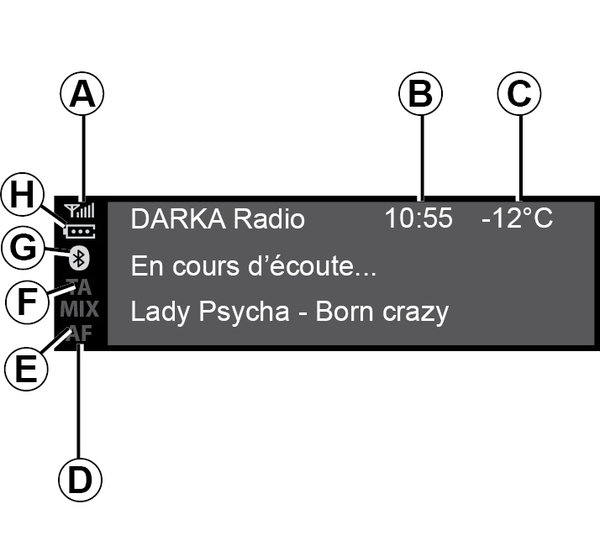
- A.
Information on the telephone network status.
- B.
Current time.
- C.
Exterior temperature.
- D.
Alternative frequency.
- E.
Shuffle tracks from an audio source.
- F.
Traffic information.
- G.
Connection information Bluetooth®.
- H.
Information on the telephone battery level.
Operation
On and off
Press briefly on
 to switch on your audio system.
The audio system can be used with the vehicle ignition off. It will operate for several minutes. Press
to keep it on for a few more minutes.
Switch off the audio system by pressing briefly on
. The system only displays the time.
Choosing the source
Scroll through the various audio sources by repeatedly pressing on
 . When scrolling, the audio sources appear in the following order: FM→ DR→ AM→ USB→ Bluetooth®.
You can also select the audio source by pressing on
 .
.
When you switch on your radio, the media that was last played should resume. If not, press briefly on
.
When you connect a USB media source while the audio system is switched on then the source will automatically switch to the new media and start to play its content.
When you connect a Bluetooth® media source while the audio system is on, if the audio source playing was already Bluetooth® then the media content will switch and start to play automatically on the audio system.
Note: press on
 or
or
 to display the telephone menu.
Volume
Adjust the volume by rotating
on the panel or by pressing
 or
or
 .
.
The display shows "Volume" followed by the current setting value.

Mute
Simultaneously press
and
. The "MUTE" message is displayed on the screen.
Press
or
again briefly to continue listening to the current audio source.
You can also activate/deactivate the mute function by rotating
on the panel.