Rear headrests <?xml version="1.0" standalone="yes"?> Adjusting the height of the headrestPress the button 1 and simultaneously slide the headrest to the desired height.Headrest in use positionLift the headrest to maximum height, then lower it until it locks. Chapter
Front seats <?xml version="1.0" standalone="yes"?>Adjustment To move the seat forwards or backLift and hold the handle 1 to unlock the seat. Release the lever in the desired position and check that it is securely in place.To raise or lower the seat Chapter
Front headrests <?xml version="1.0" standalone="yes"?>Raising the headrest Press the button 2 and pull the headrest upwards to the required height. Check that the bonnet is correctly locked. Chapter
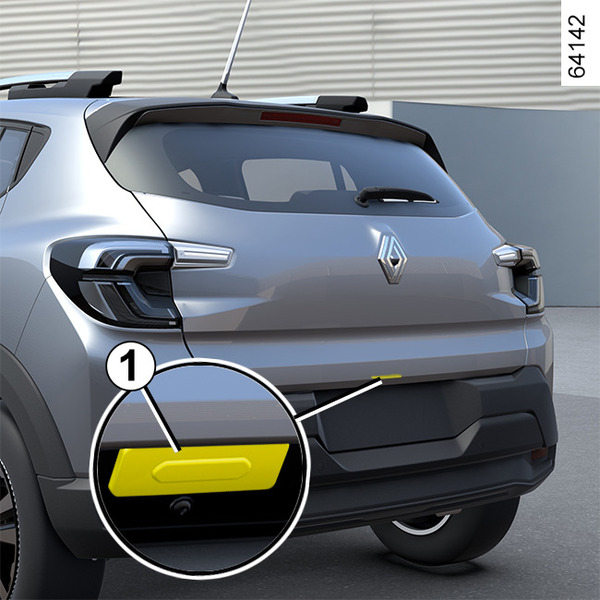
Luggage compartment <?xml version="1.0" standalone="yes"?>To open To openWith the doors unlocked, press button 1 and lift the boot lid.Depending on the vehicle, press button 2 (on the key or card) and lift the boot lid. Chapter
AUTOMATIC DOOR LOCKING WHEN DRIVING <?xml version="1.0" standalone="yes"?>Operating principle After the vehicle starts moving, the system automatically locks the doors when you reach a speed of approximately 6 mph (10 km/h).To unlock the doors: Chapter
Locking, unlocking the doors and the luggage compartment door <?xml version="1.0" standalone="yes"?>If the remote control or, depending on the vehicle, the card does not workIn some cases, the radio frequency remote control or the card may not work:Radio frequency remote control or card battery low or flat, vehicle battery discharged, etc.;Use of devices operating on the same frequency as the card (mobile phone, etc.);if the vehicle is located in a zone of high electromagnetic radiation.It is then possible: Chapter
Opening and closing the doors <?xml version="1.0" standalone="yes"?>Opening the doors from the outside With the doors unlocked, place your hand underneath the handle 1 and pull towards you. Chapter