Renault Master 4
Accessories socket 1
(depending on the vehicle)
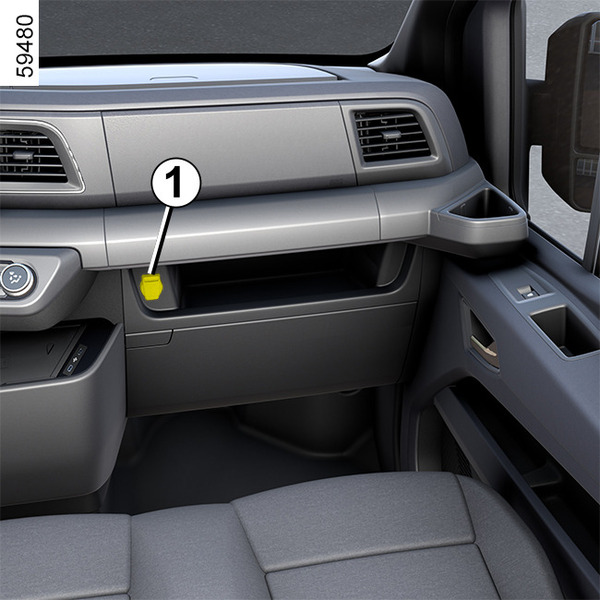
They are designed to connect accessories with a power that must not exceed 120 watts (12 V).
Luggage compartment accessories socket 2

warning
Connect accessories with a maximum power of 120 watts (12 V) only.
When several accessory sockets are used at the same time, the total power of the connected accessories must not exceed 180 watts.
Fire hazard.
230 V sockets
Operation


Depending on the vehicle, 230 V sockets are available after unlocking the electric vehicle or opening a door.
Note: when the vehicle is plugged into an AC charging terminal, the 230 V sockets are unavailable. The "Unable to use V2L - Vehicle charging in progress" message is displayed on the instrument panel.
To use the sockets, raise the flap 1 and connect the device.
When the engine is switched off, if a device is still plugged into the output socket, the "V2L Discharge in progress - Device plugged in" message is displayed on the instrument panel.
Depending on the consumption of the connected device:
- If the consumption is less than 55 W, the power supply to the 230 V sockets remains active for one hour and then automatically switches off;
- if the power consumption is greater than 55 W, the power supply to the 230 V sockets remains active as long as the current consumption is detected or until the low battery charge threshold is reached.
When the minimum battery charge threshold is reached, the system will be deactivated. You can set this threshold via the menu on the multimedia screen.
Please refer to the multimedia instructions for further information.
Note: the cut-off related to the minimum battery charge threshold is only active when the system is used while the vehicle is stopped and the gear lever is in P position.
When driving, no specific limitations apply to the operation of 230 V sockets.
warning
The sockets must be handled in a safe manner – they must not be handled while driving.Never open the box on which the sockets are located. The system is connected to the vehicle's high voltage circuit. Risk of serious injury.
warning
Never wash the loading area with a jet of water while a device is plugged in or one of the flaps is open.
While the flaps are closed, be careful not to direct the jet directly at the sockets.
Operating faults
Using 230 V sockets | POSSIBLE CAUSES | ACTION REQUIRED |
|---|---|---|
The "V2L discharging impossible - Connected device fault" message is displayed on the instrument panel. | System overloading. | Check that the power consumed by the device is compatible with the system specifications. If this is the case, disconnect and then reconnect the device into the 230 V socket to restart the system. If it the fault persists, consult an Approved Dealer. |
The V2Li system interrupts the power supply to the circuit. | Defective device socket. | A damaged or defective device socket may cause overheating following insertion into the 230 V output socket. Check the status of your equipment and its socket. |
With the vehicle stationary, if the system does not activate after a device is plugged into a 230 V socket. | System inactive when the vehicle is switched off. | Check the condition of the vehicle, for example by observing the emergency call Emergency call operation indicator light. If the emergency call indicator light is off, the vehicle has gone into standby mode and has switched off its power supply. Open a door or unlock the vehicle to set the vehicle to customer mode. The emergency call indicator light will come on and the system will be operational again. If the system remains inactive, see an approved dealer. |
Important recommendations
warning
Please read these instructions carefully. Failure to follow these instructions may lead to a risk of fire, serious injury or electric shocks which could result in death.
Precautions to be taken during use. Do not attempt to power your home as this can lead to damage and electric shocks.
Precautions to be taken when using electrical/electronic devices. Before plugging in and using a device (extension cable, multi-plugs, etc.), check the precautions for use by referring to its user manual.
Do not connect:
- devices that require a direct current, such as medical equipment. The power supply may be interrupted, depending on the vehicle operating conditions;
- devices that consume more than the maximum regulatory current in the country where sold;
- devices that do not comply with national regulations and standards;
- damaged devices (unit, cables, etc.);
- devices whose initial recommendations for use are not adapted to the environment in which they will be used (risks related to contact with dust and water);
- more than one multi-plug. If using, do not exceed the consumption indicated on the socket's flap 1;
- an extension lead longer than 20 metres.
If using an extension lead, be sure to unwind it completely.