Renault Master 4
Instrument panel A
The presence and operation of the display and indicators DEPENDS ON THE LEVEL OF EQUIPMENT AND THE COUNTRY.
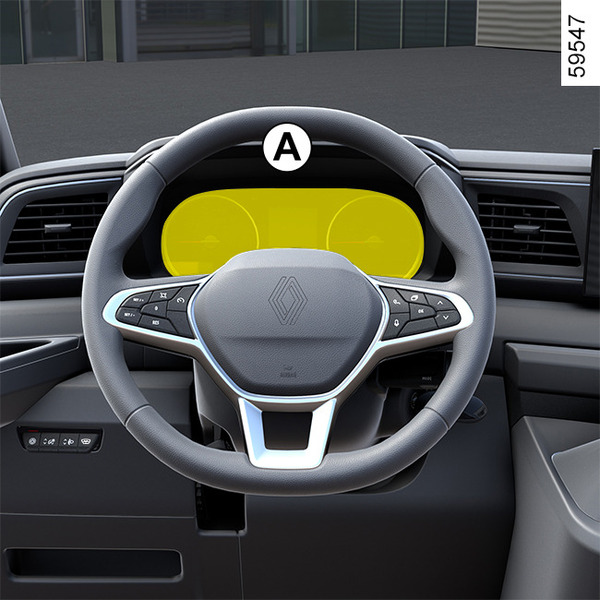
Rev counter 1 (rpm x 1000)

Automatic gearbox display 2

Speedometers 3 and, depending on the vehicle, 4
(kilometres or miles per hour)

Control your speed according to the speedometer 3 or 4.
In case of a difference between the speedometers, refer to the approved speedometer 3 and consult an approved dealer.
Trip computer 5

Fuel gauge 6
The number of squares lit shows the fuel level. When it is at minimum, the squares disappear and the low fuel level warning light comes on, depending on the vehicle.
Instrument panel B
The presence and operation of the display and indicators DEPENDS ON THE LEVEL OF EQUIPMENT AND THE COUNTRY.

It lights up when the ignition is switched on. In some cases, the appearance of a warning light is accompanied by a message.
Selection of views
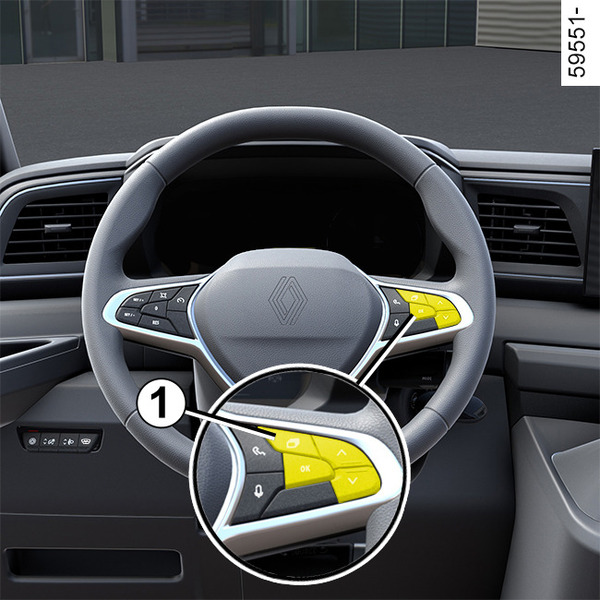
Depending on the vehicle, use the control 1 to browse and select the various view on the instrument panel B. Several views are proposed:
- Charging view: only while the vehicle is charging, displays the vehicle range, battery percentage and remaining charging time;
- ADAS view: displays the speed and the active driving aids in full screen and the information area on the instrument panel;
- Power view: displays the speed, active driving aids and power-meter on the instrument panel;
- Minimum view: displays only essential information, the speed, active driving aids and the information area on the instrument panel.
Excessive speed audible alarm
Depending on the vehicle and country, the
 warning light is displayed and a beep sounds. This beep sounds as soon as the vehicle is travelling at over 75 mph (120 km/h). This warning light remains lit for as long as the vehicle is travelling at over 74 mph (120 km/h).
Central gauge indicator lights

- 2
Speedometer
The vehicle speed is limited to approximately 75 mph (120 km/h) or, for combustion engine versions, approximately 93 mph (150 km/h) or 99 mph (160 km/h), depending on the vehicle.
- 3
Driving style indicator
- 4
Battery Information
(traction battery charge rate, estimated range).

- 5
Total mileage recorder
- 6
Trip computer zone
- 7
Multimedia information
Depending on the vehicle, you can display information from the multimedia screen (telephone, navigation, etc.).
Please refer to the multimedia instructions for more information.

- 8
Charge meter
Left-hand gauge indicator lights

- 9
Left-hand direction indicator
- 10
Warning light
- 11
Tyre under-inflation warning light
- 12
Warning light forairbag
Right-hand gauge indicators

- 14
Right-hand direction indicator
- 15
Parking brake warning light
- 16
"Hands off steering wheel" detection warning light
- 17
Urgent stop warning light

Charging cable "plugged-in"warning light 18
This comes on when the charging cable is plugged into the vehicle.
Remaining charging time 19
Charge level 20
The gauge indicates the level of energy remaining.
Traction battery charge rate 21
Reserve threshold
Depending on the vehicle, when the traction battery reaches about 20% or 15%, the traction battery level 20 and the warning light 21
 appear in yellow on the instrument panel, accompanied by a beep (depending on the vehicle).
To optimise your range Eco-driving.
Immobilisation threshold imminent
Depending on the vehicle, when the charge level reaches about 10% or 5%, a beep will sound. The warning light 22 flashes in yellow and the traction battery level 21 is displayed in red.
Note: when the charge level reaches approximately 10% or, depending on the vehicle, 0%, the remaining range value is no longer displayed on the instrument panel or, depending on the vehicle, after a delay of approximately 30 seconds.
Engine performance gradually decreases until the vehicle comes to a halt Towing: breakdown.
Amount of power supplying the vehicle 23.
Instrument panel in miles
Vehicles not fitted with a multimedia screen instrument panel A


- With the ignition off, press the switch 1 as many times as required to reach the vehicle tab 5;
- press control 2 or 3 repeatedly to reach the "Settings" menu, press the switch 4 " OK ";
- repeat the same operation to reach "DASHBOARD", then "Units".
Vehicles not fitted with a multimedia screen instrument panel B


- With the ignition off, press the switch 1 as many times as required to reach the "Settings" world 6;
- press control 2 or 3 repeatedly to reach "Vehicle setting", then press switch 4 "OK";
- press control 2 or 3 repeatedly to reach "DASHBOARD", then press switch 4 "OK";
- press control 2 or 3 repeatedly to reach "Unit: km/h " (or "Unit: mph " in the opposite case), press the switch 4 "OK".
Vehicles fitted with a multimedia screen.
Please refer to the multimedia instructions to select the audio system.
Note: in both cases, once the battery is switched off, the on-board computer automatically returns to the original unit of measurement.
To return to the previous mode, repeat the same operation.
Please refer to the multimedia instructions for more information.