Renault Boreal


Using the information from radar 2 and camera 1, the function triggers corrective action by the vehicle's steering system in the event of a risk of collision with an oncoming vehicle in the adjacent lane without activating the turn signal.
Depending on the vehicle, using the information from radars 3 and camera 1, the function triggers corrective action by the vehicle's steering system in the event of a risk of collision with a vehicle travelling at the same speed or at a higher speed if it is within the detection zone of the rear radars.
tip
You can regain control of the vehicle at any time by moving the steering wheel.warning
This function is an additional driving aid. The driver should always be in control of the vehicle, with this system not being a replacement for due care and attention in any way.
Camera location 1
Make sure that the windscreen is not obscured (by dirt, mud, snow, condensation, etc.).
Location of the radar 2
Check that the radar area is not obstructed (by dirt. mud, snow, a poorly fitted/installed front number plate, etc.), impacted, modified (including paintwork, etc.) or concealed by any accessory fitted to the front of the vehicle (on the grille, logo, etc.)
Location of the side radars 3
Make sure that the radar area is not obstructed (dirt, mud, snow, poorly attached/installed front plate, etc.), damaged, modified (including painting, etc.).
Activation/deactivation
Using switch AMy Safety

If it has been disabled in the "Perso" mode of the "My Safety" function, press switch AMy Safety twice.
To re-enable the function, press switch A.
On the multimedia screen B

See the multimedia instructions for more information.
Oncoming vehicle detection


When driving at a speed of between approximately 40 mph and 70 mph, if there is a risk of collision with an oncoming vehicle in an adjacent lane within detection zone C, without the activation of the indicator, the system:
will warn the driver of the risk of collision:
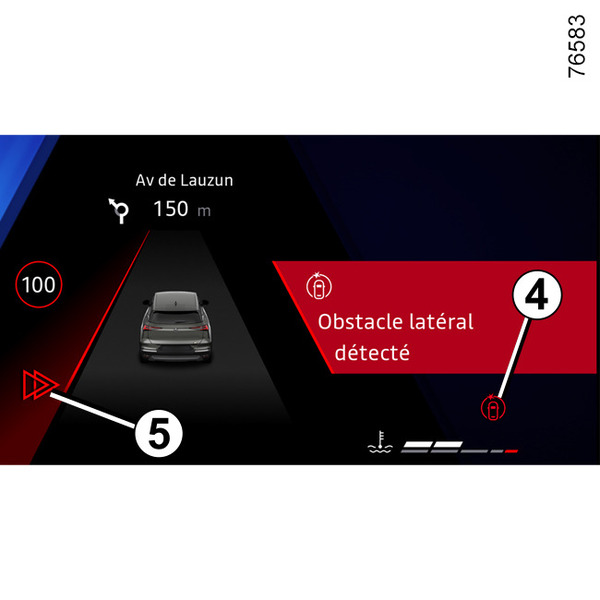
The message "Risk of collision" appears on the instrument panel accompanied by the indicator 4 in red, the line on the side of the intervention and an audible signal. Screen 5 appears on the instrument panel, on the side of the intervention;
and
initiates a corrective action of the steering system.
tip
You can regain control of the vehicle at any time by moving the steering wheel.warning
This function is an additional driving aid. The driver should always be in control of the vehicle, with this system not being a replacement for due care and attention in any way.
The function may not be activated if the approach speed is higher than approximately 125 mph (e.g. if you are driving at 65 mph and the other vehicle is travelling in the opposite direction in the adjacent lane at 60 mph).
In case of overtaking
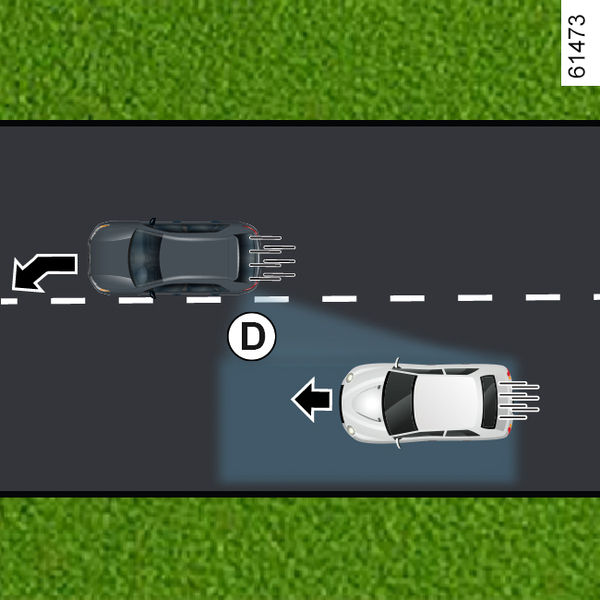


When driving at a speed of more than 40 mph, if the vehicle is approaching a line (continuous or discontinuous) and there is a risk of collision with a vehicle located in blind spot D, travelling in the same direction as your vehicle, or with a vehicle approaching rapidly from behind or in an adjacent lane and within detection zone E, the system:
warns of the risk of collision: indicator light 6 flashes, the message "Lateral obstacle detected" appears on the instrument panel, accompanied by indicator 4 in red, the line on the side of the intervention and an audible signal. Screen 5 appears on the instrument panel, on the side of the intervention;
and
initiates a corrective action of the steering system.
Function temporarily unavailable/disabled
The system is temporarily unavailable or disabled when:
- departing on the very fast lane;
- driving in a continuous line;
- approximately four seconds after changing lanes;
- sharp turns;
- impaired visibility;
- one of the turn signals is activated;
- warning lights are activated;
- strong acceleration;
- vehicle speed of more than approximately 100 mph or 110 mph, depending on the vehicle;
- changes in the width of the road;
- the anti-lock wheel system is in operation;
- operation of electronic stability control ESC;
- operation of the anti-lock braking system.
The system cannot be activated when:
the camera does not detect a line (continuous or discontinuous) on the side in question;
the camera does not detect the two limits of the road on which your vehicle is driving at the same time;
reverse gear is engaged;
the camera's field of view is obstructed;
the front radar is obstructed;
depending on the vehicle, the rear radars are obstructed;
...
Depending on the vehicle, if one of the side radars is obstructed, the message "Side radars no visibility" appears on the instrument panel.
When the front radar is obstructed, the message "Front radar no visibility" appears on the instrument panel.
When the front camera is obstructed, the message "Front camera no visibility" appears on the instrument panel.
Clean the area where the sensors are located.
Automatically disabling the function
The system is automatically disabled when:
the electronic stability control (ESC) is disabled or is malfunctioning;
there is an anomaly in the anti-lock braking system;
a tow bar is electrically connected to the trailer coupling;
the warning light
 goes on.
If the vehicle is equipped with a towbar recognised by the system, the message "Trailer: side radars unavailable" will be displayed to inform you that the "Emergency lane departure prev." function has been disabled.
If the vehicle is towing a trailer or caravan, there may be unforeseen or unnecessary corrections. You can disable the system to avoid unforeseen or unnecessary corrections.
Operating faults
When the function detects an operating fault, the following messages are displayed on the instrument panel:
- "Check Front camera"
or
- "Front radar to check"
or
- "Check Driving assist"
or
- "Check Side radars"
Consult an Approved Dealer.
Warnings
warning
This function is an additional driving aid. This function is not under any circumstances intended to replace the due care and attention of the driver, who should at all times be in control of the vehicle.
System servicing/repairs
- In the event of an impact, the camera alignment may be changed, and its operation may consequently be affected. Deactivate the function and consult an authorised dealer.
- Any work in the area where the camera is located (repairs, replacements, windscreen modifications etc.) must be carried out by a qualified professional.
Only an authorised dealer is qualified to service the system.
In the event of system disturbance
Some conditions can disturb or damage the operation of the system, such as:
- windscreen obscured (by dirt, ice, snow, condensation etc.) ;
- a complex environment (tunnel etc.) ;
- poor weather conditions (snow, rain, hail, black ice etc.) ;
- poor visibility (night, fog etc.) ;
- the road markings are irregular or difficult to distinguish (e.g. partially erased, excessive spacing, distorted road surface) ;
- being dazzled (glaring sun, lights of vehicles travelling in the opposite direction etc.) ;
- the road is narrow, winding or undulating (tight bends etc.) ;
- closely following a vehicle travelling in the same lane.
In this case, the "Lane departure prevention" function may be activated incorrectly or not at all.
Risk of unwanted, incorrect correction or no correction of trajectory.
Deactivating the function
You must disable the function if:
- the area of the camera has been damaged (on the windscreen side or the interior rear-view mirror side);
- the road is slippery (snow, black ice, aquaplaning, gravel etc.) ;
- poor visibility (night, fog etc.) ;
- the windscreen is cracked or distorted (do not carry out windscreen repairs in this area; have it changed by an Authorised Dealer);
- the vehicle is towing a trailer or a caravan;
- the vehicle is entering an area with several surface markings (an area with road works etc.).