Renault Boreal

The system displays the speed limits on the instrument panel according to the signs detected at the side of the road.
It mainly uses the information obtained from camera 1 , connected to the windscreen behind the rear-view mirror.
Depending on the country, the system also uses information from a map subscription to interpret certain signs (town/city entrance, etc.).
The signal displayed on the instrument panel changes when a road sign is detected by the system.
As soon as the speed limiter or adaptive cruise control Stop and Go is activated, you can adapt the limited speed setpoint to the speed displayed on the instrument panel by the system Speed limiterAdaptive cruise control Stop and Go.
If the detected speed limit is exceeded, the road sign displayed on the instrument panel is modified to inform the driver.
Location of the camera 1
Make sure the windscreen is not obscured (by dirt, mud, snow, condensation etc.).
Special instructions
For vehicles with a map subscription:
- If the vehicle is travelling in a country that uses different speed units than the vehicle's units, the system displays the country's speed limit sign, along with the speed limit converted to the unit used by the vehicle's instrument panel;
- For countries where the speed limit is reduced during rainy weather on some types of roads, the system may change the detected speed limit a few seconds after the windscreen wiper is activated.
For vehicles not equipped with a navigation system: When driving in a country where the speed units are different from those of your vehicle, you can manually select the speed unit shown on the instrument panel (e.g. change from kilometres to miles) to display the accurate Displays and indicators information.
Note: The system does not consider exceptional speed limit measures, such as on peak pollution days.
Operation

The function displays the following indicator lights:
- 2.
Speed limit signs and additional speed limit signs (speed on exit ramp with arrow, speed with caravan, speed limit with length of application, etc.)
- 3.
Additional road signs (start and end of the no-overtaking zone).
If the detected speed limit is exceeded, a circle flashes around the road sign (indicator light 2) accompanied, depending on the vehicle, by an audible alert emitted for a few seconds to warn you. It will remain lit on the instrument panel as long as the vehicle continues to exceed the detected speed limit.
tip
Map subscription
Signage detection is associated with a map subscription.
To manage your subscription, refer to the multimedia instructions.
If there is no subscription, the system will limit itself to considering the speed limit signs when they are detected by the camera.
The system will no longer consider information related to maps. Speed limit availability may be affected.
Activation/deactivation
warning
For safety reasons, carry out adjustments while the vehicle is stationary.
tip
Depending on the vehicle and the time elapsed since the last time the engine was switched off, the audible alert is re-enabled:
- when the vehicle is unlocked;
or
- when a door is opened;
or
- when the engine is started again.
Enabling and disabling the Overspeed Audible Alert using the 4 buttonMy Safety

Audible alerts can be enabled or disabled by the "Perso" mode in the "My Safety" My Safety.
If the audible alert has previously been disabled using the "Perso" mode:
- to disable the audible alert, press the 4 button twice. The indicator light on button 4 goes out;
- To re-enable the audible alert, press button 4 once. The indicator light on button 4 goes on;
Enabling and disabling the Overspeed Audible Alert from the multimedia screen 5

To enable or disable the audible alert, refer to the multimedia instructions.
Choose "ON" or "OFF".
Limited speed variation or cruising speed
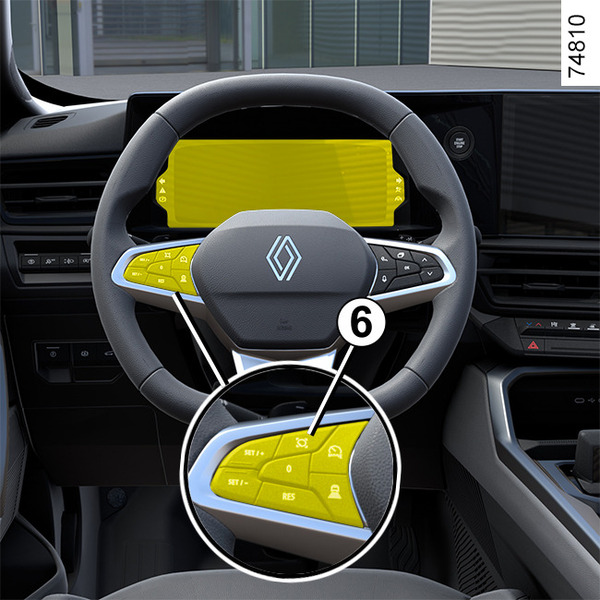
To adapt the speed limiter or adaptive Stop and Go cruise control to the detected speed limit, press switch 6.
Temporary unavailability
If the system is not available for reasons related to camera or map data, the symbol
 or, depending on the vehicle, the yellow symbol
 is displayed on the instrument panel. If there is still a problem, contact an authorised dealer.
The system cannot detect the speed limit when:
- the windscreen is not clean;
- the camera is dazzled by the sun;
- visibility is insufficient (fog, etc.);
- the signs are not legible (snow, etc.) or are hidden (by another vehicle or by trees);
- map information is not up to date.
Note: When the front camera is obscured, the message "Front camera no visibility" is displayed on the instrument panel. Clean the windscreen area in front of the camera.
Operating faults
When the system detects a fault in operation, the
or, depending on the vehicle, the yellow
is displayed on the instrument panel.
In some cases, this is accompanied by the following message:
- « Driving assist unavailable » ;
or
- « Check Front camera » ;
or
- « Check Driving assist ».
consult an approved dealer.
Warnings
warning
This function is an additional driving aid. The driver should always be in control of the vehicle, with this system not being a replacement for due care and attention in any way.
The driver should always drive at a speed appropriate to the driving conditions and traffic rules, irrespective of the system warnings.
The system may not detect all speed limit signs or may misinterpret them.
The driver should not ignore road signs not detected by the system and should prioritise compliance with road signs and traffic rules.
In the event of poor visibility (fog, snow, ice, etc.), the system may not indicate the correct speed to the driver.