Renault Boreal
Using information from a radar and a camera, the adaptive cruise control function Stop and Go gives you the option to maintain a selected speed, known as the cruising speed, while maintaining a safe distance from the vehicle in front in the same lane.
Depending on the vehicle, when the "Sign Detection" function is enabled Signage detection, the system can adapt the vehicle's speed according to the speed limit signs recognised by the camera. For this, it is necessary for the driver to take action by pressing the "contextual" button

If the vehicle in front stops, adaptive cruise control Stop and Go can bring your vehicle to a complete stop before setting off again.
The system controls the acceleration and deceleration of your vehicle using the engine and braking system.
The maximum range of the system is approximately 130 metres. This varies depending on the road conditions (terrain, weather conditions, etc.)
The adaptive cruise control Stop and Go function can be activated from 0 km/h.
The function is indicated by the
 symbol.
Note:
- The driver must abide by the speed limits and safe distances in accordance with the law in the country where they are driving;
- The adaptive cruise control Stop and Go can brake the vehicle to up to one-third of the braking capacity. Depending on the situation, the driver may need to brake more intensely.
tip
The adaptive cruise control function Stop and Go does not trigger an emergency stop and its braking capability is limited.
warning
This function is an additional driving aid.
Under no circumstances can it substitute the driver's responsibility to respect speed limits and safety distances.
The driver must keep control of the vehicle at all times.
The driver must always adapt their speed according to the environment and traffic conditions.
Use adaptive cruise control outside urban areas, on wide roads with visible lines.
The cruise control may have limited effect on winding or slippery roads (ice, aquaplaning, gravel) or in adverse weather conditions (fog, rain, crosswinds, etc.).
There is a risk of accidents.
Camera location 1

Make sure that the windscreen is not obscured (by dirt, mud, snow, condensation, etc.).
Location of the radar 2
Check that the radar area is not obstructed (by dirt. mud, snow, a poorly fitted/installed front number plate, etc.), impacted, modified (including paintwork, etc.) or concealed by any accessory fitted to the front of the vehicle (on the grille, logo, etc.)
Controls

- 3
Switch to select/deselect driving aids, depending on the vehicle:
- speed limiter
- Adaptive cruise control;
- Active driver assist;
- OFF.
- 4
Adjusting the guiding distance.
- 5
Recover the stored cruising speed (RES).
- 6
Enable and decrease the cruising speed (SET/˗) or store the current speed.
- 7
Enable and decrease the cruising speed (SET/+) or store the current speed.
- 8
Put the function on standby (and store the cruising speed) (0).
- 9
Contextual menu button (depending on the vehicle): adapts the reference speed to the detected speed limits
.
tip
Depending on the vehicle, you can link the cruise control function to the "Traffic Sign Detection" function by pressing button 9.
warning
The radar and camera zones must remain clean and free from alteration to ensure the proper functioning of the system.
Displays

- 10.
Adaptive cruise control warning light.
- 11.
Stored cruising speed.
- 12.
Vehicle ahead.
- 13.
Stored safe distance
warning
Important: you must keep your feet near the pedals at all times to be prepared for any event.
Switching on
Press switch 3 as many times as necessary to select adaptive cruise control Stop and Go.
The indicator light 10
goes on in grey and the message "Adaptive Cruise Ctl selected" is displayed on the instrument panel accompanied by dashes to indicate that the function is enabled and waiting for a cruising speed to be stored.
This function cannot be enabled when:
- the handbrake is applied;
the driver's seat belt is not fastened;
one or more doors are not properly closed;
the "Hands-free parking" function is already activated.
The "Adaptive Cruise Ctl unavailable" message is displayed on the instrument panel.
Activating cruise control
When the vehicle is stationary or moving at a constant speed, press the switch 7 (SET/+) or 6 (SET/˗) to enable the function and store the current speed.
The minimum cruising speed is 20 km/h.
The cruising speed 11 replaces the dashes and the cruise control is confirmed by the appearance of the cruising speed in green and the 10
warning light.
If you try to enable the function above the vehicle's maximum speed, the message "Invalid Speed" will be displayed and the function will remain disabled.
Once a cruising speed is memorised and the cruise control function is active, you may lift your foot off the accelerator pedal.
Note: If the vehicle speed is less than about 10 mph, the function will use a default cruising speed of 10 mph. The vehicle will accelerate until it reaches the stored cruising speed.
warning
Important: you must keep your feet near the pedals at all times to be prepared for any event.
Activating cruise control with speed limit sign recognition

If the vehicle is equipped with the "Traffic Sign Detection" Signage detection function, press switch 9 to adapt the vehicle's speed to the speed limits 14 detected by the camera.
When passing the sign, the cruising speed 11 adopts the value of the detected speed 14.
The driver must always be aware of the speed applied by the system and remains responsible for the speed of the vehicle.
Defining the cruising speed
You can vary the speed by repeatedly pressing (small increments) or holding down (large increments) switch 6 or 7:
- Switch (SET/˗) 6 to reduce the speed;
- Switch (SET/+) 7 to increase the speed.
Activation of the safe distance control
Once the cruise control is enabled, the default safe distance 13 will be displayed in green on the instrument panel.
If the system detects a vehicle in your lane, a sketch of a vehicle 12 will appear above the distance gauge 13 on the instrument panel.
Your vehicle adapts its speed to that of the vehicle in front and applies the brakes if necessary (the brake light comes on) to maintain the distance indicated on the instrument panel.
Note: The size of the sketch 13 varies according to the distance separating you from the vehicle in front. The larger the sketch, the closer you are to the vehicle in front.
Adjusting the guiding distance

You can vary the safety distance from the vehicle in front at any time by pressing switch 4 several times.
The horizontal distance gauge on the instrument panel indicates the various safe distances available:
- distance gauge A: long distance (corresponding to approximately 2.4 seconds);
- distance gauge B: intermediate distance 2 (corresponding to approximately two seconds);
- distance gauge C: intermediate distance 1 (corresponding to approximately 1.6 seconds);
- distance gauge D: short distance (corresponding to approximately 1.2 seconds).
The selected distance meter appears in green on the instrument panel.
The other meters are displayed in grey.
Note: The distance should be set according to the traffic, local legislation and weather conditions.
tip
The safe distance is set by default in the distance guide B .
Exceeding the cruising speed

The cruising speed may be exceeded at any time by pressing the accelerator pedal.
If it is exceeded, the cruising speed 11 appears in red.
The distance meter flashes if the distance between your vehicle and the vehicle in front is less than the selected safe distance: the "safe distance control" function is no longer active.
Then release the accelerator pedal: the cruise control and safe distance control will automatically resume the speed and distance instructions you selected earlier.
Overtaking manoeuvre
If you want to overtake the vehicle in front of you and your speed is above 45 mph, activating the turn signals will temporarily reduce the following distance and enable the acceleration to make it easier to overtake.
Stopping and starting the vehicle
If the vehicle in front slows down, the system will bring the vehicle to a complete stop if necessary (e.g. in heavy traffic). The vehicle stops a few metres from the vehicle in front.
When the vehicle in front leaves again:
- if the stop does not exceed approximately 30 seconds, the vehicle will automatically move without any action by the driver;
Note: The driver must always be ready for sudden incidents while driving and remains responsible for controlling the vehicle: if the system detects a pedestrian in the area around the vehicle, the automatic restart will be inhibited until the next stop;
- if the stop exceeds approximately 30 seconds, you must press the accelerator pedal or switch 5 (RES) for the vehicle to move again. The "Press RES or accelerate to restart Cruise Control" message will appear on the instrument panel to confirm this.
If the stop exceeds about three minutes, the electronic parking brake is automatically applied and the adaptive cruise control Stop and Go is disabled.
The indicator light 10
goes off to confirm that the function is disabled.
Putting the function on standby
You can put the function on standby by:
- pressing the switch 8 (0);
- pressing the brake pedal while the vehicle is moving.
The function is disabled by the system if:
- you set the automatic gearbox to P, R or N;
- the driver's seat belt is unfastened;
- you open one of the opening elements;
- you press the engine start/stop button;
- the slope is very steep;
- the vehicle speed is above 110 mphkm/h;
- Certain driving aids and correction devices are activated (active emergency braking, ABS, ESC).
In all circumstances, standby mode is confirmed when the warning lights appear in grey and the "Adaptive Cruise Control disconnected" message is displayed on the instrument panel.
warning
Putting the adaptive cruise control Stop and Go on standby or switching it off does not trigger a quick reduction in speed: if necessary, you must brake using the brake pedal.
Exit standby mode
From the stored cruising speed
If a speed is memorised, it can be recalled, once you are sure that the road conditions are suitable (traffic, road surface, weather conditions, etc.).
Press switch 5 (RES) within the valid speed range. When the stored speed is restored, activation of the cruise control is confirmed by the appearance of the cruising speed warning light in green.
Note: If the stored speed is higher than the current speed, the vehicle will accelerate until this speed is reached.
From the current speed
With the cruise control function on standby, pressing switch 6 (SET/˗) or switch 7 (SET/+) re-enables the cruise control function without taking into account the stored speed: the current speed of the vehicle is taken into account.
"Take control of the vehicle" warnings

In some situations (e.g. coming up to a much slower vehicle, vehicle in front changing lanes quickly, etc.), the system may not have time to react.
Depending on the situation, the system emits a beep combined with:
- the orange alert E if the situation requires the driver's attention;
or
- the red alert F accompanied by the "Brake" message if the situation requires the driver's immediate attention.
In all situations, react in an appropriate manner and perform the appropriate manoeuvres.
Switching off the function

The "adaptive cruise control" function Stop and Go is interrupted when you press switch 3. In this case, the speed is no longer stored.
The warning light 10
disappears from the instrument panel to confirm that the function is no longer enabled.
tip
In this case, the next time the engine is started, the "Speed Limiter" function will be enabled and waiting for a speed limit to be stored.
Temporary unavailability
Radar
The radar is capable of detecting vehicles in front of your vehicle. The system cannot operate properly if the radar detection area is obscured or if its signal is interrupted.
If the camera detection area is obstructed or the camera signal is interrupted, the "Front radar no visibility" message will be displayed on the instrument panel and the adaptive cruise control function will be interrupted. The green
warning light disappears to confirm that the function has been automatically deactivated.
Make sure the radar area is not obstructed (by dirt, mud, snow), impacted, modified (including paintwork) or hidden by any accessory installed at the front of the vehicle.
Conditions in certain geographical areas may impair the function, for example:
- arid areas, tunnels, long bridges or unused roads without lanes, without a signal, or with trees around;
- in the vicinity of a military zone or airport.
You must leave these areas in order for the function to work.
In all cases, if the message does not go out after a new engine start, contact an approved dealer.
Camera
The system will not be able to operate if the camera is obstructed (by dirt, mud, snow, condensation, etc.).
In the event of decreased camera visibility, the adaptive speed control performance will be reduced. Stay alert.
Operating Faults
If an operating fault is detected for the "adaptive cruise control" function Stop and Go, the message "Check Adaptive Cruise Control" will be displayed on the instrument panel and the "Stop and Go adaptive cruise control" function will be interrupted.
If an operational fault is detected in one or more system components, the "adaptive cruise control function" Stop and Go will be interrupted.
Depending on the type of fault, the message is displayed on the instrument panel:
- Check Front camera;
- Front camera no visibility
- Check Front camera;
- Front radar no visibility;
- Driving assist unavailable
consult an approved dealer.
System operating limits
Vehicle detection

The system only detects vehicles (cars, lorries, motorcycles) that are moving in the same direction as your vehicle.
A vehicle moving in the same lane (example G) will only be taken into account by the system once it has fully entered the camera's detection zones.
The system may activate braking abruptly or with a delay.

The system cannot detect:
- vehicles arriving at intersections: slippery road (example H);
- vehicles being driven on the wrong side of the road or reversing towards you.
tip
The automatic adaptive cruise control must only be used on motorways (or dual carriageways).
Detection on bends

On a bend or corner, the camera may be temporarily unable to detect the vehicle in front (example J)
The system may trigger an acceleration.
When you exit a bend, the system's detection of the vehicle in front may be impaired or delayed.
The system may activate braking abruptly or with a delay.
Detection of vehicles in adjacent lanes
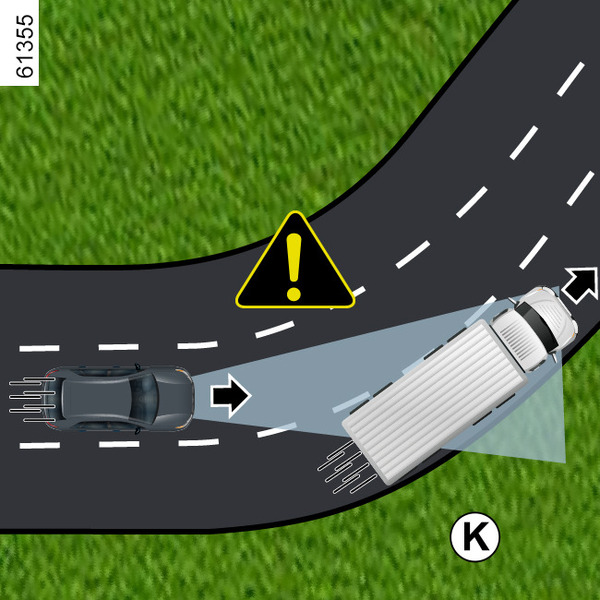
The system can detect vehicles moving in an adjacent lane when:
- you are driving on a bend (e.g. K);
- you are driving on a road with narrow lanes;
- the speed of the vehicle in the adjacent lane is slower and one of these vehicles is located very close to the lane in which the other vehicle is moving.
The system may incorrectly trigger the deceleration or braking of the vehicle.

Vehicles concealed by variations in ground relief
The system will not register vehicles moving up or down slopes when hidden by the terrain or located outside the camera detection areas.
Vehicles outside the camera detection areas
The system will react late or not at all if detected vehicles are outside the camera detection areas, especially in the following cases:

- Vehicles carrying long objects that cross the line;
- Vehicles insufficiently centred in the lane;
- Narrow vehicles that are very close together (example M).

Stationary and slow vehicles
When your vehicle speed is over approximately 30 mph, the system does not detect:
- stationary vehicles (example N);
- very slow vehicles.
When your speed is less than approximately 30 mph, the system may not react or may react too late to:
- stationary vehicles (example N);
- very slow vehicles;

- vehicles ahead 14 changing lanes or detecting a slow or stationary vehicle 15 (example P);
- stationary or slow vehicles 16, when you change lanes (example Q).

tip
Always be prepared to take control of the vehicle when faced with stationary or very slow vehicles (example N).
The adaptive cruise control function does not trigger an emergency stop and its braking capability is limited.

Non-detection of fixed obstacles and small objects
The system cannot detect:
- pedestrians, bicycles, scooters, shopping trolleys, golf carts, etc.;
- animals;
- fixed obstacles (toll barriers, walls, etc.) (example R).
These are not taken into account by the system.
They do not trigger any alerts or reactions from the system.

Detection of vehicles entering the lane at high speed
If your vehicle is overtaken by another vehicle at high speed 17 (motorcycle, car, etc.) and the vehicle is temporarily located between your vehicle and the vehicle in front 18, the system may trigger undue acceleration, deceleration or braking.
Warnings
warning
This function is an additional driving aid. Under no circumstances can it substitute the driver's responsibility to respect speed limits and safety distances.
The driver must keep control of the vehicle at all times.
The driver should always drive at a speed appropriate to the driving conditions and surroundings, irrespective of the system warnings. With the exception of lane dividing lines, the traffic indicators (traffic lights, signals, pedestrian crossings, etc.) are not recognised by the system. They do not trigger any alerts or reactions from the system.
Under no circumstances should the system be used to detect obstacles or as an anti-collision system.
The automatic adaptive cruise control must only be used on motorways (or dual carriageways).
System repairs/maintenance
- In the event of an impact, the alignment of the camera may be altered and operation may be affected accordingly. Deactivate the system and consult an approved dealer.
- Any work in the area where the camera is located (repair, replacement or modification of windscreen, etc.) must be carried out by a qualified professional.
Only an approved dealer is fully certified to carry out system maintenance.
Disabling the feature
You should deactivate the feature if:
- the vehicle is moving along a winding road.
- the vehicle is being towed (breakdown recovery);
- the vehicle is towing a trailer;
- the vehicle arrives at a toll booth, a motorway service station or a narrow road;
- the vehicle is being driven up or down a very steep slope;
- visibility is poor (strong sun, fog, etc.);
- the vehicle is being driven on slippery ground (rain, snow, gravel, etc.);
- weather conditions are bad (rain, snow, crosswinds, etc.);
- the camera area has been damaged (e.g., inside or outside the windscreen);
- the windscreen is cracked or distorted.
If you notice any abnormal behaviour, disable it and contact an authorised dealer.
warning
In the case of systemic problems
Some conditions may damage or affect the system, such as:
- the windscreen is obscured (by dirt, ice, snow, condensation, etc.);
- adverse weather conditions (snow, heavy rain, hail, black ice, etc.);
- poor visibility (night time, fog, etc.);
- insufficient contrast between the vehicle in front of it and the surrounding area (e.g. white vehicle in a snowy area, etc.);
- dazzling (bright sun, headlights of vehicles coming from the opposite direction, etc.);
- the road is narrow, winding or undulating (sharp curves, etc.);
- a slower vehicle moving at a significantly different speed;
- using floor mats that are not adapted to the vehicle. Dear driver, only use mats adapted to the vehicle, which hook onto the pre-installed elements, and regularly check their fixation. Do not lay several mats on top of each other. There is a risk of wedging the pedals
In these cases, the system may be incorrectly triggered.
Risk of unwanted braking or acceleration.
Many unforeseen situations may affect the operation of the system. Certain objects or vehicles appearing in the camera detection zone may be misinterpreted by the system, potentially leading to inappropriate acceleration or braking.
You should always be ready for sudden events that may occur while you are driving. Always keep your vehicle under control, keeping your feet close to the pedals to prepare for any event.