Music

<?xml version="1.0" standalone="yes"?>

Music

Chapter

Audio sources

<?xml version="1.0" standalone="yes"?>

Multimedia widget

The widget allows you to control multimedia functions from the home screen.

The multimedia widget lets you listen to music through a variety of apps. The widget supports the following music systems.

Chapter

Add, manage widgets

<?xml version="1.0" standalone="yes"?>

Widget and wallpaper settings

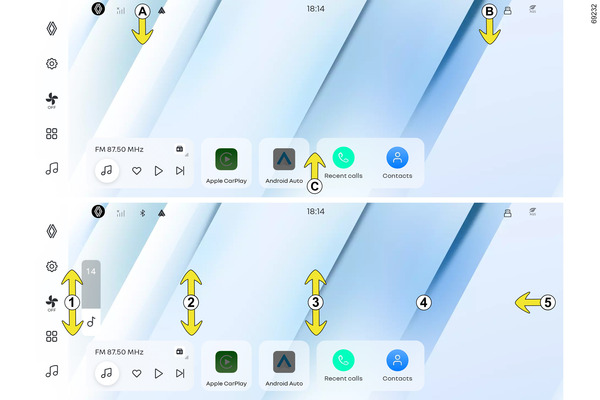
Press and hold the home screen for about 3 seconds to activate buttons A and B, allowing you to edit widgets and wallpapers.

Chapter

Switching on, off

<?xml version="1.0" standalone="yes"?>

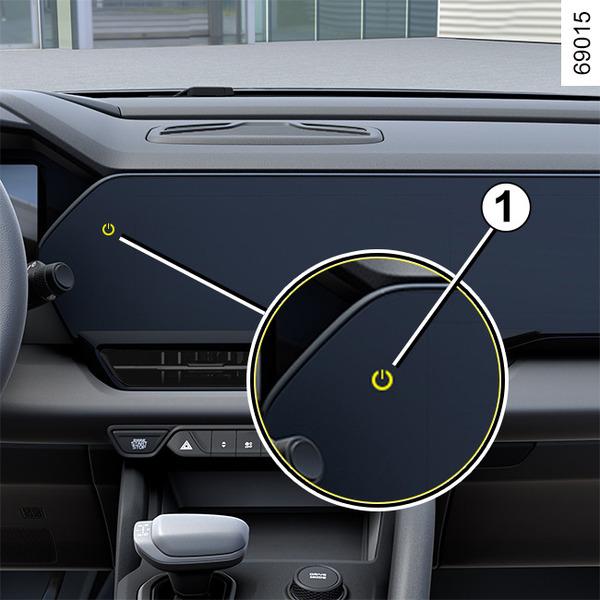
Power button 1

Turning on the multimedia system

When you press the vehicle start button, the multimedia system will automatically turn on.

Chapter

Introduction to the controls

<?xml version="1.0" standalone="yes"?>

Steering wheel controls

You can operate various functions of the multimedia system using the buttons on the right side of the steering wheel.

Chapter

General description

<?xml version="1.0" standalone="yes"?>

Central screen

This is the basic home screen of the central display. There is one home screen in the center and one in the front passenger side, and various gesture functions can be used (such as brightness adjustment, volume control, screen navigation, etc.).

Chapter