Modular roof bars <?xml version="1.0" standalone="yes"?> If the vehicle is equipped, this device allows you to position the roof bars in the longitudinal or transverse position.To place the bars in the transverse position: Chapter
Luggage compartment storage <?xml version="1.0" standalone="yes"?>Rear parcel shelf RemovalRelease the two cables 1 (on the sides of the luggage compartment door). Chapter
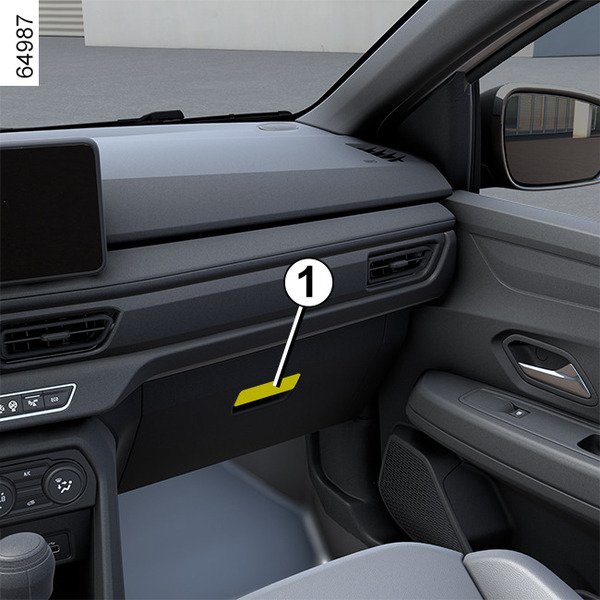
Passenger compartment storage space and fittings <?xml version="1.0" standalone="yes"?>Glove box Pull the handle 1 to open it. warningThe driver's footwell should be kept clear of all objects as under heavy braking they may slide under the pedals, preventing their use. Chapter
Accessories socket <?xml version="1.0" standalone="yes"?>Accessories socket 1 The socket is provided to connect accessories approved by our technical department.warningOnly connect accessories with a maximum power requirement of 120 Watts (12 V). Chapter
Sun visor, mirror, grab handle <?xml version="1.0" standalone="yes"?>Sun visor 1 and 2 Lower the sun visor 1 or 2 over the windscreen or unclip it and swivel it over the side window. Chapter
Interior lighting <?xml version="1.0" standalone="yes"?>Reading and courtesy lights Pressing the switch 1 will enable: Chapter
Electric windows <?xml version="1.0" standalone="yes"?>warningDriver's responsibilityNever leave a child, a dependent adult or an animal inside the vehicle with the key or the card, even for a short time.They may pose a risk to themselves or to others by starting the engine or activating equipment (such as the gear lever or electric windows). Chapter
Multimedia equipment <?xml version="1.0" standalone="yes"?> The presence and location of this equipment depends on the vehicle’s multimedia equipment.1.Multimedia screen.2. Multimedia and charging socket (C). Chapter