Renault Boreal
Depending on the vehicle, they may include:
- the ABS (anti-lock braking system);
- emergency brake assist;
- of the electronic stability programESC with understeer control and traction control;
- hill start assistance;
- deceleration speed control;
- multi-collision braking.
warning
These functions are an additional aid in the event of critical driving conditions, enabling the vehicle behaviour to be adapted to suit the driving conditions. The functions do not take the place of the driver. They do not increase the vehicle's limits and should not encourage you to drive more quickly. Therefore, they can under no circumstances replace the vigilance or responsibility of the driver when manoeuvring the vehicle (the driver must always be ready for sudden incidents which may occur when driving).
ABS (anti-lock braking system [ABS])
During heavy braking, the ABS prevents the wheels from locking, allowing the stopping distance to be managed and control to be kept of the vehicle.
Under these circumstances, the vehicle can be steered to avoid an obstacle whilst braking. In addition, this system can increase stopping distances, particularly on roads with low surface grip (wet ground etc.).
You will feel a pulsation through the brake pedal each time the system is activated. The ABS does not in any way improve the vehicle's "physical" performance relating to roadholding. It is still essential to follow the rules of good driving practice (such as driving at a safe distance from the vehicle in front etc.).
tip
In an emergency, apply firm and continuous pressure to the brake pedal. There is no need to pump it repeatedly. The ABS will modulate the force applied in the braking system.
Operating faults:
-
 and
and
 lift the instrument panel accompanied by the messages "Check ABS", "WARNING: Check Braking System" and "Check ESC": this indicates that functions ABS, ESC and Emergency Brake Assist are disabled. Braking is still provided;
 -
,
 ,
and
,
and
 are lit up on the instrument panel, accompanied by the message "WARNING: Braking System": this indicates a fault in the braking system.
In both cases, contact an authorised dealer.
warning
For your own safety, if the warning light
comes on, stop immediately, or as soon as traffic conditions allow. Switch off the engine and do not restart it. Please contact an authorised dealer.
Emergency brake assist with electronic brake distribution
(depending on the vehicle)
This system supplements the ABS and helps reduce vehicle stopping distances.
Operating principle
The system is designed to detect an emergency braking situation. In this case, brake assist immediately applies the maximum force and may regulate the ABS.
ABS braking is maintained as long as the brake pedal is applied.
warning
The braking system will only partially work. However, it is dangerous to brake suddenly and it is essential to stop immediately, as soon as traffic conditions allow. Please contact an authorised dealer.
Electronic stability control ESC with understeer control and traction control
Electronic stability control ESC
(depending on the vehicle)
This system helps you to keep control of the vehicle in critical driving conditions (avoiding an obstacle, loss of grip on a bend, etc.).
Understeer control
This system optimises the action of the ESC in the case of pronounced understeering (loss of front axle road holding).
Traction control
This system helps to limit wheelspin of the drive wheels and to control the vehicle when pulling away accelerating or decelerating.
Disabling the ESC function
(depending on the vehicle)
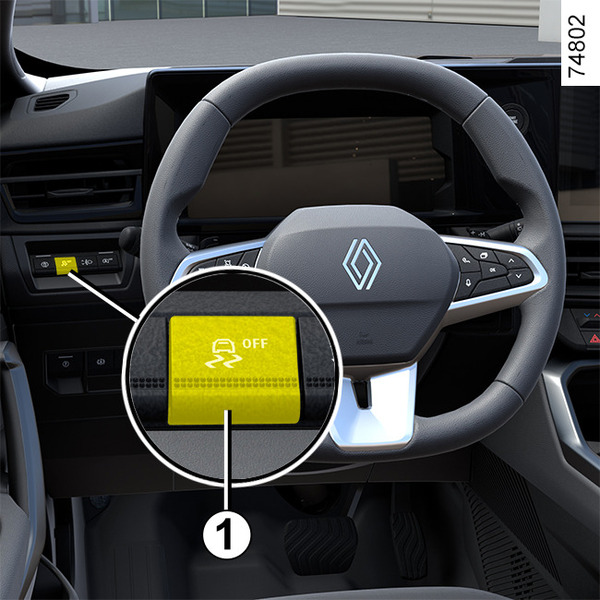 In some situations (driving on very wet ground: snow, mud, etc. or driving with snow chains fitted), the system may reduce the engine output to limit wheelspin. If this is not necessary, you can deactivate the function by holding down switch 1.
The indicator light
 on the instrument panel comes on to warn you of this. If you disable this function, the traction control system will also be disabled.
As the electronic stability program ESC with understeer control and traction control provides additional safety, you are advised not to drive with the function turned off. Get out of this situation as soon as possible by pressing switch 1 again.
Note: this feature is automatically reactivated when the ignition is switched on or when the vehicle speed exceeds approximately 31 mph (50 km/h).
Operating principle
A sensor in the steering wheel detects the direction selected by the driver.
Other sensors throughout the vehicle measure the actual direction.
The system compares the input from the driver on the actual direction of the vehicle and corrects the direction by controlling the brakes on some of the wheels or the engine output. If the system is active, the indicator light
 will flash on the instrument panel.
Operating faults
If the system detects a system failure, warning lights
and
light up on the instrument panel and, depending on the vehicle, the message "Check ESC" is displayed on the instrument panel. In this case, the Electronic Stability Program ESC, with understeer control and traction control, is disabled.
Please consult an authorised dealer if these warning lights remain displayed on the instrument panel after the ignition is switched off and on again.
Deactivating the traction control system
(depending on the vehicle)
Disabling the use of button 1
In some situations (driving on very wet ground: snow, mud, sand, etc. or driving with snow chains fitted), the system may reduce the engine output to limit wheelspin. If this is not necessary, you can deactivate the function by holding down switch 1.
In this case, the indicator light
appears on the instrument panel, accompanied by the message "Traction control off".
The traction control system provides additional safety. Driving while this function is deactivated is not recommended. Get out of this situation as soon as possible by pressing switch 1 again.
Note: this feature is automatically reactivated when the ignition is switched on or when the vehicle speed exceeds approximately 31 mph (50 km/h).
Disabling from the multimedia screen 2
 Depending on the vehicle, although the ignition is logged, you can disable the system via the multimedia screen 2.
See the multimedia instructions for more information.
Hill start assistance
Depending on the gradient of the incline, this system assists the driver when starting on a hill. It prevents the vehicle from rolling backwards by automatically applying the brakes when the driver lifts his/her foot off the brake pedal to depress the accelerator pedal.
System operation
It only operates when the gear lever is in a position other than neutral (other than N or P on an automatic gearbox) and the vehicle is completely stationary (brake pedal pressed).
The system holds the vehicle for approximately 2 seconds. The brakes are then released (the vehicle will move according to the slope).
If the system detects an operating fault, the
warning light and, depending on the vehicle, the "Check Hill Start Assist" message is displayed on the instrument panel. Consult an approved Dealer.
warning
The hill start assistance system cannot completely prevent the vehicle from rolling backwards in all situations (extremely steep gradients etc.).
In all cases, the driver may depress the brake pedal to prevent the vehicle from rolling backwards.
The Hill Start Assist function should not be used for prolonged stops: use the brake pedal.
This function is not designed to immobilise the vehicle permanently.
If necessary, use the brake pedal to stop the vehicle.
The driver must remain particularly vigilant when driving on slippery or low-grip surfaces.
Risk of serious injury.
Multi-collision braking
Multi-collision braking reduces the risk of an additional collision after an accident by temporarily bringing your vehicle to a standstill.
Operating principle
If the airbag system detects a collision, the pretensioners or the airbags are triggered Methods of restraint in addition to the front seat belts and the "Multi-collision braking" function activates the Electronic Stability Control (ESC) to brake the vehicle.
Multi-collision braking is deactivated during operation if:
- the driver presses the accelerator pedal firmly;
and/or
- the braking force generated by the driver pressing the brake pedal is greater than the force produced by the automatic braking triggered by the function.
Note: multi-collision braking requires the proper functioning of your vehicle's braking system.
Operating faults
When the system detects an operating fault, the "Check Post-collision" message and the
warning light appear on the instrument panel.
In this case, the function is deactivated. Consult an approved Dealer.