Renault Koleos
The "Active driver assist" system is a driving aid for use outside urban areas, on wide roads with visible lines.
This system consists of the "Intelligent adaptive cruise control" functionIntelligent adaptive cruise control and the "Lane Centring" function, and can operate simultaneously at speeds ranging from 0 to 150 km/h.
This system enables the driver to:
- maintain vehicle speed based on a previously stored speed;
- adjust the distance between their vehicle and the vehicle in front;
- direct the trajectory of the vehicle in the lane.
When this feature is activated, turning on the turn signal will activate the automatic lane change assist function. Additionally, when your hands are no longer detected on the steering wheel, a 'Keep hands on steering wheel' warning will be triggered.


Active driver assist uses the front camera 1, front radar 2, and side radar 3.
When you power on your vehicle, active driver assist begins a self-check, and no system features are available at this stage.
Make sure the front camera and front/side radar areas are clear. Environmental conditions, such as dirty front camera and front/side radar areas or rain, can affect the performance of the system. In the event of an operational abnormality, a related message may appear on the instrument panel.
warning
Make sure the front camera and front radar are clean. The radar and camera zones must be kept clean and free of any tampering in order to ensure the proper operation of the system. Dirty front camera and front radar, as well as environmental conditions such as rain and dim lanes, can affect the performance of active driver assist.
warning
The "Active driver assist" is an additional driving aid. It can under no circumstances replace the driver's responsibility to respect speed limits and safe distances and to be vigilant. The driver must always hold the steering wheel with both hands to control the vehicle.
This feature is only suitable for use on highways or roads with limited access, and requires the driver to remain focused on driving.
When using active driver assist, keep your hands on the steering wheel and pay attention to the road and surrounding traffic. Do not use this feature on city streets, construction zones, or roads with cyclists or pedestrians. Do not rely on active driver assist to determine an appropriate driving route. Always be prepared to take immediate action. Failure to follow these instructions can result in property damage, serious injury, or death.
Active driver assist is a convenience system, not an emergency warning and collision avoidance system. Drivers must drive according to the law.
Active driver assist does not operate against vehicles or objects crossing the driveway.
Changes in vehicle attitude due to excessive loads can reduce the functionality of the system or render it inoperable.
If another vehicle crosses into the lane in front of your vehicle at a low speed, it may be too late for the system to respond. The driver must apply the brakes in time.
When accelerating suddenly and approaching a vehicle in front of you at high speed (a clear speed difference with the vehicle in front of you), the driver must brake in time.
The driver must adjust the following distance according to the flow of traffic ahead, weather conditions (rain, snow, etc.), and set the system appropriately. To ensure safety, the driver must be in active control of the vehicle at all times.
It is the driver's responsibility to maintain a distance from the vehicle ahead.
When driving on a steep downhill grade, it may be difficult to maintain the proper distance from the vehicle in front of you. You should be especially careful in these situations and be prepared to apply the brakes at any time. Do not use the system under heavy loads or severe conditions.
The active driver assist system may not be able to recognize pedestrians, tricycles, irregularly shaped loads, or deformed vehicles.
When driving with the active driver assist system active, it cannot recognize stationary, slow, and oncoming vehicles. In these cases, the driver must react appropriately and Emergency Brake Assist may be activated.
If active driver assist is activated when the vehicle is stationary, the system can recognize stationary obstacles ahead and hold the vehicle stationary to ensure a safe departure. Obstacles include, but are not limited to, speed bumps, trees, people, railings, etc.
If the driver presses the accelerator pedal when the system is engaged, the driver takes control of the vehicle and the system's speed control is disabled.
Target selection may be delayed or interrupted when entering or exiting curves. The system may brake unexpectedly or brake late.
In some cases (such as when the speed of the vehicle in front of you is too slow compared to your vehicle, or when the vehicle in front of you is close to your lane), the system does not have enough time to reduce its relative speed. In these cases, you must react appropriately.
If the vehicle in front of you suddenly brakes, the system may not react in a timely manner or may react too slowly. In this case, the driver may lose control of the vehicle and may need Emergency Brake Assist.
When making sharp turns, for example on winding roads, the system may not be able to properly detect the vehicle in front of you due to the limitations of the front radar's field of view, causing the vehicle to accelerate. The driver must react appropriately based on the actual situation.
If the distance between the driving vehicle and the adjacent lane is too small or the vehicle in the adjacent lane is too close to the driving vehicle's lane, the system may react and apply the brakes.
If a vehicle in the adjacent lane jumps into the path of the driving vehicle, detection can be affected or delayed in some environments, such as low reflectivity of targets (pedestrians, two-wheelers, tricycles), electromagnetic interference, etc. The system may not be able to identify the target or accurately calculate the distance to the vehicle in front of it. In these situations, the system becomes unresponsive or experiences brake delays. The driver must actively control the vehicle.
The view of the front camera, front radar, and rear radar must not be blocked by contaminants, especially if they are completely covered by snow. The system shuts down, and shutdown information is displayed to the driver on the instrument panel.
The installation of the front camera, front radar, and rear radar may be affected by vibration or shock, which can degrade system performance. If this occurs, the front camera, front radar, and rear radar must be recalibrated.
Drivers should be especially careful in the following situations
- The driver must ensure that the area ahead is clear before activating the active driver assist system. If the active driver assist system is activated (ON) and then departs, it may not be able to detect and identify pedestrians, children, animals, two-wheelers, tricycles, or obstacles in front of the vehicle, increasing the risk of a serious collision.
- If your vehicle is moving at a high speed, the active driver assist system automatically accelerates your vehicle and shortens the distance to the vehicle in front of you when the left turn signal illuminates when passing on the left. If your vehicle enters the passing lane and there is no vehicle in front of you, the system accelerates to the set cruise control speed.
The system cannot detect loaded items or mounted accessories protruding from the sides, rear, or roof of the target vehicle. The system should be turned off when the vehicle in front of you is carrying any of the special loads mentioned above or when overtaking such vehicles.
- Road construction rails or metal objects can interfere with the forward radar and cause malfunctions.
- Towing a trailer reduces the dynamics of the active driver assist system.
- For your safety, do not use the system in poor visibility, on slopes, curves, or on slippery roads (such as snow, ice, moisture, or waterlogged areas).
- If the vehicle continues to move after the system asks the driver to take control of the vehicle, the driver must press the brake pedal.
- If the instrument panel prompts the driver to take control of the vehicle, the driver must immediately adjust the distance to the vehicle in front of them.
- The driver must always be ready to take control of the vehicle by accelerating or braking.
- The front radar is mounted under the front bumper. If the front radar is covered with dirt and the system is unable to operate, a message displays on the instrument panel. Clean it in time or have it checked by an authorized workshop.
- Make sure that objects such as license plates do not obstruct the front radar in front of and around it, otherwise the system may be affected.
- For vehicles that have been structurally modified, lowering the chassis height or changing the front license plate mounting board may affect the system.
- If the front camera is impaired, the system may be affected and unavailable in low light, directly under strong light, obstructed by objects, or in conditions where the light changes frequently.
In the following road conditions, active driver assist's steering assistance may be degraded or may not work. Drivers should pay attention to the following
- The active driver assist system cannot be applied to curves with excessively small curve radii.
- The active driver assist system is not applicable on roads where lanes are not visible.
- The active driver assist system does not apply at intersections.
- The active driver assist system cannot be applied on roads with vehicle markings (e.g., tyre tracks).
- The active driver assist system does not apply on roads with an increasing or decreasing number of lanes.
- The active driver assist system does not apply on roads where the difference between the original lane and the new lane is large.
- The active driver assist system can recognize road edges (walls, guardrails, curbs, greenbelts, asphalt joints) as working lanes.
- The active driver assist system is not applicable to pavement with potholes, irregularities, or undulations.
- The active driver assist system does not recognize road markings (such as traffic safety cones) and cannot be applied in construction pavement areas.
- The active driver assist system cannot be applied to very wide or very narrow roads.
- The active driver assist system does not work on zigzagging roads.
- The active driver assist system is not applicable in inclement weather and reduced visibility conditions.
When the active driver assist system follows the vehicle in front of you through an intersection, the vehicle moves sideways with the vehicle in front of you. The driver must supervise and control the feature due to the risk of side collisions with oncoming traffic.
At freeway or arterial entrances, road changes may prevent the active driver assist system from changing lanes and reduce its functionality.
The active driver assist system cannot operate in complex road conditions (e.g., heavily congested roads, complex traffic changes, intersections, ramps, roads with reduced lanes, etc. The active driver assist system provides a comfortable experience only in suitable road conditions. The driver must assume full responsibility for safe driving.
The front camera is mounted behind the windshield of your vehicle. Make sure that the view of the front camera is not obstructed by contaminants or interfered with by strong light. Otherwise, the system may not function. A message is displayed on the instrument panel to remind the driver to wipe the area in front of the front camera windshield or to avoid dark environments and direct sunlight. The loss of functionality of the front camera is a general protection and reminder in certain situations. Drivers can avoid dark environments and direct sunlight without obstructing the view of the front camera.
The driving assistance system takes control of the brakes when necessary, which may result in an audible brake application.
■ Activating the function

On the instrument panel, press menu button 6 or 9 on the left side of the steering wheel
to select active driver assist. After selection, the system turns on and then goes into
standby, and the active driver assist indicator lights up white.

■ Controls
The system control buttons are located on the left side of the steering wheel.
- 4
- Intelligent driving buttons: Activate and reactivate the system.
- 5
- Time gap setting button
- 6, 9
- Switch to toggle the driving aids.
- 7
Speed adjustment and confirmation buttons:
Swipe the button up briefly to increase the speed in 1 km/h increments, and hold to increase the speed in 5 km/h increments.
Shortly push the button down to decrease the speed by 1 km/h, long press to decrease the speed by 5 km/h.
Press the button to activate the active driver assist feature.
- 8
CNCL button: Cancels operation of the system.
To activate the active driver assist system, the following conditions must be met.
- The active driver assist system is active.
- The gear lever is in position D.
- The engine is running.
- All doors, tailgate, and bonnet are closed.
- The vehicle is in motion and the brake pedal is not depressed.
- The brake discs are intact.
- The front camera and front radar are not hot, dirty, or malfunctioning.
- Electronic stability control (ESC) is activated.
- The electronic parking brake is released.
- The driver is wearing a seat belt.
- The driving modes are matched.
■ Activating the function and setting speeds
When your vehicle is stationary, activate features and set speeds as follows.
- Select and activate the active driver assist system. The active driver assist system indicator light on the instrument panel illuminates white.
- Press the brake pedal or activate the auto hold feature.
- Press the intelligent drive button 4 or the speed adjust & confirm button 7 to activate the active driver assist system. The active driver assist system indicator on the instrument panel lights green. The set speed is 30 km/h.
- If the brake pedal is released, the system can keep the vehicle stationary.
- The driver must press the intelligent drive button 4 or press the accelerator pedal to allow the active driver assist system to control the vehicle's startup.
- The active driver assist system controls the vehicle based on the set cruise control speed.
Activate and set the vehicle speed when the vehicle is in motion as follows.
- Select and activate active driver assist. The active driver assist indicator on the instrument panel lights up white.
- Press the intelligent drive button 4 or the speed adjust & confirm button 7 to activate the active driver assist system.
- The active driver assist indicator on the instrument panel lights green. If your vehicle speed is less than 30 km/h, the set speed is 30 km/h. If the vehicle speed is greater than 30 km/h, the set speed is the current vehicle speed.
- The active driver assist system controls the vehicle based on the set speed.
The maximum set speed is 150 km/h. The driver is responsible for driving at a safe speed based on road conditions and speed limits.
Press the speed adjust and confirm button 7 to set the desired speed.
When the speed of the vehicle in front of you changes during system operation, the instrument panel displays the distance status from the vehicle in front of you in varying degrees.
The instrument panel displays the distance to the vehicle ahead in real time, and the image of the vehicle ahead changes size based on the distance. When the active driver assist system detects a vehicle in front of you, the image of the vehicle in the instrument panel appears blue in color. If the distance to the vehicle ahead is too close, the image of the vehicle ahead changes to yellow. If you press the accelerator pedal to take control of the vehicle yourself, the image of the vehicle ahead is gray. If the system fails, the image of the vehicle ahead is not displayed.
If the active driver assist system is disabled, the set speed is displayed in white.
When the active driver assist system is active, the set speed is colored green.
Also, if intelligent adaptive cruise control or active driver assist is not active, the set speed is not displayed after the first function selection after pressing the menu button on the left side of the steering wheel.
If the active safety interface is blocked by another interface, a small interface appears that displays feature information.
If the active driver assist system is not active and there is no vehicle in front of you, the instrument panel does not display the vehicle in front of you. When a vehicle appears, it is grayed out in the instrument panel.
If the active driver assist system is active and there is no vehicle in front of you, the instrument panel does not display the vehicle in front of you. When a vehicle appears, the instrument panel displays blue, yellow if you are close to the vehicle in front of you, or red if the distance is too close and requires direct driver control.
The following distance is the interval time distance set by the driver.
■ Setting a safe following distance
It is the driver's responsibility to set a safe following time distance.
The driver can adjust the following time distance for active driver assist based on the current road conditions. The following time distance is the time it takes for your vehicle to travel to the current location of the vehicle in front of you at your current speed. It is calculated by dividing the following distance by the vehicle speed.
The driver can decrease/increase the time distance to the vehicle in front by pressing the adjustment button 5. The inter-car time distance consists of three components: near, medium, and far. Each time the vehicle is started, the Intelligent adaptive cruise control system defaults to the far time distance.
The setting for the interval time distance is displayed on the instrument panel.
- if the time distance between vehicles is Far
- If the time distance between vehicles is medium
- If the time distance between vehicles is short
■ The head-up display shows the time distance between vehicles.
When active driver assist detects a vehicle in front of you, an image of the vehicle is shown on the heads-up display.
The number of bars indicates the time distance to the vehicle in front of you.
active driver assist system indicators and the set speed are displayed.
In all cases, the driver must maintain a sufficient stopping distance from the vehicle ahead and be aware of traffic laws regarding minimum distances or shortest times. It is the driver's responsibility to comply with the law.
■ Lane offset assistance
For vehicles with Lane offset assistance, if you are attempting to overtake (or be overtaken by) a truck, trailer, or other large vehicle in front of you with active driver assist enabled, the system controls your vehicle to depart the lane in the opposite direction of the truck's position for a certain distance, i.e., to actively maintain a distance from the large vehicle, and after overtaking (or being overtaken) for a certain distance, the system controls the vehicle back to the center of the lane without any driver intervention.
This feature can only be automatically activated when the vehicle speed is 50 km/h or higher, and requires the driver to keep their hands on the steering wheel and concentrate on driving.
Note: you must keep your hands on the steering wheel when using the "Lane Centring" function. Under no circumstances should you take your hands off the steering wheel.
■ Alarm dismissal
You must keep your hands on the steering wheel even when active driver assist is active. If your hands are not detected on the steering wheel for a period of time, a warning message appears on the instrument panel.
active driver assist detects the driver's hands by identifying the slight resistance that occurs when turning the steering wheel or the resistance that occurs when the driver turns the steering wheel slightly.
When active driver assist detects steering wheel manipulation (resistance), the instrument panel message disappears and active driver assist continues to operate.
If active driver assist does not detect steering wheel manipulation (resistance), the message changes and continues to be displayed and an audible alert sounds.
If you still ignore the active driver assist warning and no steering wheel movement (resistance) is detected, active driver assist automatically shuts down after the beep.
If steering wheel manipulation (resistance) is detected during the chime, the warning message disappears and active driver assist continues to operate.
An announcement tone sounds when active driver assist is terminated.
■ Deactivating the function
You can deactivate the system in one of the following ways.
- Press the brake pedal.
- Press CNCL button 8.
active driver assist depends on the operation of other systems, such as Electronic Stability Control (ESC). If any of these systems stop working, the system automatically deactivates.
In the event of automatic deactivation, an audible alarm sounds and a message displays on the instrument panel. The driver must intervene to maintain the speed and distance of the vehicle in front.
Examples of situations in which the system may be deactivated (including but not limited to):
- A door, bonnet, or tailgate is open.
- The driver's seat belt is unbuckled.
- A wheel loses road traction.
- The brake system is degraded or has an anomaly.
- The parking brake is applied.
- The front radar and front camera are obscured by snow or heavy rain.
■ Display in active driver assist

- A
Vehicle in front: gray if the system is not active, blue if the system is active, and yellow if the system is active and too close to the driving vehicle.
- B, C
Vehicle ahead: gray if the system is not active, white if the system is active, and not shown if the system fails.
- D
Stored cruising speed: The set speed is gray when the system is not active, white when the system is active, if Intelligent adaptive cruise control or active driver assist is not active, the set speed is not displayed after the first function selection after pressing the menu button on the left side of the steering wheel.
- E
active driver assist indicator: white when the system is not active, green when the system is performing both cruise control and lane departure assist, yellow-green when the system is performing cruise control only, gray when the system fails.
- F
Lane shading: Low shading when the system is not active, then high shading when the system is active.
- G
Lane: No lane is shown if the system does not detect a lane. If the Lane Keeping Assist system is not active, the lane is grayed out. If Lane Assist is intervened by steering wheel control, the lane is colored blue. If Lane Departure Assist sounds an alarm, the lane is colored red.
The curvature of a lane can be detected inaccurately due to limited sensor performance. For example, a straight road may appear as a curved road.
When you power on your vehicle, active driver assist begins a self-check, and system features are not available during this phase.
■ System limitations
The front camera, front radar, and rear radar have a limited detection range. In some cases, they may not detect a vehicle or detection of a vehicle may be delayed.
Poor detection can occur in the following situations.
- A vehicle is moving slowly along the driver's lane. The system can only detect vehicles that are fully in the driver's lane.
- If the vehicle in front of you is a large truck, there may be a delay in detecting the vehicle.
- In some driving conditions (roundabout, intersection, the bend is too sharp, etc.).
In these situations, drivers should use caution. Take emergency action and temporarily disable the system if necessary.
The detection performance of the front camera may be limited.
In some cases, the front camera may not be able to accurately determine lanes and is susceptible to interference from the surrounding environment.
You may experience issues with lane detection in the following situations.
- If the lane is not up to standard, it cannot be recognized.
- The lane is unrecognizable due to low clarity and contrast.
- The lane surface is covered with dirt, water, snow, etc. and cannot be recognized.
- On rainy or snowy days, wheel marks and braking marks from the vehicle in front of you can be recognized as lanes.
- Road borders, curbs, etc. can be recognized as lanes.
- Continuous lane-like shadows, such as the shadow of a guardrail on the road, may be recognized as lanes.
■ Automatic lane change assist
▶ Enabling and disabling features
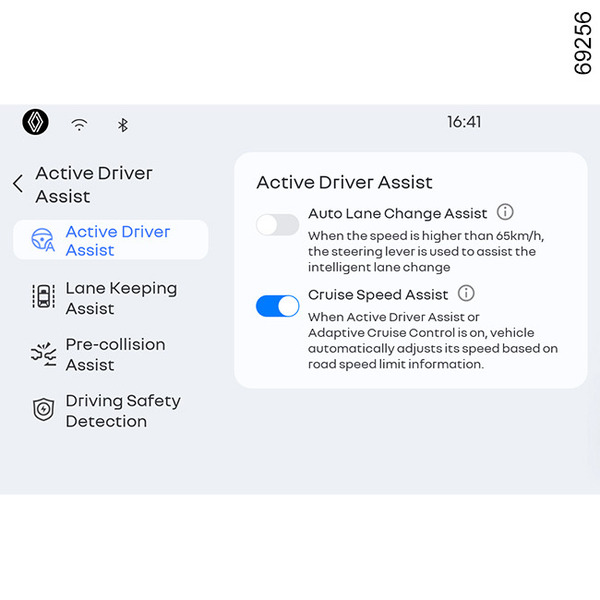
From the left menu of the center screen, select [My apps]
 -[Smart Pilot]-[Active driver
assist] in order, and then enable or disable [Auto lane change assist] from the [Active
driver assist] item.
-[Smart Pilot]-[Active driver
assist] in order, and then enable or disable [Auto lane change assist] from the [Active
driver assist] item.
▶ Operating method and conditions

When you enter a freeway or urban expressway with the system activated and the instrument panel displays a green H in the lane to the left or right of your vehicle, the system has determined that you can change lanes in the desired direction. If you confirm that there are no vehicles in the adjacent lane to the left or right of the lane you want to change to and you believe you can safely change lanes, do one of the following
- Move the turn signal you want to change lanes with from the OFF position to the ON position and change it back to the OFF position within approximately 1.5 seconds.
- Activate the turn signal in the direction you want to change lanes with a one-touch triple turn signal. Audible and visual signals
The turn signal flashes in the direction you want to change lanes and the system automatically stops flashing the turn signal when the lane change is complete.
warning
Even if you initiate an automatic lane change by engaging your turn signal according to the instructions, if the system determines that the lane change cannot be performed safely, or if you intervene, it aborts the lane change attempt and returns you to your original lane.
This can only work if the travel lane is a white dashed line, otherwise (solid white line, etc.) the system cannot operate.
You should always be alert, as unexpected events or errors in the system can disengage the system during a lane change.
warning
Use automatic lane change assist only when driving on the mainline of a freeway or urban expressway. In other cases, it may not function properly and there is a risk of an accident. Accidents and damages caused by incorrect use of this function are not warranted.
warning
The "Active driver assist" is an additional driving aid and cannot replace the driver.
Drivers are responsible for adhering to speed limits and paying attention while driving. The driver must always adapt their speed to the highway code and traffic conditions, regardless of system indications, and must not drive relying on this feature under any circumstances. You must always be ready to apply the brakes.
The driver must always adapt their trajectory and speed according to the surroundings and driving conditions, regardless of system indications.
This system is system is a driving aid for use outside urban areas, on wide roads with visible lines, and is available while intelligent adaptive cruise control is engaged, specifically for highways or multi-lane roads with separated lanes on both sides.
It must not be used in heavy traffic, on winding or slippery roads (black ice, aquaplaning, gravel) or during bad weather (fog, rain, side winds etc.).
There is a risk of accidents.
Depending on road conditions and the surrounding environment, the system may disengage, fail to operate, or operate unnecessarily, so you should keep your feet near the pedals and your hands on the steering wheel at all times to be prepared for any eventuality.
Warnings may not function properly if objects are attached to the steering wheel.
warning
The "Active driver assist" is an additional driving aid. It can under no circumstances replace the driver's responsibility to respect speed limits and safe distances and to be vigilant. you should keep your feet near the pedals and your hands on the steering wheel at all times to prepare for any event.
The driver must always adapt their trajectory and speed according to the surroundings and driving conditions, regardless of system indications.
Except for lines delimiting lanes and the speed limit signs within the limits of the system's detection capacity, the road sign information (other traffic signs, traffic lights, pedestrian crossings, etc.) are not recognised by the system. These do not trigger any alert or reaction by the system.
The "Active driver assist" uses the "Intelligent adaptive cruise control" and "Lane centring" functions. The system should under no circumstances be taken to be an obstacle detector or an anti-collision system.
Use the "Active driver assist" only outside built-up areas, on wide roads with visible lines.
There is a risk of accidents.
System servicing/repairs
- In the event of an impact, the radar and/or camera alignment may be changed and its operation may consequently be affected. Deactivate the system and consult an authorised dealer.
- Any work in the proximity of the radar and/or camera (replacements, repairs, windscreen modifications, paintwork etc.) must be carried out by a qualified professional.
Only an approved dealer is qualified to service the system.
Deactivating the system
You must deactivate the system if:
- In high winds;
- the vehicle is being towed (breakdowns);
- When the spare tyre is mounted;
- the vehicle is towing a trailer or a caravan;
- the vehicle is being driven in a tunnel or close to a metallic structure;
- the vehicle arrives at a toll point, a roadwork area or on a narrow lane;
- the vehicle is being driven up or down a very steep slope;
- the visibility is poor (glaring sun, fog, etc.);
- the weather conditions are poor (rain, snow, side winds, etc.);
- the vehicle is being driven on a slippery road surface (rain, snow, gravel, etc.);
- the camera area has been damaged (e.g. interior or exterior windscreen area); the windscreen is cracked or distorted;
- the radar area has been damaged (impacts, etc.);
- the surface of the steering wheel is damaged or damp.
In the event of the system behaving abnormally, deactivate it and contact an authorised dealer.
Some conditions can disrupt or damage the system operation, for example:
- obstruction of the windscreen or the radar area (by dirt, ice, snow, condensation etc.) Frequently check the cleanliness and condition of the windscreen, front wiper blades and front bumper;
- a complex environment (tunnel, etc.);
- poor weather conditions (snow, heavy rain, hail, black ice, etc.);
- poor visibility (night, fog, etc.);
- poor contrast between the vehicle preceding it and the surrounding area (e.g. white vehicle in a snowy area, etc.);
- being dazzled (glaring sun, lights of vehicles travelling in the opposite direction; etc.);
- narrow, winding or undulating road (tight bends, etc.);
- the tar lines detected as a line by the system;
- narrowing/widening lanes;
- road markings which are worn, lacking in contrast or very widely spaced from one another (lines partially erased; etc.);
- multiple markings on the road (roadworks area, slip roads connecting to adjacent motorways, hard shoulder, etc.);
- a vehicle with a significant difference in speed;
- use of mats not adapted to the vehicle. On the driver's side, only use mats suitable for the vehicle, attached with the prefitted components, and check the fitting regularly. Do not lay one mat on top of another. There is a risk of wedging the pedals.
In these cases:
- Risk of unwanted braking or acceleration.
- Risk of unwanted, incorrect correction or no correction of trajectory.
Many unforeseen situations may affect the system operation. Certain objects or vehicles that can appear in the camera or radar detection zone may be interpreted by the system incorrectly, possibly leading to inappropriate acceleration or braking.
You should always be attentive to sudden events that might occur while you are driving. Always maintain your vehicle under control by keeping your feet near the pedals and your hands on the steering wheel, so that you are ready to act in any event.