Renault Koleos
The speed limiter function controls the engine and braking system to help you not to exceed a driving speed that you have chosen, known as the limit speed.
After use, be sure to turn off the feature to prevent unintentional speed adjustments.
- While the vehicle is equipped with a speed limiter system, the driver must adjust the speed according to the situation. Avoid pressing the accelerator pedal too deeply if it is not necessary.
- Using the speed limiter system in adverse weather conditions is very dangerous, as driving on roads with water, ice, snow, or leaves can lead to serious injuries. Therefore, only use the speed limiter system when road conditions and weather permit.
■ Switching on
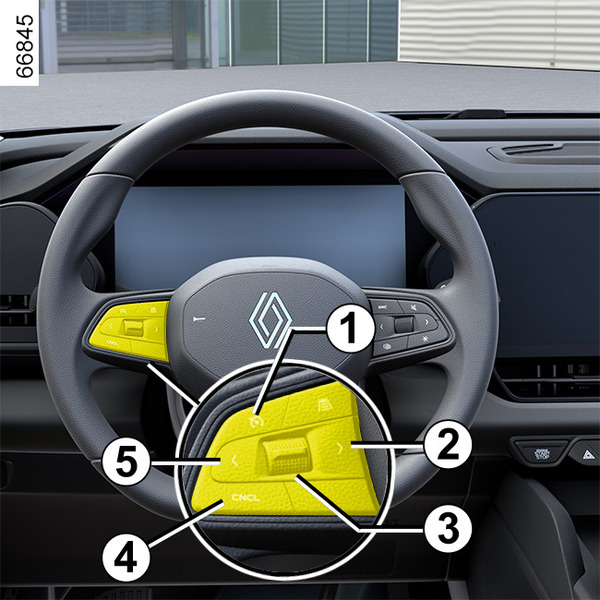
Press the menu switch button 2 or 5 on the left side of the
steering wheel to select [Speed limiter] on the instrument panel. After selection, the
system will switch to standby mode, and the speed limiter indicator will light up in
white.

■ Controls
The speed limiter control buttons are located on the left side of the steering wheel.
- 1
Speed limiter resume button: Recalling the stored limit speed.
- 2, 5
- Driving assistance system switch buttons
- 3
Speed adjustment and confirmation button:
Pressing the button upwards briefly increases the speed by 1 km/h, and pressing it long increases the speed by 5 km/h.
Pressing the button downwards briefly decreases the speed by 1 km/h, and pressing it long decreases the speed by 5 km/h.
Pressing the button activates the speed limiter function.
- 4
CNCL Button: Cancels the operation of the system.
■ Varying the limit speed
The limit speed can be changed by pressing button 3 repeatedly or holding it down.
■ Function resumption
If you press the accelerator pedal deeply while driving, the system will switch to driver
control mode, and the indicator will light up in yellow
. Then, release the accelerator
pedal: the speed limiter function will return, and the warning light will illuminate in
green.
warning
You must keep your feet near the pedals to be ready to react in an emergency.
warning
If the speed limiter is not available (after several attempts to activate), contact an approved dealer.
■ Limited speed cannot be maintained
When driving down a steep slope, the system may not maintain the limit speed, and the vehicle may accelerate due to gravity. In this case, you should immediately press the brake pedal to reduce the vehicle's speed.
■ Switching off the function
Pressing the CNCL button 4 will change the system indicator from green to white, putting the system in standby mode.
When the system is in standby mode, pressing button 4 will turn the system off.
■ Deleting saved speed
The speed limit set by the speed limiter system will be deleted when the system or the vehicle ignition is turned off.
warning
The speed limiter is independent of the brake function. Therefore, do not rely on this feature while driving under any circumstances. The driver must always be prepared to press the brake pedal.