Kangoo ZE
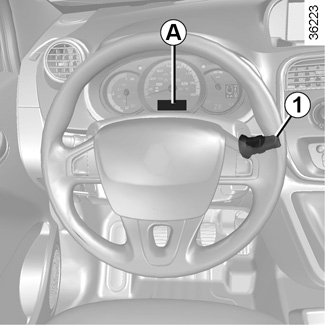
With the ignition on, the time and, depending on the vehicle, exterior temperature are displayed.
Setting the time
Resetting the clock A
(depending on vehicle)
Display the “Clock” page on the instrument panel by pressing one of the buttons on stalk 1.
After two seconds, the hours and minutes start flashing.
Press and hold the bottom button to enter the hour setting mode.
When only the hours flash, press the top button to scroll through them.
Press and hold the bottom button to enter the minute setting mode.
When only the minutes flash, press the top button to scroll through them.
Confirm by pressing and holding the bottom button on stalk 1.
Vehicles equipped with a navigation system, radio, etc.
Refer to the equipment instructions for the special features.
Exterior temperature
On equipped vehicles, the exterior temperature is displayed at A. If it is between -3°C and +3°C, the °C characters flash (signalling a risk of ice).
For safety reasons, carry out any adjustments when the vehicle is not being driven.
If the electrical supply is cut (battery disconnected, broken supply wire, etc.), the clock will lose its time setting. The time must then be set.
Exterior temperature indicator
As ice formation is related to climatic exposure, local air humidity and temperature, the external temperature alone is not sufficient to detect ice.