Renault Boreal
Introduction
The "Active driver assist" is a driving assistance system for use outside urban areas, on wide roads with visible markings.
The system consists of the following functions:
- "Adaptive cruise control Stop and Go"
- "Lane centring"
- "Emergency brake assist"
This system allows the driver to:
maintain the vehicle's speed based on a stored speed;
adjust the distance between the vehicle and the vehicle in front;
direct the vehicle's trajectory in the traffic lane;
adapt the speed of the vehicle to the speed shown on the road signs, after confirmation by the driver.
reduce the speed of the vehicle until it comes to a complete stop in the lane if the driver's hands are not on the steering wheel.
warning
This function is an additional driving aid.
It does not, under any circumstances, exempt the driver from respecting speed limits and safe distances, nor from vigilance and responsibility.
The system may not detect all situations that would require prior warning to the driver.
The driver must always maintain control of the vehicle in all driving circumstances and situations.
The driver must always adapt their speed according to the surroundings and traffic conditions.
There is a risk of accidents.
The Stop and Go adaptive cruise control function
Based on information from a radar, a camera and mapping data transmitted to the multimedia system via a GSM connection (depending on the country and the subscription contracted), the adaptive cruise control function Stop and Go gives the option to maintain a selected speed, known as the cruising speed, while maintaining a safe distance from the vehicle ahead in the same lane.
Depending on the vehicle, when the "Sign Detection" function is enabled Signage detection, the system can adapt the vehicle's speed according to the speed limit signs recognised by the camera.
If the vehicle in front stops, adaptive cruise control Stop and Go can bring your vehicle to a complete stop before setting off again.
warning
Important: always keep your feet close to the pedals and your hands on the steering wheel, so that you are prepared for any situation.
The system controls the acceleration and deceleration of your vehicle using the engine and braking system.
The adaptive cruise control function Stop and Go can be enabled from 0 km/h depending on road conditions (traffic, weather conditions, etc.).
The function is indicated by the
 symbol.
Note:
- The driver must abide by the speed limits and safe distances in accordance with the law in the country where they are driving;
- The adaptive cruise control Stop and Go can brake the vehicle to up to one-third of the braking capacity. Depending on the situation, the driver may need to brake more intensely.
tip
The adaptive cruise control function Stop and Go does not trigger an emergency stop and its braking capability is limited.
For more information on the operation of the Stop and Go adaptive cruise control (speed control, speed control with speed-limit sign recognition, cruise control, following distance, overtaking manoeuvre, temporary unavailability, system operation limitations, etc.) Adaptive cruise control Stop and Go
The "Lane Centring" function
Using information from the camera, the "Lane Centring" function manipulates the steering system to steer the vehicle in the lane. This function is only available with Active Driver Assist enabled.
If conditions allow, the function can be enabled:
From 0 mph when following a vehicle. Once activated, the function can intervene;
or
from approximately 30 mph without any vehicle being followed. Once enabled, the function can intervene from approximately 20 mph.
The "Lane Centring" function is a comfort feature.
It is represented by the indicator light
 .
.
Note: In the event of a tight turn, the lateral holding capabilities of the function are limited and require the driver to take immediate action on the steering wheel.
Additional information
Depending on the vehicle, the "Active driver assist" function can be used with other driving assistance functions.
Interaction with the "Lane Departure Prevention" function
When the "Lane Centring" function is in the adjustment mode, this will suspend the "Lane Departure Prevention" function if it has already been enabled Lane Departure Prevention.
When the "Lane Centring" function is not controlling the steering system, the "Lane Departure Prevention" function may be reactivated if conditions allow.
Location of components
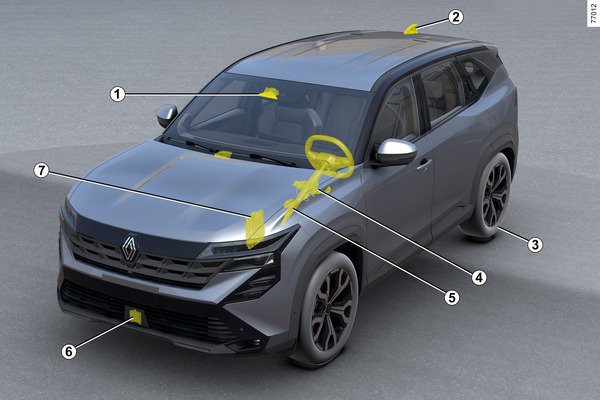
1 Camera/Calculator
Camera
Detects the markings on the road and the position of vehicles in the various traffic lanes.
Calculator
Receives information from radar 6 and combines it with its own information to determine the vehicle's trajectory and speed (acceleration/braking). Among other functions, controls the system activation/deactivation parameters (door opening status, etc.).
Depending on the vehicle, processes information to detect the presence of the driver's hands on the steering wheel.
Make sure that the windscreen is not obstructed (by dirt, mud, snow, etc.).
2 Antenna and maps
(depending on country and subscription)
Road maps and certain traffic conditions (roundabouts and bends) are transferred depending on the route taken by the vehicle. The system is able to anticipate decelerations following a change in the speed limit indicated on traffic signs, depending on the parameters selected by the driver.
The system is also capable of regulating the vehicle's speed when approaching a sharp bend or a roundabout.
3 Parking Brake Assist
Keeps the vehicle stationary in certain circumstances.
4 Power Assisted Steering
Operates the front wheels to guide the vehicle's trajectory according to the information transmitted by the calculator 5 .
5 Engine Calculator
Controls and commands the engine to obtain the desired acceleration.
6 Radar
Calculates the distance between your vehicle and the vehicle in front (target vehicle).
The maximum range of the system is approximately 130 metres. This range may vary depending on the driving conditions (relief, weather conditions, etc.)
Make sure that the radar area is not obstructed (by dirt, mud, snow, an incorrectly placed front number plate), subject to impacts, modified (included by painting) or obscured by any accessory placed at the front of the vehicle (on the grill or logo, etc.).
7 Dynamic Vehicle Control
This system transmits information about the vehicle's dynamics to the calculator 5 (speed, lateral acceleration, etc.) and acts on the braking system to control deceleration and keep the vehicle stationary.
warning
The radar and camera zones must remain clean and free from alteration to ensure the proper functioning of the system.
Controls

- 9.
Switch to select/deselect the driving aids, depending on the vehicle:
o Active Driver Assist;
Adaptive Cruise Control
speed limiter
OFF.
- 10.
Safety distance settings
- 11.
Puts the function to sleep and stores the speed limit (0).
- 12.
Recover the stored setting speed (RES).
- 13.
Activates, decreases the adjustment speed or stores the current speed (SET/-).
- 14.
Activates, increases the adjustment speed or stores the current speed (SET/-).
- 15.
Contextual menu button (depending on the vehicle): adapts the reference speed to the detected speed limits.
If the "OFF" mode is selected before the engine is switched off, the "Speed Limiter" function will be activated by default the next time the engine is started.
Displays on the instrument panel
- 16.
Stop and Go
adaptive cruise control function indicator light.- 17.
Stored cruising speed.
- 18.
Vehicle in front.
- 19.
Stored safety distance.
- 20.
Left and right line indicators.
- 21.
"Lane centring"
 function indicator light.
Steering wheel 22
The driver must always have their hands on the steering wheel.
If the driver turns the steering wheel with sufficient force, the "Lane Centring" function will be interrupted so that the driver can regain control of the vehicle.
In certain conditions (tight bends, etc.), a vibration in the steering wheel may be activated to warn the driver that they need to regain control of the vehicle.
If the driver does not take control of the steering wheel (if the driver's hands are not detected), the "Lane Centring" function will be disabled after several visual and audible alerts.
Enable/disable " Active driver assist " function
Activating the function

To enable the function, press the switch 9 as many times as necessary to activate it 23.
The warning light 21
for the "Lane centring" function and the
warning light will be displayed in grey on the instrument panel.
Then press the steering wheel control 14 (SET/+) or 13 (SET/-).
The "Active driver assist" function, consisting of the "Adaptive cruise control Stop and Go" and "Lane centring" functions, is enabled.
The green indicator light 21 and the left and right dash indicators 20 are displayed on the instrument panel to confirm that the function is working and to guide your vehicle towards the centre of the lane.
You can stop the "Lane Centring" function at any time by turning the steering wheel vigorously. As soon as you stop turning the steering wheel, the "Lane Centring" function will be automatically reactivated when conditions permit.
Note: You must keep your hands on the steering wheel when using the "Lane Centring" function. You must not remove your hands from the steering wheel under any circumstances.
Disabling the feature
Press the switch 9. The deactivation of the function is confirmed by the disappearance of the warning light 21
and the left-hand and right-hand line indicators 20 on the instrument panel.
Note: If the "Lane Departure Prevention" function has been enabled previously and conditions allow it, it will be automatically reactivated.
To exit the driving assistance, press the switch 9 as many times as necessary until you access it OFF. The "Driving assist. deactivated" message is displayed on the instrument panel.
In this case, the next time the engine is started, the "Speed Limiter" function will be in operation and waiting for a speed limit to be registered.
Adjust lane position
(depending on the vehicle)

To enable lane position adjustment, the following conditions must be met:
- The "Lane Centring" function must be in operation, with indicator light 21 displayed in green on the dashboard;
- The vehicle speed must be less than approximately 30 mph;
- The vehicle must be on a dual carriageway (dual lane or motorway);
- The vehicle is travelling on a sufficiently wide and straight road.
When these conditions are met, you can adjust your vehicle's lateral position in the lane without disabling the "Lane Centring" function.
To do this:
- turn the steering wheel slightly to the right or left to adjust/move the vehicle in the lane to the desired position;
- maintain the steering effort for approximately 10 seconds: the vehicle's position is automatically calculated based on speed, lane width and lane type;
- relieve steering effort: the vehicle maintains the changed position and the arrows 20 displayed on the dashboard indicate that the adjustment is in effect.
Under certain conditions (e.g. cornering, speed above approx. 30 mph), the vehicle can be re-centred automatically.
To return to the centre of the lane, turn the steering wheel slightly in the opposite direction, then release the effort when the vehicle is located in the centre.
"Lane Centring" function in standby mode
The "Lane Centring" function is automatically put into standby mode in the following cases:
The system does not detect the lines or only one line is detected in your lane;
The lane is too narrow or too wide;
The system does not detect the driver's hands on the steering wheel;
In some driving conditions (roundabout, intersection, too tight a bend, etc.);
The vehicle speed is less than approximately 20 mph, with no vehicle further ahead;
The vehicle crosses a line;
The system is temporarily disturbed (e.g. camera obscured by dirt, mud, snow, condensation, etc.).
Certain actions performed by the driver may also put the "Lane Centring" function in standby mode:
Activation of the indicators;
Turning of the steering wheel with enough force.
Suspension of the function is confirmed by displaying the indicator light in grey 21 and the left and right dash indicators 20 on the instrument panel.
As soon as the conditions are met again, the function regulates and keeps the vehicle in the lane again. The warning light 21
and the left and right lane indicators 20 appear in green on the instrument panel.
Special cases
The system anticipates certain situations (approaching a lane limit, etc.) that may cause the "Lane Centring" function to be put on hold.
In this case, indicator 21 and line indicator 20 (left or right) appear in yellow on the dashboard to alert the driver.
In some cases (loss of line detection by the front camera, etc.), the system is put on standby accompanied by a beep.
warning
Important: always keep your feet close to the pedals and your hands on the steering wheel, so that you are prepared for any situation.
tip
You can change the vehicle's trajectory at any time by turning the steering wheel.
"Keep your hands on the wheel" warning
From approximately 5 mph, when the system Active driver assist no longer detects the presence of your hands on the steering wheel, several alert levels will be triggered:
- After approximately 15 seconds, the message "Keep hands on steering wheel" appears in yellow on the instrument panel;
- After approximately 30 seconds, the message "Keep hands on steering wheel" on the instrument panel and the indicator light
 appear in red and are accompanied by a beep;
 - After approximately 35 seconds, if the driver does not return their hands to the wheel after the warnings, the system will be disabled and a beep will sound. Depending on the vehicle, Emergency Braking Assist will be enabled automatically.
The emergency braking assistant is a function that allows the vehicle to come to a standstill when the system no longer detects the presence of the driver's hands on the steering wheel.
Emergency Braking Assist uses information from the front camera 1 and front radar 2.
Once triggered:
- Emergency Brake Assist keeps your vehicle in its own lane and maintains a safe distance from the vehicle in front (vehicle being followed);
- The hazard warning lights come on automatically, the indicator light
remains on and the message "Emergency Stop Keep control" is displayed on the instrument panel, accompanied by a beep;
- Your vehicle's brakes are then applied in bursts to encourage you to take back control. If you don't react, the system gradually slows the vehicle to a complete stop;
- After stopping the vehicle, the message "Emergency Stop performed" is displayed on the dashboard, always accompanied by a beep. The system keeps the vehicle stationary.
warning
The braking and lane-keeping performance of Emergency Stop Assist is limited.
The system does not guarantee that the vehicle will stay in the lane when:
- the system no longer detects the lanes;
- the lane is very narrow;
- the bend is very tight;
- ...
There is a risk of accidents.
tip
In the first two warning levels, when the system detects the presence of the driver's hands on the steering wheel again, the warnings stop. The function continues to steer the vehicle in the lane.
After stopping the vehicle:
- the emergency lights remain on;
- the doors unlock automatically;
- the indicator light
remains red until control of the vehicle is regained;
- the parking assist brake is applied automatically approximately three minutes after the vehicle stops.
warning
Do not remain stationary in the traffic lane. Regain control of your vehicle and head to safety.
There is a risk of accidents.
warning
This function is an additional driving aid. The driver can intervene in the system to regain control of the vehicle.
The driver can stop the emergency stop assist and regain control of the vehicle at any time (during the manoeuvre or when stopping) through a separate action or a combination of actions.
Depending on the vehicle, the possible actions are:
- a strong pressure on the accelerator pedal;
- a strong pressure on the brake pedal (with the vehicle in motion);
- a strong action on the steering wheel;
- pressure on the brake pedal when changing the position of the gear lever;
- an action on the automatic parking brake;
- a moderate action on the accelerator pedal accompanied by a moderate action on the steering wheel;
- a slight rotation of the steering wheel while pressing the 11 (0) button on the steering wheel;
- a slight rotation of the steering wheel accompanied by a pressure on the accelerator pedal;
- a slight rotation of the steering wheel accompanied by a pressure on the brake pedal;
tip
If the emergency stop assist is triggered, the Active Driver Assist system is disabled.
Regain control of your vehicle, both when manoeuvring and stopping.
Once you have regained control of your vehicle, you can manually re-enable the Active Driver Assist system.
Special cases
In some situations, the "Lane Centring" function may no longer be able to detect your hands on the steering wheel and may issue an alert:
The driver holds the steering wheel very lightly;
The driver is wearing gloves;
...
In case of a tight turn

In the event of a tight turn, depending on the speed of the vehicle, the lateral holding capabilities of the function will be limited and will require the driver to take immediate action on the steering wheel in order for the vehicle to stay in lane.
If the driver does not intervene, the function triggers the vibration of the steering wheel to signal that the vehicle is about to cross the line and that the driver needs to take immediate action.
The warning light 21
and the left-hand or right-hand line indicators 20 will be displayed in red on the instrument panel.
If the vehicle crosses a line completely and leaves its lane or if the bend is too tight, the "Lane Centring" function will be put into standby mode.
The suspension of the function is confirmed by the appearance of the warning light in grey 21
and the left-hand and right-hand line indicators 20 on the instrument panel.
tip
The "Lane Centring" function cannot help the driver at a roundabout or junction and may automatically switch to standby mode.
In any case, the driver must always turn the steering wheel to manage the vehicle's trajectory in these driving conditions.
Temporary unavailability
Radar
The radar detects vehicles in front of you. The system will not operate properly if the radar area is obstructed or if the signal is interrupted.
If the radar zone is obscured or the radar signal is interrupted, the message "Camera Radar no Visibility" will be displayed on the dashboard and the Active Driver Assist system will stop.
Extinguishing the green indicator light
confirms the automatic shutdown of the system.
Make sure the radar area remains clear and is not obstructed by snow, mud, a poorly attached/poorly installed sign or any accessory mounted on the front of your vehicle (on the grille) or hidden by any accessory mounted on the front of your vehicle (on the grille, logo, etc.).
Some areas can hinder the operation of the system, such as:
- a deserted area, a tunnel, a long bridge or a highway with very light traffic, without curbs, nearby trees or signs;
- in the vicinity of a military zone or airport.
You must exit the zone to reactivate the system.
In any case, if the message does not disappear after restarting the engine, consult an authorised dealer.
Camera
The system may not ensure that the vehicle stays in the lane if the camera is obstructed (dirt, mud, snow, fog, etc.), the "Lane Centring" function is put on standby.
The adaptive cruise control function remains operational, but its performance will be reduced.
Stay alert.
In some cases, this is accompanied by the message "Front camera no visibility" on the dashboard.
Operating faults
If a malfunction is detected, the message "Driving assist unavailable" or "Check Driving assist" will appear on the instrument panel and the system will be deactivated.
Depending on the nature of the malfunction, the adaptive cruise control function may remain operational.
In all cases, if any system malfunction occurs, consult an authorised dealer.
Warnings
warning
"Active Driver Assist" is an additional driving aid. Under no circumstances can the system replace compliance with speed limits, safety distances or the driver's attention.
The driver must always maintain control of the vehicle.
The driver must always adapt their trajectory and speed to the traffic conditions and the surrounding area, regardless of the system's instructions.
With the exception of lane-demarcating dashes and speed limit signs within the limits of the system's detection capability, road-sign information (other traffic signs, traffic lights, pedestrian crossings, etc.) is not recognised by the system. These indicators do not trigger any alert or reaction from the system.
"Active driver assist" uses the "Adaptive Stop and Go cruise control" and "Lane centring" functions.
Under no circumstances should the system be used to detect obstacles or as an anti-collision system.
Use "Active driver assist" exclusively outside urban areas, on wide roads with visible markings.
It should not be used in heavy traffic conditions, on winding or slippery roads (ice, "water table", gravel) or in adverse weather conditions (fog, rain, crosswind, etc.).
There is a risk of accidents.
System interventions/repairs
In the event of an impact, the alignment of the radar and/or camera may be modified and its operation may be affected. Deactivate the system and consult an approved dealer.
Any intervention near the radar and/or camera (replacements, repairs, windscreen modifications, painting, etc.) must be carried out by a qualified professional.
Only an authorised dealer is authorised to intervene in the system.
warning
Deactivating the system
You will need to disable the system if:
the vehicle is driving on a winding road;
the vehicle will be towed (breakdown);
the vehicle is towing a trailer or caravan;
the vehicle is driving in a tunnel or near a metal structure;
the vehicle arrives at a toll booth, a roadside area or a narrow road;
the vehicle is driving on a very steep slope;
visibility is insufficient (bright sun, fog, etc.);
weather conditions are bad (rain, snow, crosswinds, etc.);
the vehicle is driving on slippery ground (rain, snow, gravel, etc.);
the camera area is damaged (e.g. inside or outside the windscreen); the windscreen is cracked or deformed;
the radar area has been damaged (impacts, etc.).
the surface of the steering wheel is damaged or damp.
Contact an authorised dealer if you notice any abnormal behaviour.
warning
Certain conditions may disrupt or damage the operation of the system, such as:
obstruction of the windscreen or radar area (due to dirt, ice, snow, condensation, etc.). Frequently check the cleanliness and condition of the windscreen, front wiper blades and front bumper;
a complex environment (tunnel, etc.);
bad weather (snow, heavy rain, hail, ice, etc.);
poor visibility (night, fog, etc.);
insufficient contrast between the vehicle in front and the surrounding area (e.g. white vehicle in a snowy area, etc.);
glare (bright sun, oncoming vehicle lights, etc.);
the road is narrow, winding or undulating (sharp curves, etc.);
the system detects the marks on the tarmac as a line;
narrowing/widening of lanes;
various road markings (roadworks, etc.), difficult to distinguish or irregular (e.g. partially or extremely faded markings, excessively faded markings, excessive spacing of markings, uneven surface, etc.);
traffic signs other than an arrow at a motorway exit;
an area with reduced connectivity that makes it impossible to geolocate the vehicle or outdated maps;
a slower vehicle moving at a significantly different speed;
using floor mats that are not adapted to the vehicle. On the driver's side, it is imperative that only mats suited to the vehicle are attached to the pre-installed elements and regularly check that they are fastened. Do not lay several mats on top of each other. There is a risk the pedals will be obstructed.
In these cases:
risk of unwanted braking or acceleration.
risk of unintentional or incorrect correction or lack of trajectory correction.
Several unexpected situations can affect the operation of the system. Certain objects or vehicles that may appear in the camera detection zone may be interpreted by the system incorrectly, potentially leading to inappropriate acceleration or braking.
Always keep an eye out for unforeseen situations that may occur while driving. Maintain control of your vehicle at all times by keeping your feet close to the pedals and your hands on the steering wheel to be ready to respond in any situation.