Renault Trafic 3 phase 1

It allows locking/unlocking without input on the card RENAULT when within the access zone 1.
Locking/unlocking the vehicle
There are two ways to unlock/lock the vehicle: be within the access zone or using the card RENAULT.
Do not store the RENAULT card anywhere it may come into contact with other electronic equipment (computer, phone, etc.) as this could hinder its operation.
Driver’s responsibility when parking or stopping the vehicle
Never leave an animal, child or adult who is not self-sufficient alone in your vehicle, even for a short time.
They may pose a risk to themselves or to others by starting the engine, activating equipment such as the electric windows or locking the doors, for example.
Also, in hot and/or sunny weather, please remember that the temperature inside the passenger compartment increases very quickly.
RISK OF DEATH OR SERIOUS INJURY.
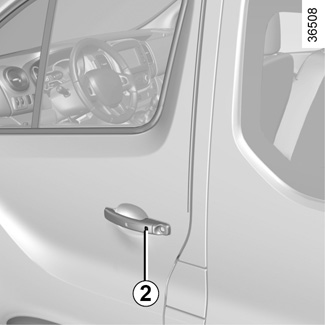


Be within the access zone
Depending on the vehicle, press button 2 on the handle of one of the front doors, the tailgate or the rear hinged door.
The hazard warning lights flashing tells you about the vehicle status:
- two flashes indicate that the vehicle is locked.
- one flash indicates that the vehicle is unlocked.
Special features relating to vehicle locking
- When locking, if a door is open or incorrectly closed, the vehicle will lock and unlock in quick succession without the hazard warning lights flashing;
- after locking by pressing button 2, you have to wait approximately 3 seconds to be able to unlock the vehicle again.
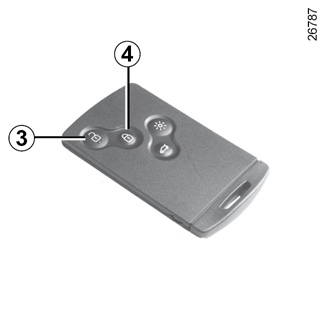
Unlocking with the card RENAULT
Press the button 3.
The hazard warning lights flash once to indicate that the doors have been unlocked.
Locking using the RENAULT card
With the doors closed, press button 4: the vehicle will lock.
The hazard warning lights flash twice to indicate that the doors have locked.
NB: The maximum distance at which the vehicle locks depends on the surroundings.

Special note:
The vehicle will not lock if:
- a door is open or not properly closed;
- the card is not in the zone 1.
After locking/unlocking the vehicle using the buttons on the RENAULT card, "hands-free" locking and unlocking is deactivated.
To reactivate the “hands-free” mode: restart the vehicle.

With the engine running, if, after opening and closing a door, the card is no longer in the zone 5, the message “KEYCARD NOT DETECTED” (together with a beep when the speed exceeds a limit) warns you that the card is no longer in the vehicle. This avoids you driving away after having dropped off a passenger who has the card, for example.
The warning disappears when the card is detected again.

Distance lighting function
The interior lights come on for approximately 30 seconds when button 6 is pressed. This can be used, for example, to identify the vehicle from a distance when parked in a car park.
NB: Pressing button 6 again switches off the lighting.
Rear opening elements locking/unlocking
Press button 7 to lock/unlock the rear hinged doors or the tailgate and, depending on the vehicle, the side doors.
The hazard warning lights flashing notifies you of the status of the rear opening elements:
- two flashes indicate that the rear opening elements are locked;
- one flash indicates that the rear opening elements are unlocked.
After locking/unlocking the vehicle using the buttons on the RENAULT card, "hands-free" locking and unlocking is deactivated.
To reactivate the “hands-free” mode: restart the vehicle.