X61VE
The presence and operation of the display and indicators DEPENDS ON THE LEVEL OF EQUIPMENT AND THE COUNTRY.

Speedometer 1
Vehicle speed is limited to approximately 80 mph (130 km/h).
Depending on your vehicle, this speed can be permanently limited to a set value.
Overspeed buzzer
Depending on the vehicle, a beep sounds for 10 seconds approximately every 40 seconds as long as the vehicle is travelling at over 72 miles per hour (120 km/h).
Note: the desired speed may be programmed; consult an approved Dealer.
Multifunction display 2
Please refer to the information on the “Trip computer: general information” in Section 1.

Charge level 3
The gauge indicates the level of energy remaining.
Reserve threshold 5
This indicates that the battery is at approximately 12% charge. The warning light Ṏ comes on and a beep sounds.
To optimise your range, please see the information on “Recommendations: saving energy” in Section 2.
Immobilisation threshold imminent 4
This indicates that the battery is at approximately 6% charge. A beep is repeated every 10 seconds and warning light Ṏ flashes.
The message “Limited performance” may also be displayed on the instrument panel.
Motor performance gradually decreases until the vehicle comes to a stop.
Please see the information on “Towing: breakdown recovery” in Section 5.
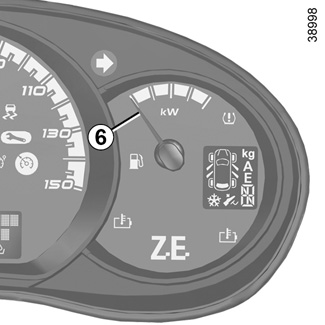

Charge meter 6
Please refer to the information on the “Charge meter” in Section 2.
“Energy recovery” usage zone A
The needle tells you that the vehicle is generating energy and the traction battery is being recharged (under braking or going downhill).
“Neutral” position B
The needle tells you that you are at nil consumption (the vehicle is at a standstill without consuming energy).
“Consumption” usage zone C
The needle tells you the energy consumption (as soon as you depress the accelerator pedal).

Display selection keys 5 or 6
Depending on the vehicle, pressing the button repeatedly enables the information on the display to be selected and the trip mileage recorder to be reset (for this, the trip mileage must be selected on the display).
- Display selection
Press briefly to move from the total mileage to the trip mileage and vice versa.
- Resetting the trip mileage recorder
Once trip mileage has been selected on the display, press and hold the button.
Multifunction display
Total mileage recorder.
Trip mileage recorder.
Setting the time.
OR
Trip computer and warning system
Refer to the information on the “Trip computer” in Section 1.