Renault Koleos

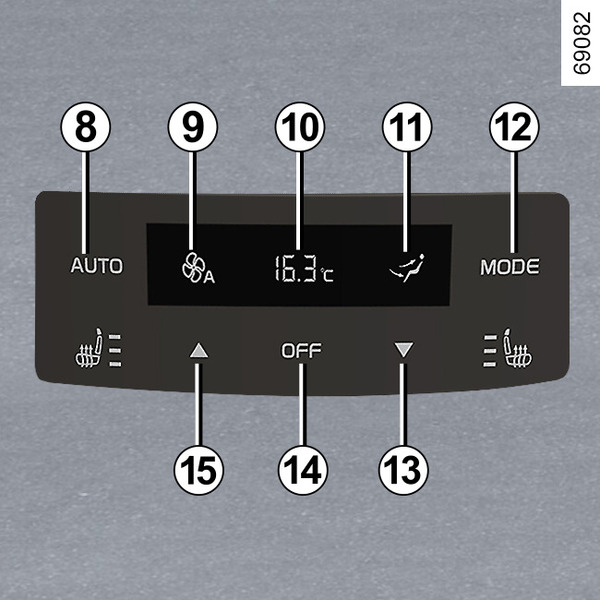
■ Center screen rear seat air conditioning control and rear seat air conditioning controller
- 1, 8
- AUTO mode button
- 2
- Lock button
- 3
- Rear seat air conditioning off (OFF) button
- 4
- When you press the button, the center screen changes to the front seat air conditioning setting screen. Front seat air conditioning (air conditioning)
- 5
- Ankle air vent button
- 6
- Upper body air vent button
- 7
- Rear seat air temperature control button
- 9
- Displayed when auto mode is in operation.
- 10
- Current rear seat temperature setting display
- 11
- Current setting MODE (air distribution) display
- 12
- MODE (air distribution) button
- 13, 15
- Rear seat air temperature lowering, raising button
- 14
- Rear seat air conditioner off (OFF) button
■ AUTO mode 1, 8
The AUTO air conditioning operates at optimum conditions to provide comfort inside the vehicle, prevent fogging and provide adequate visibility (except in extreme conditions). The system controls the air flow speed, changes the air distribution mode, switches between inside and outside air, starts and stops the AC function, and adjusts the air temperature.
When you press the AUTO mode button 1 or 8, the rear seat air conditioning control display

The indicator light appears and the ventilation distribution MODE 11 is not displayed.
When you press the MODE button 11, the ventilation distribution MODE
11 is displayed on the rear air conditioner display.
The indicator light disappears.
When the air conditioner is off, if you press the AUTO button 1 or 8, the air conditioner will start operating and enter AUTO mode, and the temperature will be maintained at the temperature before the air conditioner was turned off.
■MODE setting12
Each time you press the MODE button 12, the fan mode switches among three
modes: upper body fan, upper body fan/ankle fan, and ankle fan, and the rear seat air
conditioner display changes.
The indicator light goes off.
When the air conditioner is off, pressing the MODE button 12 will start the air conditioner.
■ Rear seat temperature settings7, 1315
Swipe up/down on the current temperature 7 on the rear seat air conditioning control screen on the center screen to set the temperature.
Pressing button 13 on the rear seat air conditioning controller will lower the temperature by 0.5°C, and pressing button 15 will raise the temperature by 0.5°C.
The temperature setting range of the air conditioning is 16°C to 28°C, and temperatures outside the setting range are displayed as follows.
- Above 28℃: HI
- Below 16℃: LO
The current rear seat temperature setting is displayed at 10.
If it is below 16°C, it is displayed as LO, and if it exceeds 28°C, it is displayed as HI.
When the air conditioner is off, pressing button 13 or 15 will activate the air conditioner.
Note: The rear seat air volume follows the front seat setting. However, when the rear seat air conditioner temperature is set to LO or HI, the front seat air conditioner air volume also increases for the rear seat cooling/heating efficiency.
■ Turn off rear seat air conditioning (OFF) 3, 14
When the rear seat air conditioning is running, pressing button 3 or 14 will turn the rear seat air conditioning off.
■ Rear seat air conditioning lock 2
Pressing button 2 locks the rear seat air conditioning controls.
The buttons on the rear seat air conditioning controls do not work.
■ Upper body vent 6
Pressing button 6 sets the fan mode to upper body fan mode.
■ Ankle air vent button5
Pressing button 5 sets the fan mode to ankle fan mode.
■ Change to the front seat air conditioning settings screen4
Pressing button 4 will change the center screen to the front seat air conditioning settings screen. Front seat air conditioning (air conditioning)