Renault Kardian Latam
Automatic gearbox, electronic lever
Selector lever 1


R: Reverse
N: Neutral
D: Drive
P: Park, button 2

The display 3 on the instrument panel shows the engaged position of the selection lever 1

warning
Check that the P indicator light on the instrument panel and the indicator light on the button 2 are activated before getting out of the vehicle.
Risk of loss of vehicle immobilisation.
Starting
With the vehicle stationary and the automatic gearbox in P position, start the vehicle.
With your foot on the brake pedal (the warning light 3
 disappears from the display), engage D position.
The lever must only be set to D or R position while the vehicle is stationary, with your foot on the brake and the accelerator pedal released.
Operation
Move the selection lever 1 one or two positions forwards or backwards to engage the desired position (R, N or D ) and then release the lever: it returns to its initial position.
The engaged position lights up on the panel.
If conditions prevent you from changing from one position to another, the requested position will flash on the instrument panel.
To engage the P position
With the vehicle stationary, the engine running or the ignition switched on, press button 2 to engage P position. The indicator light on the button 2 appears in orange when the gearbox is set to P position.
To disengage P position
With the vehicle stationary and the engine on, press the brake pedal and move the selection lever 1 forwards or backwards to select the desired position. The light on button 2 goes out.
If the brake pedal is not pressed, the press brake and the
warning light are displayed on the instrument panel.
Note:
The
warning light is switched on each time the brake pedal must be pressed in order to change gear on the automatic gearbox.
To engage Neutral gear (N position)
With the vehicle stationary and the engine on, to engage N position move the selection lever 1 one notch forwards or backwards, depending on which gear is engaged.
To engage Drive gear (D position)
With the vehicle stationary and the engine on, move the selection lever 1 one notch backwards to engage D position.
If one of the conditions are not applied, D flashes for approximately five seconds and the "Press brake pedal" message is displayed on the instrument panel for approximately 15 seconds.
In most traffic conditions you may encounter, you will no longer need to touch the lever: the gears will automatically shift at the optimal time and at the right engine speed because the automation takes into account the vehicle's load, the road profile and the selected driving style.
Note: with the engine on and the vehicle moving at between approximately 0 mph and 5 mph (0 and 8 km/h) in N or R position, the brake pedal must be slightly pressed in order to engage D position. This is useful during parking manoeuvres that require several alternating forward and reverse movements.
Economical driving
On the road, always leave the lever in D position. With the accelerator pedal slightly pressed, the gears automatically shift to a lower engine speed.
Accelerating and overtaking
Press the accelerator pedal firmly (to the end of travel).
This will allow you to reduce the gear to the optimum gear as far as possible.
warning
The engine brake cannot in any way replace the brake pedal.
To engage Reverse gear (R position)
With the vehicle stationary and the engine on, move the selection lever 1 two notches forwards to engage R position.
If the brake pedal is not pressed, the R position display flashes for approximately five seconds on the instrument panel and the "Press brake" message is displayed for approximately 15 seconds.
Note: with the engine on and the vehicle moving at between approximately 0 mph and 5 mph (0 and 8 km/h) in N or R position, the brake pedal must be slightly pressed in order to engage R position.
This is useful during parking manoeuvres that require several alternating forward and reverse movements.
Special circumstances
If the road profile or weather conditions (steep climbs, steep descents, deep snow, sand or mud), do not allow you to stay in automatic mode, depending on the vehicle, it is advisable to switch to manual mode using the gear shift paddles. This is to avoid successive gear changes due to the "automatism" working during the climb and to enable engine braking in the event of long descents.
In very cold climates, to avoid stalling the engine, wait a few moments before moving out of the P or N position and shifting the lever to D or R position.
Parking the vehicle
On vehicles equipped with a lever 1, P position is automatically engaged, as is the electronic parking brake (on equipped vehicles) when:
the engine is stopped;
the driver's seat belt is unfastened while the vehicle is stationary;
the driver's door is opened while the vehicle is stationary.
P is displayed on the instrument panel and the P indicator light comes on.
As P position is automatically engaged when the engine is stopped, sometimes it is necessary to set the gear lever to N position, for example in some car washes:
with the engine on, press the button P, move the selection lever 1 forwards or backwards a notch then switch off the engine;
with the engine off and the ignition on, move the selection lever 1 forwards or backwards a notch and switch off the engine.
The next time the engine is started, P position is automatically engaged in the cases mentioned above.
important
P position must only be engaged when the vehicle is completely stationary.
important
When driving uphill, do not keep your foot on the accelerator pedal to keep the vehicle stationary.
Risk of the automatic transmission overheating.
warning
For safety reasons, never switch off the ignition until the vehicle is completely stationary.
Maintenance period
Please refer to the maintenance document for your vehicle or contact an approved dealer.
Operating faults
While driving, if the "Check gearbox" message appears on the instrument panel this indicates a fault.
Contact an approved dealer as soon as possible
While driving, if the "WARNING: Gearbox Overheating" message appears on the instrument panel, stop the vehicle as soon as possible to allow the gearbox to cool down and until the message disappears.
In the event of an engine failure or electrical breakdown (battery failure, etc.) that affects the operation of the automatic transmission, make sure that the vehicle is properly stopped.
warning
In the event of an impact on the underbody of the vehicle during a manoeuvre (e.g. contact with a post, a kerb or any other street furniture) your may have damaged the vehicle (e.g. deformation of the axle), the electrical circuit, etc.
Do not touch the circuit components or any leaks or fluids.
To avoid any risk of an accident, have your vehicle inspected by an approved dealer as soon as possible.
Risk of serious injury or electric shock that could result in death.
Gear shift paddles 4 and 5
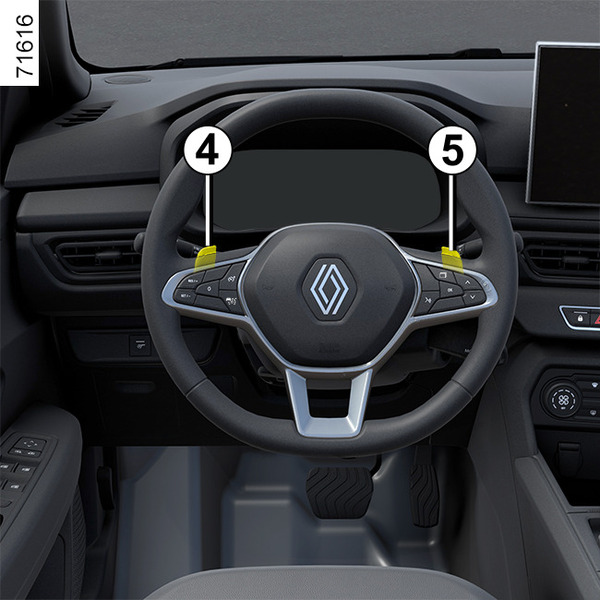
Depending on the vehicle, you can use gear shift paddles 4 and 5 to change gears when the lever is in D position (temporary manual mode).
4: shift down a gear.
5: shift up a gear.
The P, N and R positions cannot be engaged using the paddles.
Use
With the selection lever 1 in D position, you can use the paddles to change gears manually.
When driving in automatic mode you can use the paddles to change gears occasionally. In this condition, display 3 shows the selected gear (e.g.: D3). When you stop pressing the paddles, the gearbox returns to automatic mode and the display 3 shows D position.
Manual mode
With the selection lever 1 in D position, press and hold the paddle 5 for two seconds to activate permanent manual mode.
The display 3 on the instrument panel changes from D to M.
When manual mode is activated, the display 3 shows the selected gear (e.g. M3).
Use paddles 4 and 5 to shift the gears upwards or downwards.
To optimise performance, the display 3 shows a + sign next to the gear number when the gear needs to shifted up (e.g. M3+).
To protect the gearbox, when trying to shift down a gear, if the engine revolutions are insufficient (below 3,500 rpm), the gearbox prevents the gear from changing and the display 3 flashes until the conditions are met.
To deactivate manual mode and return to automatic mode:
press and hold the paddle 5 again for two seconds;
or;
move the selection lever 1 two notches backwards.
Display 3 changes from M to D.
Gear lever
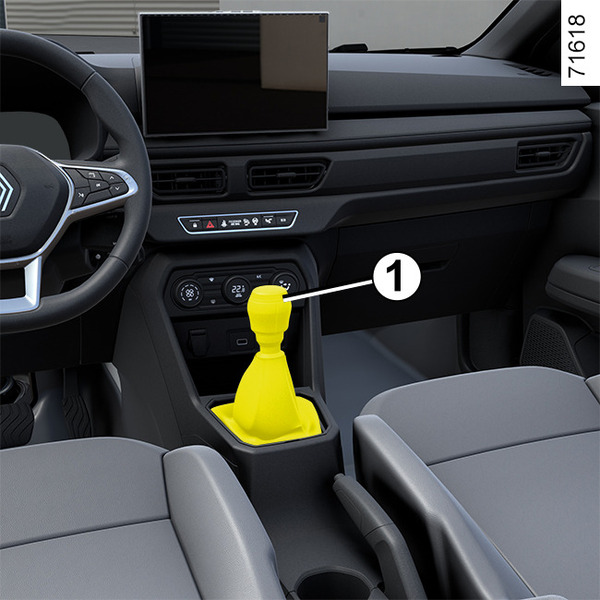
Selecting reverse gear
(vehicle stationary)
Vehicles fitted with a manual gearbox: refer to the grid shown on the knob on the lever 1.
The reversing lights will illuminate as soon as the reverse gear is engaged (with the ignition on).