Renault Koleos
■ General information

- 1
Vehicle locking or finding
- 2
Tailgate locking or unlocking
- 3
Vehicle unlocking
- 4
Remote engine start Starting and stopping the vehicle
- 5
Mechanical key Opening and closing the doors
note
The key buttons are deactivated when the engine is running.
note
Keep spare keys in a safe place and do not store them in your vehicle.
■ Unlocking the vehicle
▶ Using the key
Press button 3. The hazard warning lights will blink twice to indicate that all the doors and tailgate are unlocked.
▶ Hands-free function

If you have the key and put your hand on the front door handle 6, the vehicle will unlock. The hazard warning lights will blink twice to indicate that the doors are unlocked. To use this function, refer to the 'Hands-free setting' below.
Note: If you do not open a door within approximately 45~50 seconds after unlocking by pressing button 3 or using the hands-free function, the doors will be locked again.
■ Locking the vehicle
▶ Using the key
Press button 1. The hazard warning lights will blink once to indicate that the doors and tailgate are locked. If a door is not closed properly, the hazard warning lights will not flash and all doors will be locked and then unlocked immediately.
▶ Hands-free function

If you have the key and place your hand on area 7 of the front door handle, the vehicle will be locked. The hazard warning lights will blink once to indicate that the doors and tailgate are locked. To use this function, refer to the 'Hands-Free Setup' section below.
note
The hazard warning lights will flash to indicate that the vehicle is locked/unlocked.- blink twice indicates all doors and tailgate are unlocked.
- Blink once indicates all doors and tailgate are locked.
To sound the horn or turn it off when the vehicle is locked, from the menu on
the left side of the central screen select [Vehicle Settings]
 -[Vehicle Lock/Key]-[Horn when
Locking] in order.
-[Vehicle Lock/Key]-[Horn when
Locking] in order.
warning
Never leave your vehicle with the card inside.
■ Locking/unlocking the boot only
Press and hold button 2 to lock or unlock the luggage compartment only.
■ Finding your vehicle (Check vehicle location)
Press button 1 twice quickly and the side lights will light up for about 25 seconds, the turn signal will flash several times, and the horn will sound several times. (if [Horn & Lights] is selected)
From the menu on the left side of the central screen, select [Vehicle Settings]
-[Vehicle Lock/Key]-[Find My Car
Mode] in order, then select [Horn & Light] or [Light].
■ Opening or closing windows
Press and hold button 3 within the key operating range to open all windows.
From the menu on the left side of the center screen, after selecting [Vehicle
Settings]
-[Vehicle Lock/Key] in sequence,
if the [Automatically close windows when locked] function is ON, pressing button
1 briefly will close all windows. If the [Automatically close windows
when locked] function is OFF, pressing button 1 for a long time will close
all windows.
warning
Driver's responsibility when parking or stopping the vehicle
Never leave an animal, child or adult who is not selfsufficient alone in your vehicle, even for a short time.
They may pose a risk to themselves or to others by starting the engine, activating equipment such as the electric windows or locking the doors.
Also, in hot and/or sunny weather, please remember that the temperature inside the passenger compartment increases very quickly.
RISK OF DEATH OR SERIOUS INJURY.
Be careful because the engine may start if you step on the pedal and press the vehicle START/STOP button while the key is close to the key detection area, even if it is outside the vehicle.
Replacement: need for an additional key
If you lose your key or require another, you can obtain one from an approved dealer.
However, please be aware that it may take several weeks from the application for the smart key until its receipt, so be careful not to lose the smart key.
If a key is replaced, it will be necessary to take the vehicle and all its keys to an approved Dealer to initialise the system.
note
Recommendations
Avoid leaving the card in hot, cold or humid areas.
Do not keep the card in a place where it could be bent or damaged accidentally, such as in your back pocket. In particular, if you put it in your back pocket and sit down, the key could be damaged, which may lead to accidental vehicle operation.
note
Do not leave the key in hot, cold, or humid places.
If the key comes into contact with water, it may cause a malfunction, so wipe it off immediately.
Do not put it in the washing machine or soak it in water for a long time.
■ Hands-free settings
From the menu on the left side of the center screen, select [Vehicle settings]
-[Vehicle Lock/Key] in order.
- Unlock with Door Handle Sensor: When unlocking with the door handle sensor, you can select [All Doors] or [Single Door].
- Unlock with Key Button: When unlocking with the key button, you can select [All Doors] or [Driver's Door].
- Approaching Unlocking, Walk Away Locking: Select ON to use the Approaching Unlocking, Walk Away Locking function.
The 'Walk Away Locking' function may not work in the following cases. First, make sure to check the locking status before leaving.
- When the key stays near the vehicle (within about 6 meters) for about 5 minutes
- When the key is inside the vehicle
- When a door is open
- When the voltage of the vehicle's 12 volt battery is about 11 volts or lower
- When the doors are closed and the person holding the key left the vehicle quickly
- When the person holding the key moves out of the key's operating range with the door open and someone else closes the open door
- When in an area where strong electromagnetic waves are generated, such as high-voltage facilities, solar panels and charging facilities, and military facilities
■ Key operating range
This varies according to the surroundings: take care not to accidentally lock or unlock the vehicle by inadvertently pressing the buttons on the key.
■ If the key does not work or the operating range changes
You should check the vehicle locking and unlocking status yourself in the following cases:
- If the key battery is abnormal or discharged
- If you are using electrical equipment that uses the same frequency with the key (mobile phone, walkie-talkie, video game console, key of another vehicle, etc.)
- If the vehicle is in a high-frequency electromagnetic field (near police stations, government offices, broadcasting stations, military bases, transmission towers, airports, ports, etc.)
- If the weather is very cold
If the battery is too weak to ensure correct operation, you will still be able to start and lock/unlock the vehicle Opening and closing the doors.
Do not store the card anywhere it may come into contact with other electronic equipment (computer, phone etc.) as this could hinder its operation.
■ Battery management
It is essential to use batteries of the same specifications as the ones used and to install them correctly under normal conditions. The batteries are available from approved dealers, and their service life is approximately two years.
Replacing the battery Key: Battery
warning
Precautions relating to batteries:
- keep batteries (new or used) out of reach of children;
- do not swallow batteries;
Risk of chemical burns which may lead to death.
- if ingested or inserted into any part of the body, consult a doctor as soon as possible.
Key: Battery
■ Replacing the battery


Press button 1 and pull out the mechanical key 2 (Locking and unlocking the opening elements and doors). Insert the mechanical key about 1 cm at a right angle into the key area where the mechanical key was removed, then grasp the mechanical key handle and lift the key cover to remove it.
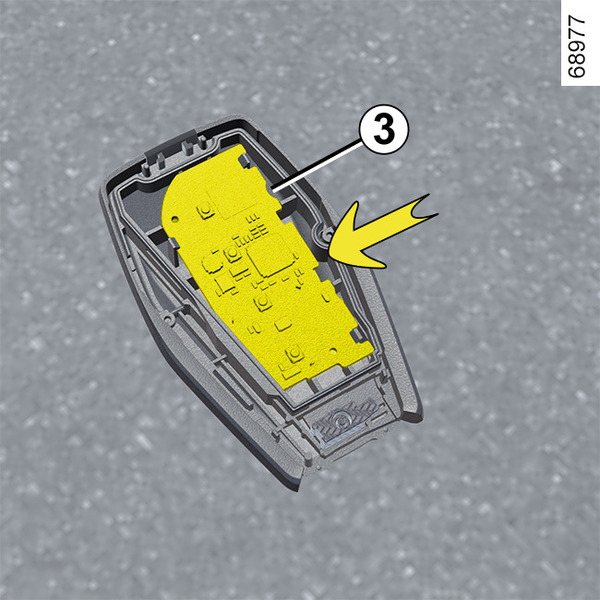
 Lift the circuit board 3 inside
the key in the direction of the arrow.
Lift the circuit board 3 inside
the key in the direction of the arrow.
Replace battery 4. When replacing the battery, ensure that the positive (+) terminal faces the + symbol on the back cover.
Note: Key battery model: 3V, CR2032
Install circuit board 3 inside the key onto the back cover.
Reattach the opposite key cover that was previously removed.
Note: when replacing the battery, do not touch the electronic circuit or contacts on the key.
Assemble in the reverse order of disassembly.
The key is equipped with sophisticated circuitry. Protect it from corrosion from shock, water, high temperatures, humidity, direct sunlight, solvents, waxes, and abrasive cleaners.
Do not directly expose the key to an environment below minus 20° for a long time, otherwise the key may issue a low battery alarm. Then replace the battery in time. Be careful not to affect the function of the remote control. Otherwise, the vehicle may not start normally, which may affect the use of the vehicle.
warning
If they need to be replaced, be sure to use the same or equivalent type of battery (consult an Approved Dealer).
warning
When replacing:
- make sure that the batteries are correctly inserted.
Risk of explosion.
- if the flap does not close correctly, do not use the key and keep out of reach of children.
■ Operating faults
If the battery is too weak to ensure correct operation, you will still be able to start and lock/unlock the vehicle Locking and unlocking the opening elements and doors.

The batteries are available from approved Dealers, and their service life approximately two years. Check that there is no dye on the battery: risk of an incorrect electrical contact.
note
Do not throw away your used batteries as rubbish.
Take them to an approved dealer or consult your local authority for information on appropriate recycling facilities.
warning
Precautions relating to batteries:
- keep batteries (new or used) out of reach of children;
- do not swallow batteries;
Risk of chemical burns which may lead to death.
- if ingested or inserted into any part of the body, consult a doctor as soon as possible.