Display Link - Navi Link
Volume adjustment according to speed ("Volume/Speed")
When your vehicle speed exceeds approximately 25 mph (40 km/h), the volume level increases in relation to the original volume level.
Adjust the volume/speed ratio by pressing "+" or "˗" in area 1.
You can deactivate this function by pressing "˗" until "OFF" appears.
"Loudness"
Press "ON" or "OFF" to activate/deactivate the loudness function, which increases the bass and treble.

Right/left and front/rear balance
Press 6 or 8 to adjust the sound the left/right balance.
Press 4 or 7 to adjust the sound the front/rear balance.
After setting balance, press "OK" to confirm.
Bass, Mid, Treble
Press areas 5 "+" or "˗" to adjust the bass, medium and treble.
Once the adjustments have been made, press "OK" to confirm.
Audio preferences
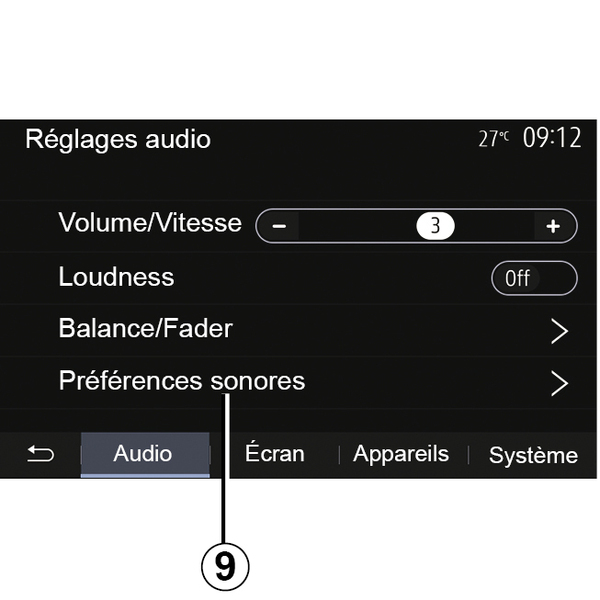
Display the audio preferences menu by pressing 9.
You can adjust the volume of each sound independently:
- « Audio » ;
- "TA";
- "Nav";
- « Phone » ;
- "Ringtone" (phone);
- « VR ».
To do this, press "+" or "˗".
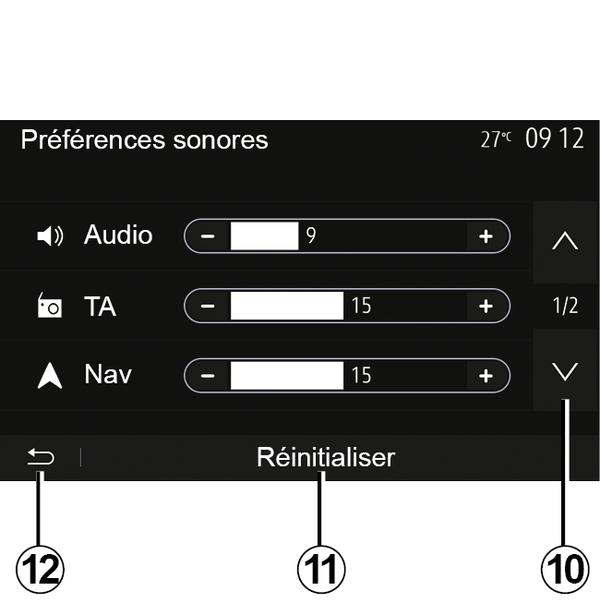
Press 10 to move to the next page.
Press 11 to reset all the audio preferences.
Press 12 to go back to previous screen.